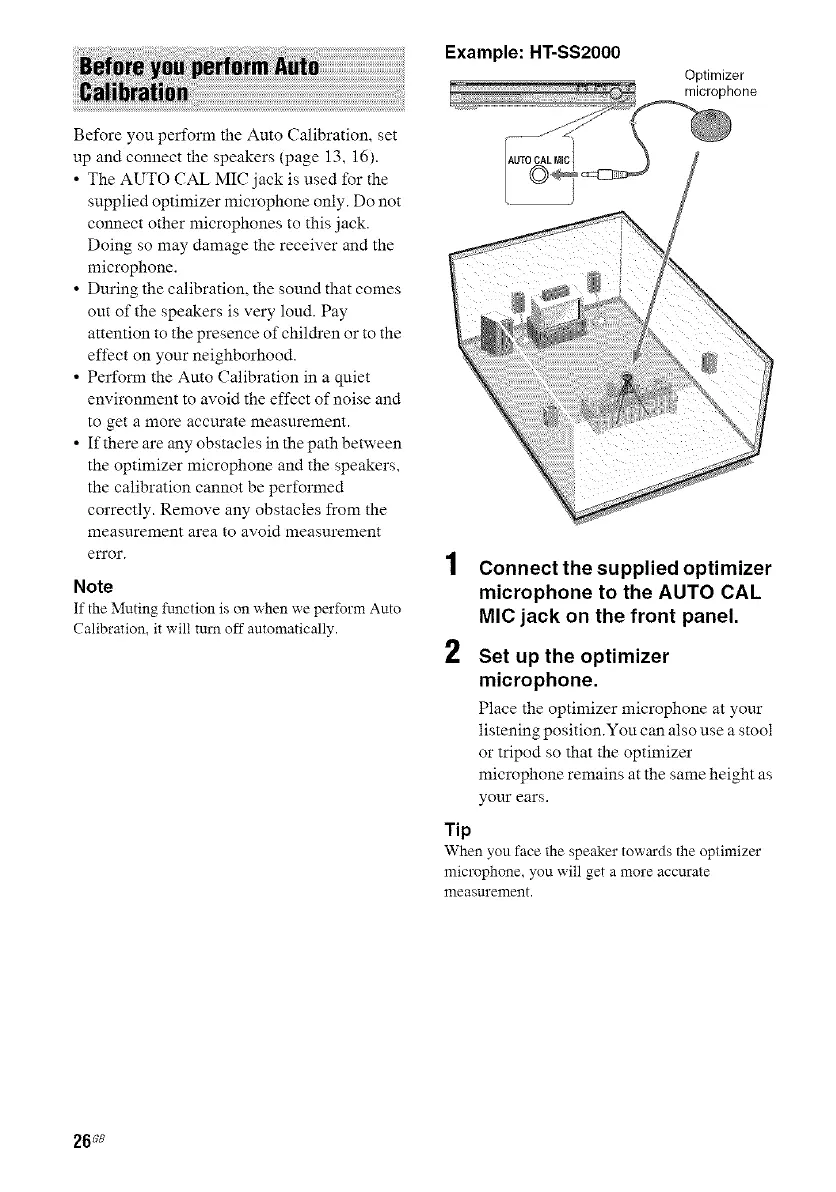
Example:HT-SS2000
Optimizer
Before you perform the Auto Calibration, set
up and connect the speakers (page 13, 16).
• The AUTO CAL MIC jack is used for the
supplied optimizer microphone only. Do not
connect other microphones to this jack.
Doing so may damage the receiver and the
microphone.
• During the calibration, the sound that comes
out of the speakers is very loud. Pay
attention to the presence of children or to the
effect on your neighborhood.
• Perform the Auto Calibration in a qniet
environment to avoid the effect of noise and
to get a more accurate measurement.
• If there are any obstacles in the path between
the optimizer microphone and the speakers,
the calibration cannot be performed
correctly. Remove any obstacles from the
measurement area to avoid measurement
en'or.
Note
If the Muting function is on when we perform Auto
Calibration, it will turn off automatically.
2
Connect the supplied optimizer
microphone to the AUTO CAL
MIC jack on the front panel.
Set up the optimizer
microphone.
Place the optimizer microphone at your
listening position.You can also use a stool
or tripod so that the optimizer
microphone remains at the same height as
your ears.
Tip
When you face the speaker towards the optimizer
microphone, you will get a more accurate
measurement.
26ss



 To Next Page