Input
MASTER
+_
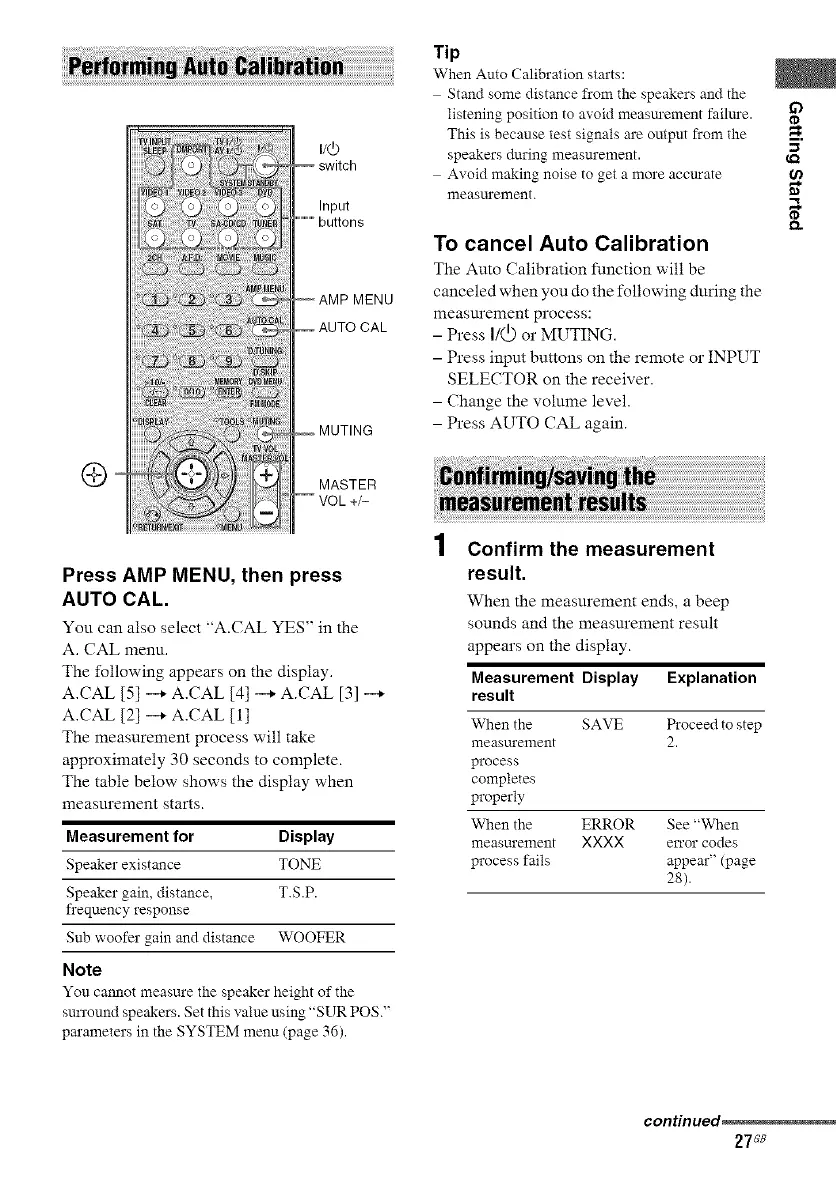
Press AMP MENU, then press
AUTO CAL.
You can also select "A.CAL YES" in the
A. CAL menu.
The following appears on the display.
A.CAL [5] _ A.CAL [4] _ A.CAL [3]
A.CAL [2] _ A.CAL [1]
The measurement process will take
approximately 30 seconds to complete.
The table below shows the display when
measurement starts.
Measurement for Display
Speaker existance TONE
Speaker gain, distance, T.S.P.
frequency response
Sub woofer gain and distance WOOFER
Note
You cannot measure the speaker height of the
surround speakers. Set this value using "SUR POS 2'
pm'ameters in the SYSTEM menu (page 36).
Tip
When Auto Calibration starts:
Stand some distance from the speakers and the
listening position to avoid measm'ement failm'e, ff_
This is because test signals are output from the
m,
speakers during measurement.
Avoid making noise to get a more accm'ate
measm'ement. "_
To cancel Auto Calibration
The Auto Calibration function will be
canceled when you do the following during the
measm'ement process:
- Press I/(_.)or MUTING.
- Press input buttons on the remote or INPUT
SELECTOR on the receiver.
- Change the volume level.
- Press AUTO CAL again.
Confirm the measurement
result.
When the measurement ends, a beep
sounds and the measurement result
appears on the display.
Measurement Display Explanation
result
When the SAVE Proceed to step
measurement 2.
process
completes
properly
When the ERROR See "When
measurement XXXX error codes
process fails appear" (page
28).
continued_
27_e



 To Next Page