22
HVR-V1E/V1P
2-887-521-12(1)
L:\SONY\PV\CX91030\1130insatuPDF\2887521121_GB\2887521111HVRV1UVIN\01GB03GET.
fm
Step 3: Charging the battery pack
You can charge the battery by
attaching the “InfoLITHIUM” battery
pack (L series) to your camcorder.
b Note
• You cannot use batteries other than the
“InfoLITHIUM” battery pack (L series)
(p. 127).
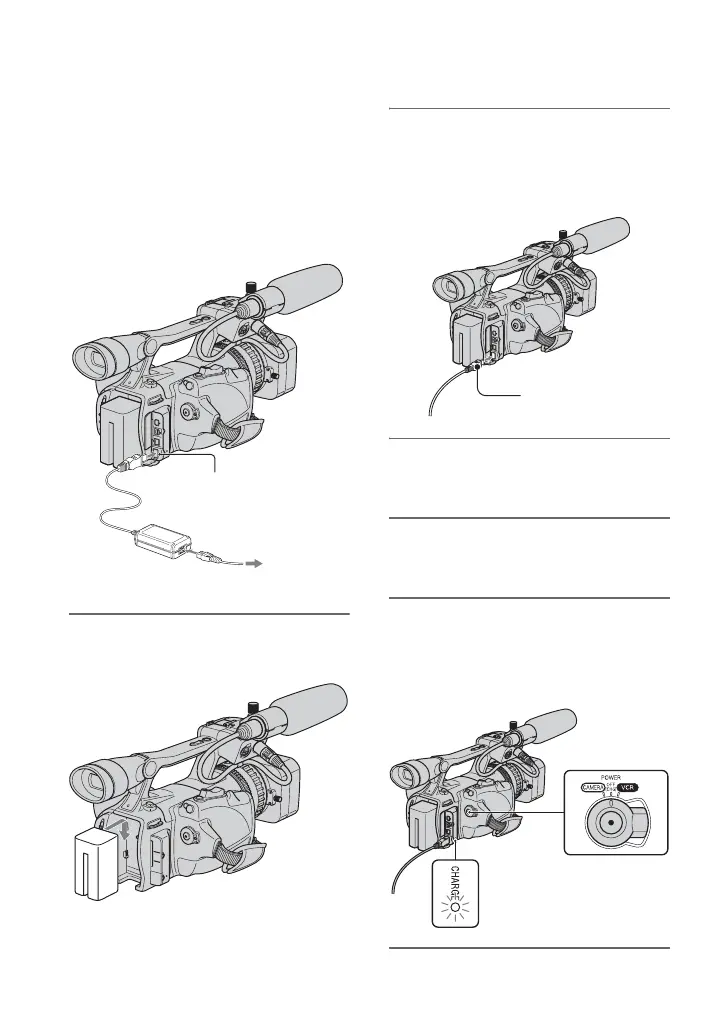
1 Press the battery pack and slide it
down.
2 With the B mark on the DC plug
facing the cassette compartment,
connect the AC Adaptor to the DC
IN jack on your camcorder.
3 Connect the mains lead to the AC
Adaptor.
4 Connect the mains lead to the
wall socket.
5 Set the POWER switch to OFF
(CHG).
The CHARGE lamp lights up and
charging starts.
DC IN jack
DC plug
AC Adaptor
Mains lead
To the wall
socket
B mark



 To Next Page