26
HVR-V1E/V1P
2-887-521-12(1)
L:\SONY\PV\CX91030\1130insatuPDF\2887521121_GB\2887521111HVRV1UVIN\01GB03GET.
fm
Step 5: Adjusting the LCD panel and viewfinder
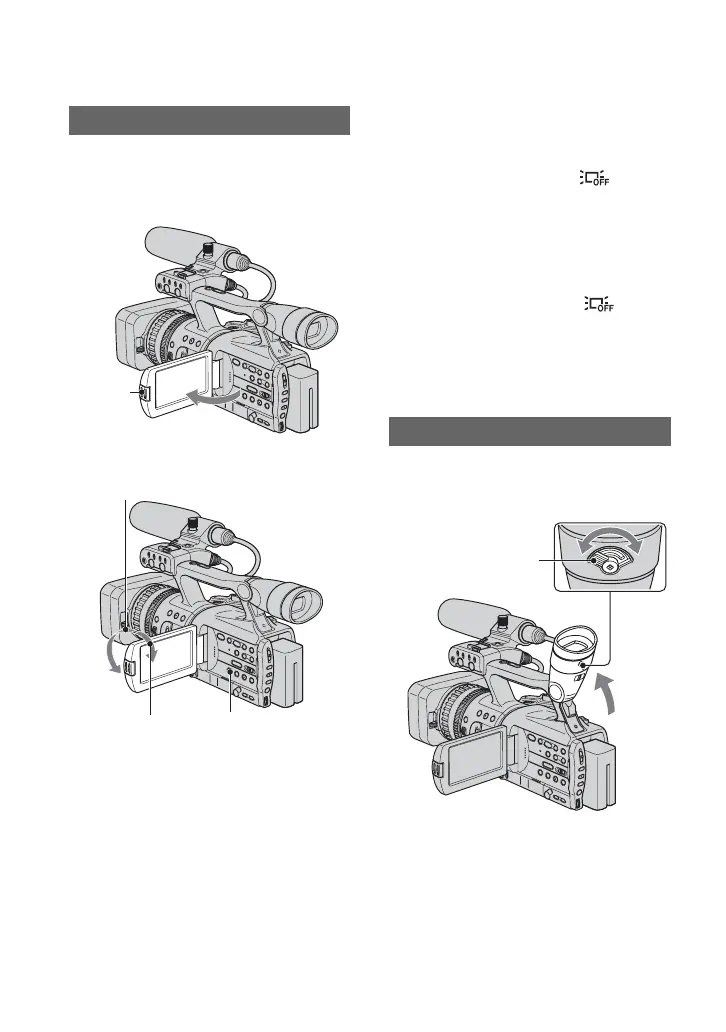
Open the LCD panel while pressing the
OPEN button 90 degrees to the camcorder
(1), then rotate it to the best angle to
record or play (2).
z Tips
• If you rotate the LCD panel 180 degrees toward
the lens from the position 1 , you can close the
LCD panel with the LCD screen facing outward.
This is convenient during playback operations.
• To close the LCD panel with the LCD screen
inward, rotate the LCD panel to the position 1,
and then close the LCD panel.
To turn off the LCD backlight to make
the battery last longer
Press and hold the DISPLAY/BATT INFO
button for a few seconds until appears.
This setting is practical when you use your
camcorder in bright conditions or where
you want to save battery power. The
recorded picture will not be affected by the
setting. To turn on the LCD backlight, press
and hold the DISPLAY/BATT INFO
button for a few seconds until
disappears.
z Tip
• See [LCD BRIGHT] (p. 80) to adjust the
brightness of the LCD screen.
You can view pictures using the viewfinder
to save the battery, or when the picture on
the LCD screen is not clear.
z Tips
• You can adjust the brightness of the viewfinder
backlight from [VF B.LIGHT] (p. 80).
• To display images both on the LCD display and
in the viewfinder, set [VF POWERMODE] to
[ON](p. 80).
• To display images in black and white in the
viewfinder, set [VF COLOR] to [OFF](p. 80).
The LCD panel
190 degrees to
the camcorder
OPEN
button
180 degrees (max.)
290 degrees
(max.)
DISPLAY/BATT
INFO
The viewfinder
Viewfinder
Viewfinder lens
adjustment lever
Move it until the picture
becomes clear.



 To Next Page