49
HVR-V1E/V1P
2-887-521-12(1)
L:\SONY\PV\CX91030\1130insatuPDF\2887521121_GB\2887521111HVRV1UVIN\01GB05BAS.
fm
Recording/Playback
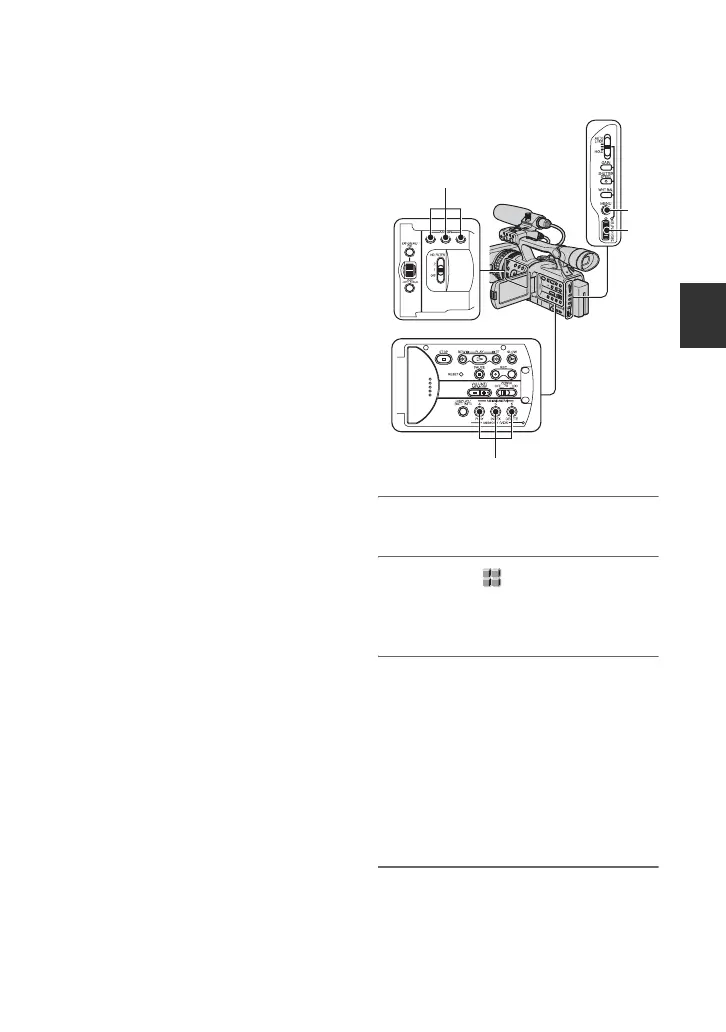
Assigning the functions to the ASSIGN buttons
You may need to assign some functions to
the ASSIGN buttons. You can assign a
single function to each the ASSIGN button
1 to 6.
Functions you can assign to the
ASSIGN buttons
•LAST SCN RVW (p.51)
• MARKER (p. 78)
• HYPER GAIN (p. 74)
• D.EXTENDER (p. 74)
• ALLSCAN MODE (p. 79)
• FOCUS INFNTY (p. 50)
• REC REVIEW (p. 51)
• END SEARCH (p. 51)
• INDEX MARK (p. 50)
• PEAKING (p. 77)
• STEADYSHOT (p. 70)
• COLOR BAR (p. 70)
• FOCUS MACRO (p. 71)
• SPOTLIGHT (p. 74)
• BACK LIGHT (p. 74)
• FADER (p. 75)
• DISPLAY (p. 54)
• Picture profile (p. 44)
• SHOT TRANS (p. 52)
b Note
• The ASSIGN buttons 4 to 6 are exclusively used
for memory playback when the POWER switch
is set to VCR, and cannot be used as ASSIGN
buttons. You cannot assign functions to the
ASSIGN buttons 4 to 6 while the POWER
switch is set to VCR.
1 Press the MENU button A.
2 Select the (OTHERS) t
[ASSIGN BTN] by the SEL/PUSH
EXEC dial B.
3 Select the number of the ASSIGN
button (ASSIGN 1-6, [SHOT
TRANS]) you want to assign the
function by turning the SEL/PUSH
EXEC dial B, then press the dial.
• [------] is displayed at the number that no
function is assigned.
• When you select [SHOT TRANS], select
[YES], then proceed to step 6.
4 Select the function to be assigned
by turning the SEL/PUSH EXEC
dial B, then press the dial.
A
B
ASSIGN button 1-3
ASSIGN button 4-6
Continued ,



 To Next Page