75
HVR-V1E/V1P
2-887-521-12(1)
L:\SONY\PV\CX91030\1130insatuPDF\2887521121_GB\2887521111HVRV1UVIN\01GB06MEN
.fm
Using the Menu
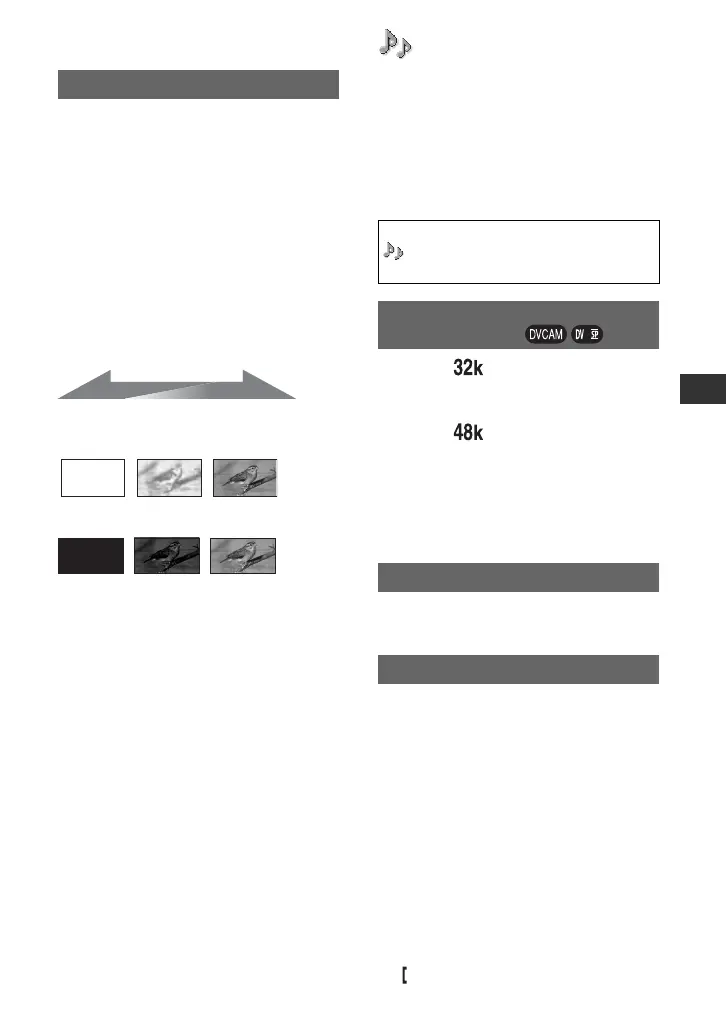
You can record a transition with the
following effects adding to the interval
between scenes.
1 Select the desired effect in [STBY] (during
fading in) or [REC] (during fading out)
mode.
2 Press the REC START/STOP button.
The fader indicator stops flashing and
disappears when the fade is complete.
To cancel before starting the operation,
select [OFF] in step 1.
Once you press the REC START/STOP
button, the setting is canceled.
WHITE FADER
BLACK FADER
b Note
• This is automatically set to [OFF] if you turn the
power off and back on.
FADER
STBY REC
Fading out Fading in
(AUDIO SET) menu
Settings for the audio recording (DV AU.
MODE/XLR SET, etc.)
The default settings are marked with B.
The indicators in parentheses appear when
the items are selected.
See page 64 for details on selecting
menu items.
B FS32K ( )
Records in the 12-bit mode (2 stereo
sounds).
FS48K ( )
Records in the 16-bit mode (1 stereo sound
with high quality).
b Note
• When recording in the HDV format, sound is
automatically recorded in the [FS48K] mode.
Since the default setting is [ON], noise
input through the microphone is reduced.
x AU. MAN GAIN
You can select whether the audio levels of
channel 1 is linked with or separated from
that of channel 2 when using an external
microphone.
B SEPARATE
Select to record the sound in channel 1
separately from that in channel 2 (to use
channel 1 and channel 2 as separate sound
source).
LINKED
Select to record the sound in channel 1 and
that in channel 2 (as a set, like stereo
sound).
appears on the status check screen.
Press the MENU button t select the
(AUDIO SET) by turning the SEL/
PUSH EXEC dial.
DV AU. MODE
(DV Audio mode)
MIC NR
XLR SET
Continued ,



 To Next Page