64
HVR-V1E/V1P
2-887-521-12(1)
L:\SONY\PV\CX91030\1130insatuPDF\2887521121_GB\2887521111HVRV1UVIN\01GB06MEN
.fm
Using the Menu
Using the menu items
You can change various settings or make
detailed adjustments using the menu items
displayed on the screen.
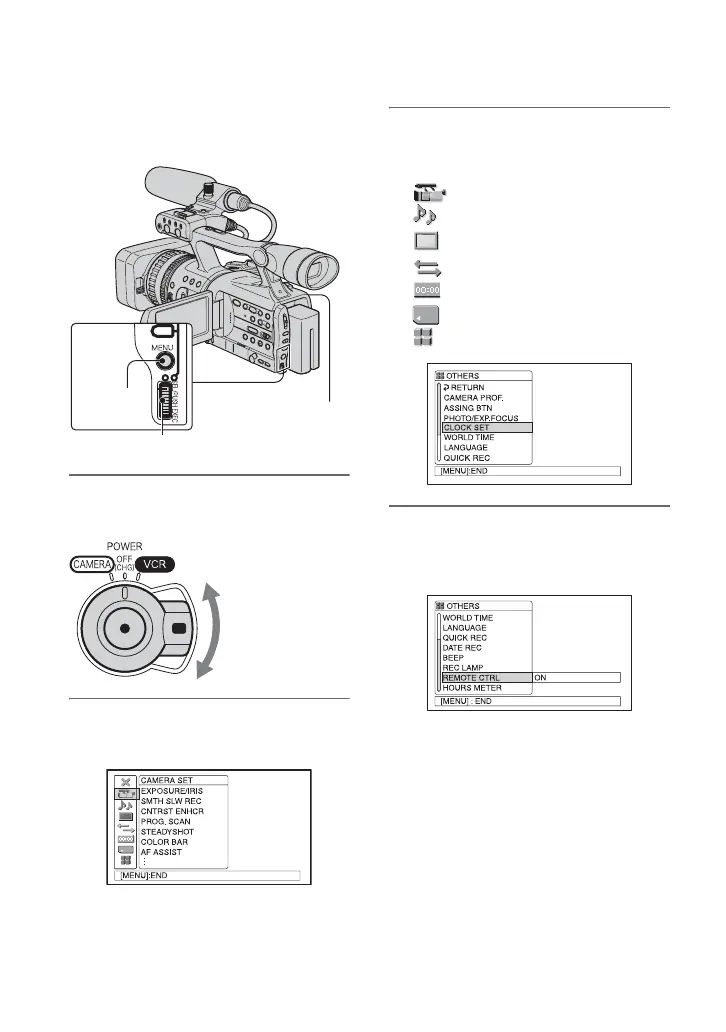
1 While pressing the green button,
set the POWER switch.
2 Press the MENU button to display
the menu index screen.
SEL/PUSH EXEC dial
MENU
button
POWER switch
If the POWER
switch is set to OFF
(CHG), slide it
while pressing the
green button.
3 Select the icon of the desired
menu by turning the SEL/PUSH
EXEC dial, then press the dial.
CAMERA SET (p. 69)
AUDIO SET (p. 75)
DISPLAY SET (p. 77)
IN/OUT REC (p. 82)
TC/UB SET (p. 85)
MEMORY SET (p. 87)
OTHERS (p. 89)
4 Select the desired item by turning
the SEL/PUSH EXEC dial, then
press the dial.
The available menu items vary
depending on the power mode of your
camcorder. Unavailable items will be
grayed out.



 To Next Page