43
HVR-V1E/V1P
2-887-521-12(1)
L:\SONY\PV\CX91030\1130insatuPDF\2887521121_GB\2887521111HVRV1UVIN\01GB05BAS.
fm
Recording/Playback
You can adjust the white balance according
to the light of the recording environment.
You can set two sets of white balance
adjustment data separately in memory A
and memory B for two different recording
conditions with A and B. During
recording, you can select the setup data
with the SEL/PUSH EXEC dial. The setup
data will be retained as long as it is not
readjusted even if the power is
disconnected.
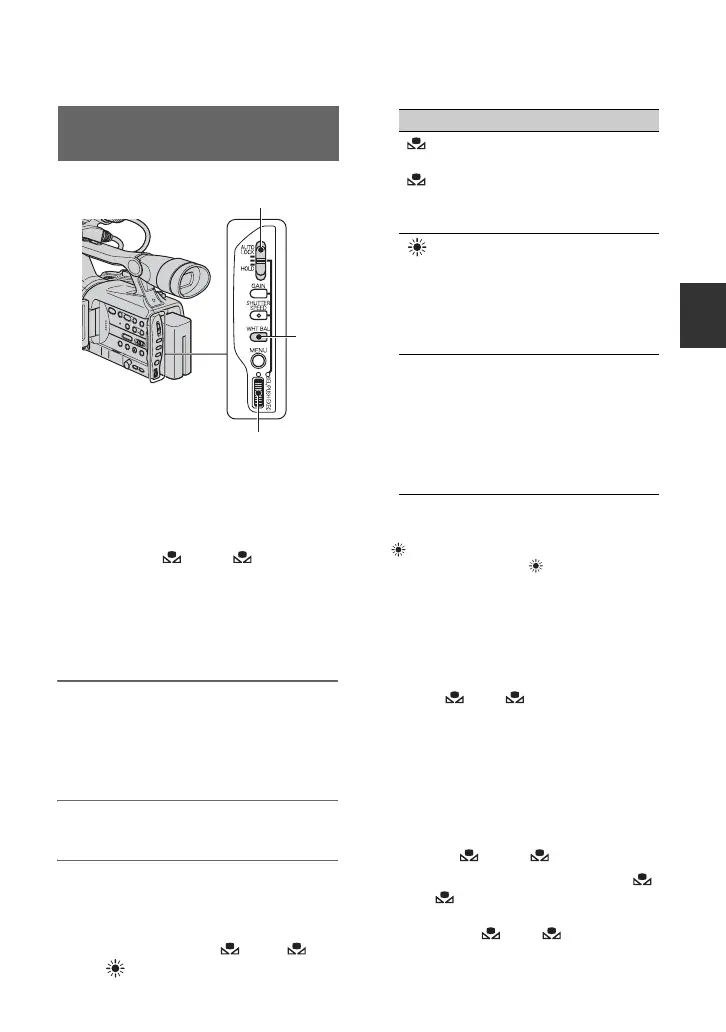
1 During recording or standby, set
the AUTO LOCK switch A to the
center position to release the
auto lock mode.
2 Press the WHT BAL button B.
3 Display desired item by turning
the SEL/PUSH EXEC dial C, then
press the dial.
The display changes. A t B
t (Outdoor) t n (Indoor)
z Tip
• You can change the white balance value for
(Outdoor) by pressing and turning the SEL/
PUSH EXEC dial when (Outdoor) is
selected. The value can be set between -
7(bluish) and +7 (reddish). The default value is
0.
To save the adjusted white balance
value in memory A or B
1 Select A or B according to step
3 of “Adjusting to Natural Color (White
Balance).”
2 Shoot something white (such as a sheet
of paper) full-screen under the same
lighting conditions as the subject.
3 Press the SEL/PUSH EXEC dial C.
Pressing the dial switches between
blinking A and B.
When the white balance is adjusted,
A or B stops blinking and remains
on. The adjusted value is now saved in
the selected A or B memory.
Adjusting to Natural Color
(White balance)
B
C
Indicator Shooting conditions
A
(MEMORY A)
B
(MEMORY B)
• White balance values
adjusted for light
sources can be stored
in memory A and
memory B. Follow the
steps below
(Outdoor)
• Recording a sunset/
sunrise, just after
sunset, just before
sunrise, neon signs, or
fireworks.
• Under daylight color
fluorescent lamps
n
(Indoor)
• Under the lighting
condition that changes
quickly
• Under strong light
such as in a
photography studio
• Under sodium lamps
or mercury lamps
Continued ,



 To Next Page