35
HVR-V1E/V1P
2-887-521-12(1)
L:\SONY\PV\CX91030\1130insatuPDF\2887521121_GB\2887521111HVRV1UVIN\01GB05BAS.
fm
Recording/Playback
Playback
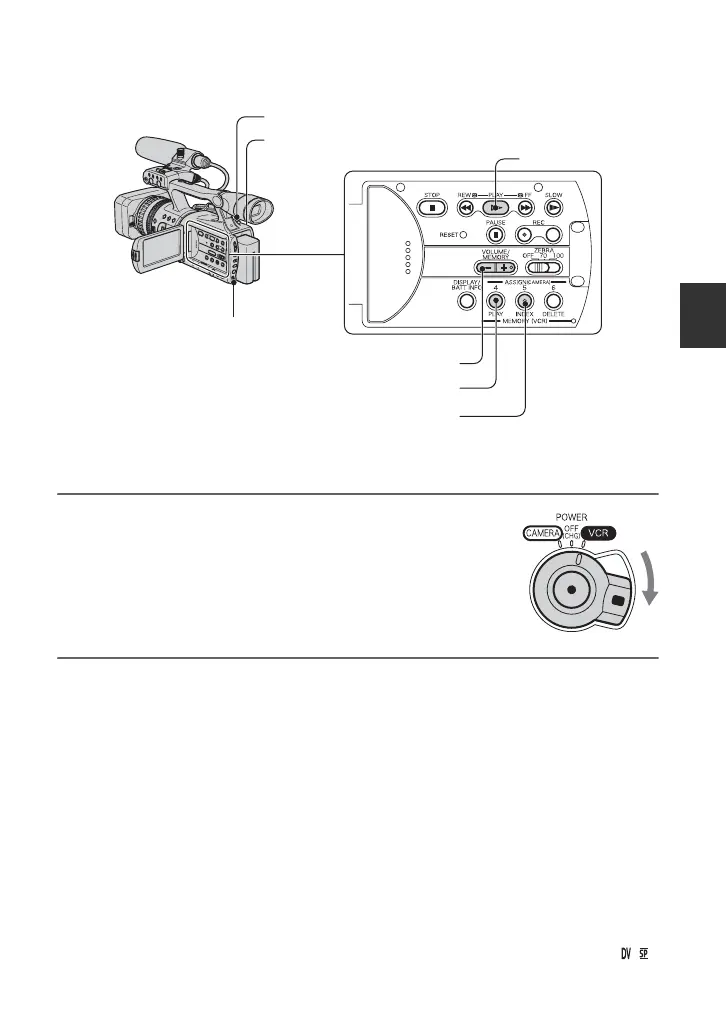
You can play back movies as follows.
1 While pressing the green button, set the POWER
switch to VCR.
2 Start playing back.
Press
m (rewind) to go to the point you want to view, then press N (play) to start
playback.
•
x : Stop
•
X : Pause (Press N or X again to restart the playback)
•
M m : Forward/Rewind
•
y : Slow
b Notes
• Playback automatically stops if pause is engaged for more than 3 minutes.
• When playing back a tape recorded in the HDV and DVCAM (DV) formats and the signal switches
between HDV and DVCAM (DV), the picture and sound disappear temporarily.
• You cannot play back the tape recorded in the HDV format on video cameras of the DVCAM (DV)
format or mini-DV players.
• DV format tapes are played back on your camcorder only if they are recorded in the SP mode (
appears on the screen). Tapes recorded in the LP mode are not played back.
PLAY button
MEMORY/PLAY button
Zoom lever
SEL/PUSH EXEC
dial
MEMORY/INDEX button
VOLUME/MEMORY button
POWER switch
Continued ,



 To Next Page