60
HVR-V1E/V1P
2-887-521-12(1)
L:\SONY\PV\CX91030\1130insatuPDF\2887521121_GB\2887521111HVRV1UVIN\01GB05BAS.
fm
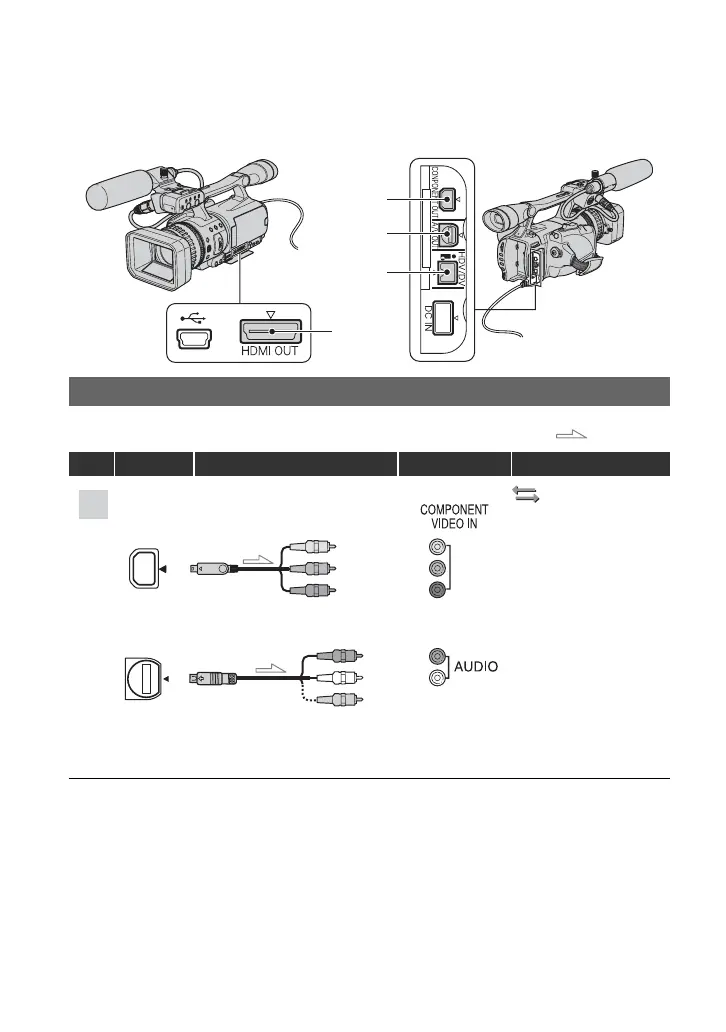
Jacks on your camcorder
Open the jack cover and connect the cable.
Connecting to a high definition TV
: Signal flow
Type Camcorder Cable TV Menu Setting
(IN/OUT REC)
menu t
[VCR HDV/DV] t
[AUTO] (p. 82)
[COMPONENT] t
[1080i/576i] (p. 83)
b Note
• An A/V connecting cable is also needed to output audio signals. Connect the white and red plugs of the A/
V connecting cable to the audio input jack of your TV.
2
3
4
1
2
3
A
Component video cable
(supplied)
A/V connecting cable
(supplied)
(Green) Y
(Blue) P
B
/C
B
(Red) P
R
/C
R
(Red)
(White)
(Yellow)
Playing the picture on a TV (Continued)



 To Next Page