EasyManua.ls Logo

Sony ICF-SW77 - Manual Tuning Procedures; How to Tune In a Station Manually; To change the selectivity; To activate the synchronous detection

Sony ICF-SW77
33 pages
Print Icon
To Next Page IconTo Next Page
To Previous Page IconTo Previous Page
Loading...
Manual
Tuning
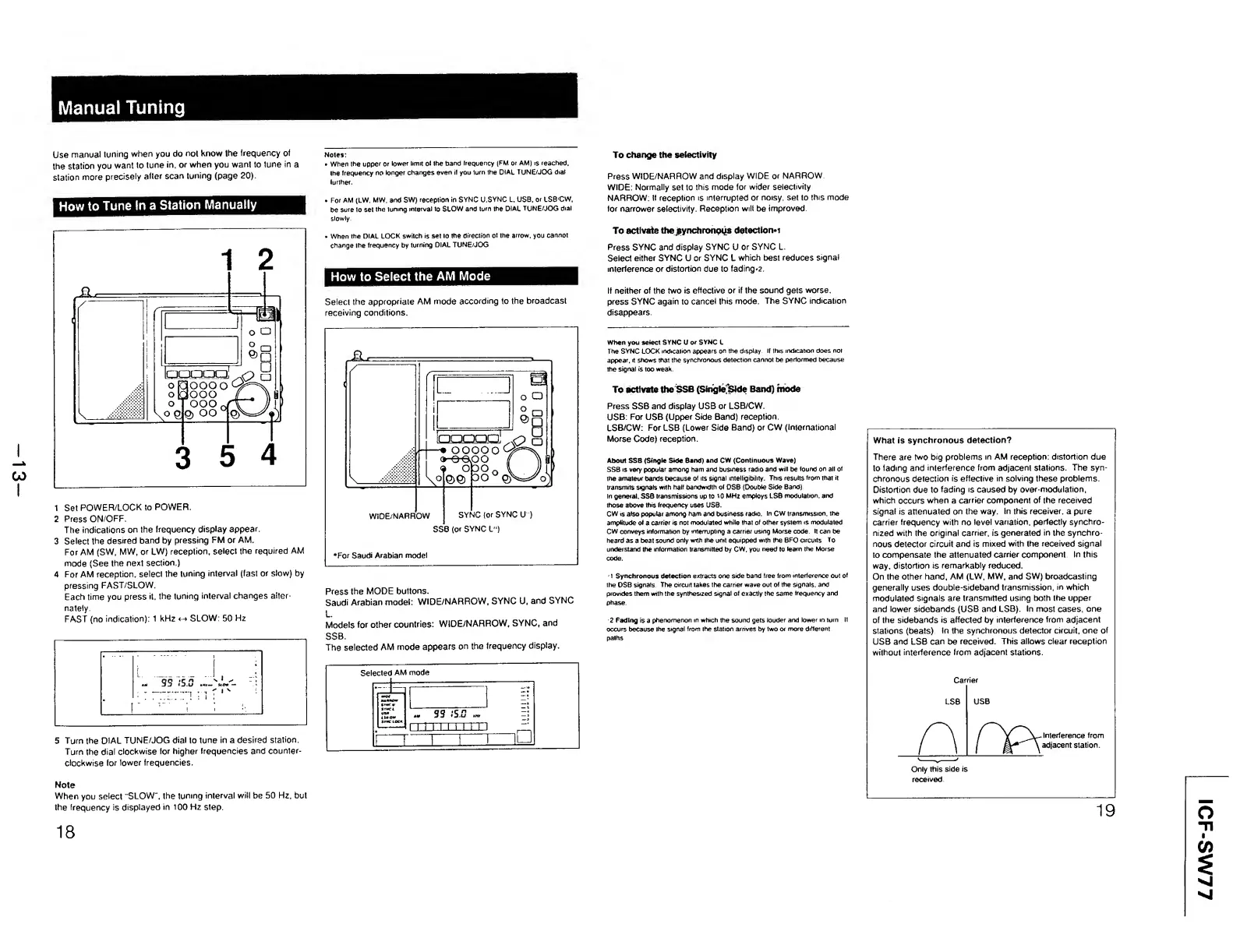
Use
manual
tuning
when
you
do
not
know
the
frequency
of
the
station
you
want
to
tune
in,
or
when
you
want
to
tune
in
a
station
more
precisely
after
scan
tuning
(page
20).
Notes:
When
the
upper
or
lower
limit
Ol
the
band
Irequency
(FM
or
AM)
is
reached,
the
frequency
no
longer
changes
even
if
you
turn
Ihe
DIAL
TUNE/JOG
dial
lurlher.
How
to
Tune
In
a
Station
Manually
1
Set
POWER/LOCK
to
POWER.
2
Press
ON/OFF.
The
indications
on
the
frequency
display
appear.
3
Select
the
desired
band
by
pressing
FM
or
AM.
For
AM
(SW,
MW,
or
LW)
reception,
select
the
required
AM
mode
(See
the
next
section.)
4
For
AM
reception,
select
the
tuning
interval
(fast
or
slow)
by
pressing
FAST/SLOW.
Each
time
you
press
it.
the
tuning
interval
changes
alter¬
nately.
FAST
(no
indication):
1
kHz
SLOW:
50
Hz
5
Turn
the
DIAL
TUNE/JOG
dial
to
tune
in
a
desired
station,
Turn
the
dial
clockwise
for
higher
frequencies
and
counter¬
clockwise
for
lower
frequencies.
.
For
AM
(LW.
MW.
and
SW)
reception
in
SYNC
U.SYNC
L.
USB.
or
LSB'CW,
be
sure
to
set
the
tuning
interval
to
SLOW
and
turn
the
DIAL
TUNE/JOG
dial
slowly.
When
the
DIAL
LOCK
switch
is
set
10
the
direction
ol
the
arrow,
you
cannot
change
Ihe
frequency
by
turning
DIAL
TUNE/JOG
How
to
Select
the
AM
Mode
Select
the
appropriate
AM
mode
according
to
the
broadcast
receiving
conditions.
Press
the
MODE
buttons.
Saudi
Arabian
model:
WIDE/NARROW,
SYNC
U,
and
SYNC
L.
Models
for
other
countries:
WIDE/NARROW,
SYNC,
and
SSB.
The
selected
AM
mode
appears
on
the
Irequency
display.
Note
When
you
select
"SLOW",
the
tuning
interval
will
be
50
Hz,
but
the
frequency
is
displayed
in
100
Hz
step
18
To
change
the
selectivity
Press
WIDE/NARROW
and
display
WIDE
or
NARROW
WIDE:
Normally
set
to
this
mode
for
wider
selectivity
NARROW:
If
reception
is
interrupted
or
noisy,
set
to
this
mode
for
narrower
selectivity
Reception
will
be
improved
To
activate
thesynchronous
detecttorw
Press
SYNC
and
display
SYNC
U
or
SYNC
L.
Select
either
SYNC
U
or
SYNC
L
which
best
reduces
signal
interference
or
distortion
due
to
fadings.
If
neither
of
the
two
is
effective
or
if
the
sound
gets
worse,
press
SYNC
again
to
cancel
this
mode.
The
SYNC
indication
disappears.
When
you
select
SYNC
U
or
SYNC
L
The
SYNC
LOCK
indication
appears
on
the
display.
If
this
indication
does
not
appear,
it
shows
that
the
synchronous
detection
cannot
be
performed
because
the
signal
is
too
weak.
To
activate
the
SSB
(SinglefSide
Band)
mode
Press
SSB
and
display
USB
or
LSB/CW.
USB:
For
USB
(Upper
Side
Band)
reception.
LSB/CW:
For
LSB
(Lower
Side
Band)
or
CW
(International
Morse
Code)
reception.
About
SSB
(Single
Side
Band)
and
CW
(Continuous
Wave)
SSB
is
very
popular
among
ham
and
business
radio
and
will
be
found
on
all
of
the
amateur
bands
because
of
its
signal
intelligibility.
This
results
from
that
it
transmits
signals
with
half
bandwidth
of
DSB
(Double
Side
Band)
In
general.
SSB
transmissions
up
to
t0
MHz
employs
LSB
modulation,
and
those
above
this
frequency
uses
USB.
CW
is
also
popular
among
ham
and
business
radio.
In
CW
transmission,
the
amplitude
of
a
carrier
is
not
modulated
while
that
of
other
system
is
modulated
CW
conveys
information
by
interrupting
a
carrier
using
Morse
code.
It
can
be
heard
as
a
beat
sound
only
with
the
unit
equipped
wilh
the
BFO
circuits
To
understand
the
information
transmitted
by
CW,
you
need
to
team
ihe
Morse
code.
1
Synchronous
detection
extracts
one
side
band
free
from
interference
out
of
the
DSB
signals.
The
circuit
takes
the
carrier
wave
out
of
the
signals,
and
provides
them
with
the
synthesized
signal
of
exactly
the
same
frequency
and
phase.
2
Fading
is
a
phenomenon
in
which
the
sound
gets
louder
and
lower
in
turn
If
occurs
because
the
signal
from
the
station
arrives
by
two
or
more
different
paths
What
is
synchronous
detection?
There
are
two
big
problems
in
AM
reception:
distortion
due
to
fading
and
interference
from
adjacent
stations.
The
syn¬
chronous
detection
is
effective
in
solving
these
problems.
Distortion
due
to
fading
is
caused
by
over-modulation,
which
occurs
when
a
carrier
component
of
the
received
signal
is
attenuated
on
the
way.
In
this
receiver,
a
pure
carrier
frequency
with
no
level
variation,
perfectly
synchro¬
nized
with
the
original
carrier,
is
generated
in
the
synchro¬
nous
detector
circuit
and
is
mixed
with
the
received
signal
to
compensate
the
attenuated
carrier
component
In
this
way,
distortion
is
remarkably
reduced.
On
the
other
hand,
AM
(LW,
MW,
and
SW)
broadcasting
generally
uses
double-sideband
transmission,
in
which
modulated
signals
are
transmitted
using
both
the
upper
and
lower
sidebands
(USB
and
LSB).
In
most
cases,
one
of
the
sidebands
is
affected
by
interference
from
adjacent
stations
(beats).
In
the
synchronous
detector
circuit,
one
of
USB
and
LSB
can
be
received.
This
allows
clear
reception
without
interference
from
adjacent
stations.
.
Interference
from
adjacent
station.
Only
this
side
is
received.
ICF-SW77

Other manuals for Sony ICF-SW77

Related product manuals