EasyManua.ls Logo

Sony ICF-SW77 - Sleep Timer Functions; Sleep Timer Operation; Auto tune; Timer Programming

Sony ICF-SW77
33 pages
Print Icon
To Next Page IconTo Next Page
To Previous Page IconTo Previous Page
Loading...
-J
I
To
tune
in
all
the
Frequencies
under
the
Station
Name
Auto
tune
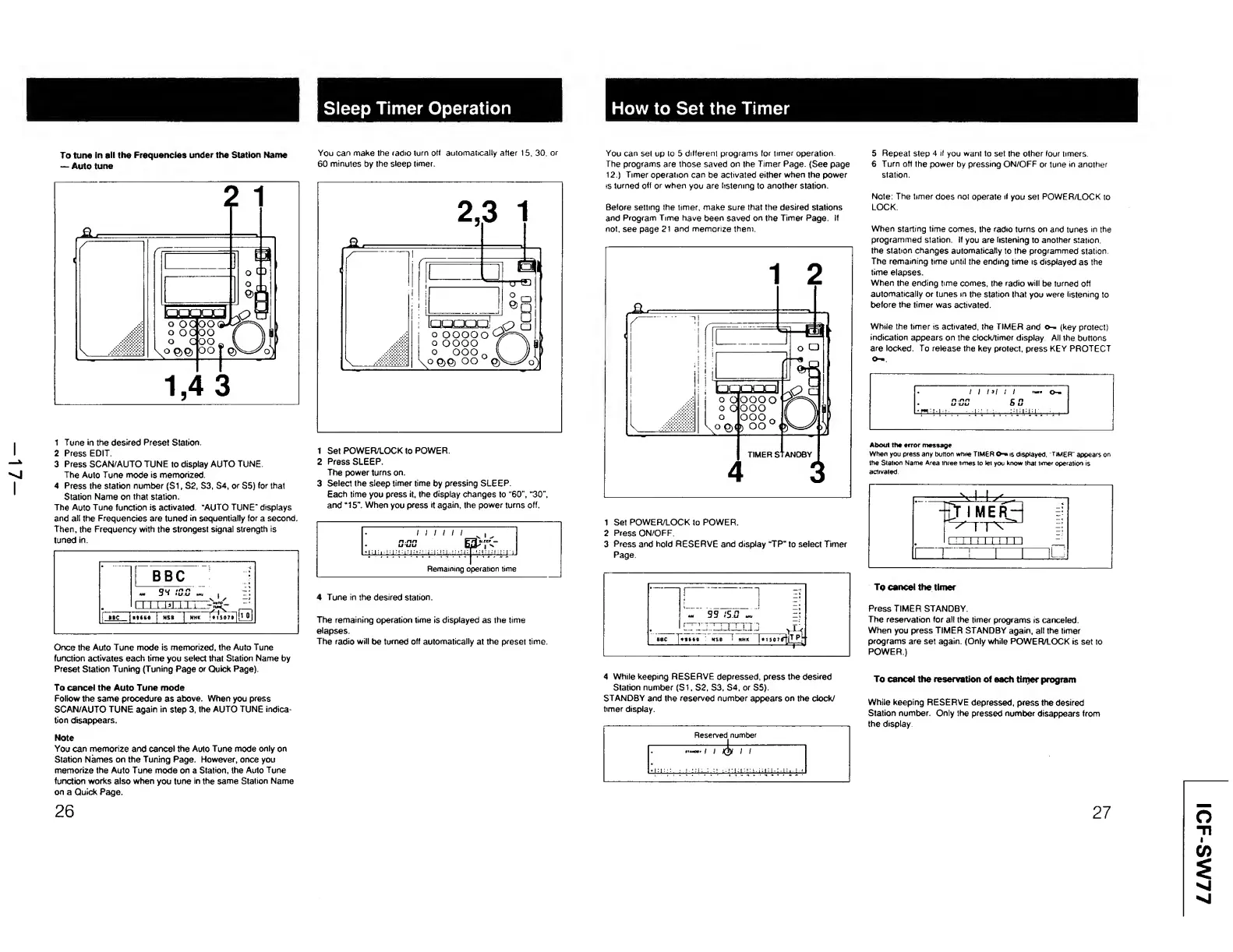
1
Tune
in
the
desired
Preset
Station.
2
Press
EDIT.
3
Press
SCAN/AUTO
TUNE
to
display
AUTO
TUNE.
The
Auto
Tune
mode
is
memorized
4
Press
the
station
number
(Si,
S2,
S3,
S4,
or
S5)
for
that
Station
Name
on
that
station.
The
Auto
Tune
function
is
activated
“AUTO
TUNE"
displays
and
all
the
Frequencies
are
tuned
in
sequentially
for
a
second.
Then,
the
Frequency
with
the
strongest
signal
strength
is
tuned
in.
Once
the
Auto
Tune
mode
is
memorized,
the
Auto
Tune
function
activates
each
time
you
select
that
Station
Name
by
Preset
Station
Tuning
(Tuning
Page
or
Quick
Page).
To
cancel
the
Auto
Tune
mode
Follow
the
same
procedure
as
above.
When
you
press
SCAN/AUTO
TUNE
again
in
step
3.
the
AUTO
TUNE
indica¬
tion
disappears.
Note
You
can
memorize
and
cancel
the
Auto
Tune
mode
only
on
Station
Names
on
the
Tuning
Page.
However,
once
you
memorize
the
Auto
Tune
mode
on
a
Station,
the
Auto
Tune
function
works
also
when
you
tune
in
the
same
Station
Name
on
a
Quick
Page.
26
You
can
make
the
radio
turn
off
automatically
after
15,
30,
or
60
minutes
by
the
sleep
timer.
1
Set
POWEFt/LOCK
to
POWER.
2
Press
SLEEP.
The
power
turns
on.
3
Select
the
sleep
timer
time
by
pressing
SLEEP.
Each
time
you
press
it,
the
display
changes
to
"60’',
"30”,
and
“15".
When
you
press
it
again,
the
power
turns
off.
4
Tune
in
the
desired
station.
The
remaining
operation
time
is
displayed
as
the
time
elapses.
The
radio
will
be
turned
off
automatically
at
the
preset
time.
|\J
©O
DQDO
How
to
Set
the
Timer
You
can
set
up
to
5
different
programs
for
timer
operation.
The
programs
are
those
saved
on
the
Timer
Page.
(See
page
12.)
Timer
operation
can
be
activated
either
when
the
power
is
turned
off
or
when
you
are
listening
to
another
station.
Before
setting
the
timer,
make
sure
that
the
desired
stations
and
Program
Time
have
been
saved
on
the
Timer
Page.
If
not,
see
page
21
and
memorize
them.
1
Set
POWER/LOCK
to
POWER.
2
Press
ON/OFF.
3
Press
and
hold
RESERVE
and
display
“TP"
to
select
Timer
Page.
5
Repeat
step
4
il
you
want
to
set
the
other
four
timers.
6
Turn
off
the
power
by
pressing
ON/OFF
or
tune
in
another
station.
Note:
The
timer
does
not
operate
if
you
set
POWER/LOCK
to
LOCK.
When
starting
time
comes,
the
radio
turns
on
and
tunes
in
the
programmed
station.
If
you
are
listening
to
another
station,
the
station
changes
automatically
to
the
programmed
station
The
remaining
time
until
the
ending
time
is
displayed
as
the
time
elapses.
When
the
ending
time
comes,
the
radio
will
be
turned
off
automatically
or
tunes
in
the
station
that
you
were
listening
to
before
the
timer
was
activated.
While
the
timer
is
activated,
the
TIMER
and
o—
(key
protect)
indication
appears
on
the
clock/timer
display
All
the
buttons
are
locked.
To
release
the
key
protect,
press
KEY
PROTECT
O-"
About
tht
error
message
When
you
press
any
button
while
TIMER
is
displayed.
TIMER"
appears
on
the
Station
Name
Area
three
times
to
let
you
know
that
timer
operation
is
activated
1
v.-1-1
^_.
!
~
It
1
ME
R—
T
I
=;
1
!
1
!
f
1
1
1
!
1
1
r~i
r.“T.:
i
i
ilj
To
cancel
the
timer
Press
TIMER
STANDBY.
The
reservation
for
all
the
timer
programs
is
canceled.
When
you
press
TIMER
STANDBY
again,
all
the
timer
programs
are
set
again.
(Only
while
POWER/LOCK
is
set
to
POWER.)
4
W
hile
keeping
RESERVE
depressed,
press
the
desired
Station
number
(Si,
S2,
S3,
S4,
or
S5).
STANDBY
and
the
reserved
number
appears
on
the
clock/
timer
display.
To
cancel
the
reservation
of
each
timer
program
While
keeping
RESERVE
depressed,
press
the
desired
Station
number.
Only
the
pressed
number
disappears
from
the
display
27
ICF-SW77

Other manuals for Sony ICF-SW77

Related product manuals