EasyManua.ls Logo

Sony ICF-SW77 - DIAGRAMS; IC Pin Function; Block Diagram; Microcomputer Section

Sony ICF-SW77
33 pages
Print Icon
To Next Page IconTo Next Page
To Previous Page IconTo Previous Page
Loading...
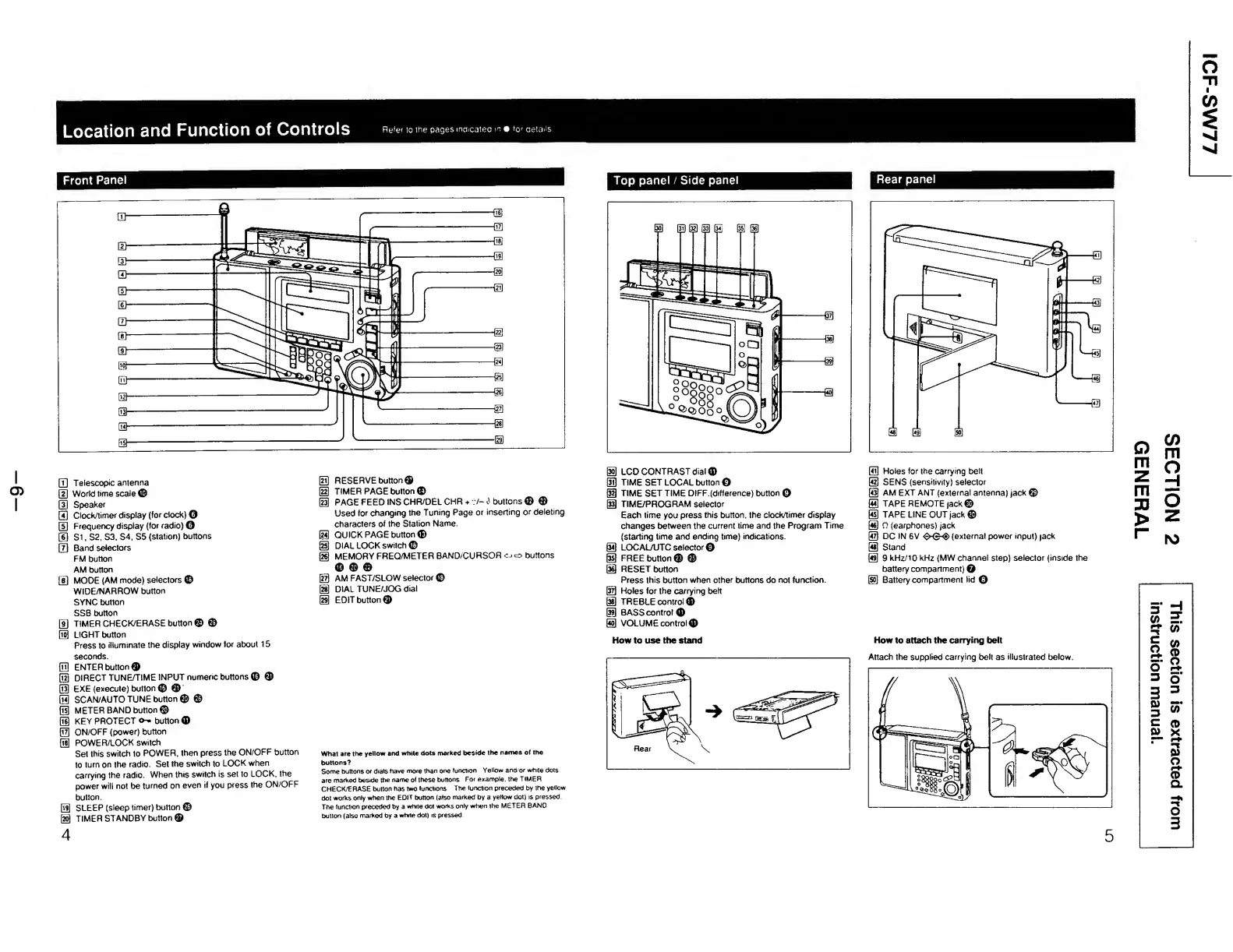
Location
and
Function
of
Controls
Refer
to
the
pages
indcatec
m
for
details.
I
CD
I
Q]
Telescopic
antenna
\2\
World
time
scale
©
(U
Speaker
[Tj
Clock/timer
display
(for
clock)
0
[U
Frequency
display
(for
radio)
©
(D
Si,
S2,
S3.
S4,
S5
(station)
buttons
[Tj
Band
selectors
FM
button
AM
button
[3
MODE
(AM
mode)
selectors
©
WIDE/NARROW
button
SYNC
button
SSB
button
[3
TIMER
CHECK/ERASE
button
©
©
0
LIGHT
button
Press
to
illuminate
the
display
window
for
about
15
seconds.
®
ENTER
button©
0
DIRECT
TUNE/TIME
INPUT
numeric
buttons
©
©
0
EXE
(execute)
button
©
©
0
SCAN/AUTO
TUNE
button
©
©
0
METER
BAND
button©
0
KEY
PROTECT
o-*
button
©
0
ON/OFF
(power)
button
0
POWER/LOCK
switch
Set
this
switch
to
POWER,
then
press
the
ON/OFF
button
to
turn
on
the
radio.
Set
the
switch
to
LOCK
when
carrying
the
radio.
When
this
switch
is
set
to
LOCK,
the
power
will
not
be
turned
on
even
if
you
press
the
ON/OFF
button.
0
SLEEP
(sleep
timer)
button
©
@
TIMER
STANDBY
button
©
4
0
RESERVE
button©
0
TIMER
PAGE
button
©
0
PAGE
FEED
INSCHR/DEL
CHR
+
?/-<)
buttons©
©
Used
for
changing
the
Tuning
Page
or
inserting
or
deleting
characters
of
the
Station
Name.
0
QUICK
PAGE
button®
0
DIAL
LOCK
switch
©
0
MEMORY
FREQ/METER
BAND/CURSOR
o
o
buttons
©
©
©
@
AM
FAST/SLOW
selector©
0
DIAL
TUNE/JOG
dial
0
EDIT
button©
What
are
the
yellow
and
white
dots
marked
beside
the
names
of
the
buttons?
Some
buttons
or
dials
have
more
than
one
function
Yellow
and/or
white
dots
are
marked
beside
the
name
of
these
buttons
For
example,
the
TIMER
CHECK/ERASE
button
has
two
functions
The
lunction
preceded
by
the
yellow
dot
works
only
when
the
EDIT
button
(also
marked
by
a
yellow
dot)
is
pressed.
The
function
preceded
by
a
white
dot
works
only
when
the
METER
BAND
button
(also
marked
by
a
white
dot)
is
pressed
Top
panel
/
Side
panel
0
LCD
CONTRAST
dial
©
@3
TIME
SET
LOCAL
button
0
0
TIME
SET
TIME
DIFF.(difference)
button
0
0
TIME/PROGRAM
selector
Each
time
you
press
this
button,
the
clock/timer
display
changes
between
the
current
time
and
the
Program
Time
(starting
time
and
ending
time)
indications.
0
LOCALAJTCselector©
0
FREE
button
©
©
0
RESET
button
Press
this
button
when
other
buttons
do
not
function.
0
Holes
for
the
carrying
belt
0
TREBLE
control
©
0
BASS
control
®
0
VOLUME
control©
How
to
use
the
stand
Rear
\
Rear
panel
0
Holes
for
the
carrying
belt
0
SENS
(sensitivity)
selector
0
AM
EXT
ANT
(external
antenna)
jack
©
@
TAPE
REMOTE
jack©
0
TAPE
LINE
OUT
jack©
0
0
(earphones)
jack
0
DC
IN
6V
<$>-©-<§>
(external
power
input)
jack
0
Stand
0
9
kHz/10
kHz
(MW
channel
step)
selector
(inside
the
battery
compartment)
Q
0
Battery
compartment
lid
©
How
to
attach
the
carrying
belt
Attach
the
supplied
carrying
belt
as
illustrated
below.
5

Other manuals for Sony ICF-SW77

Related product manuals