EasyManua.ls Logo

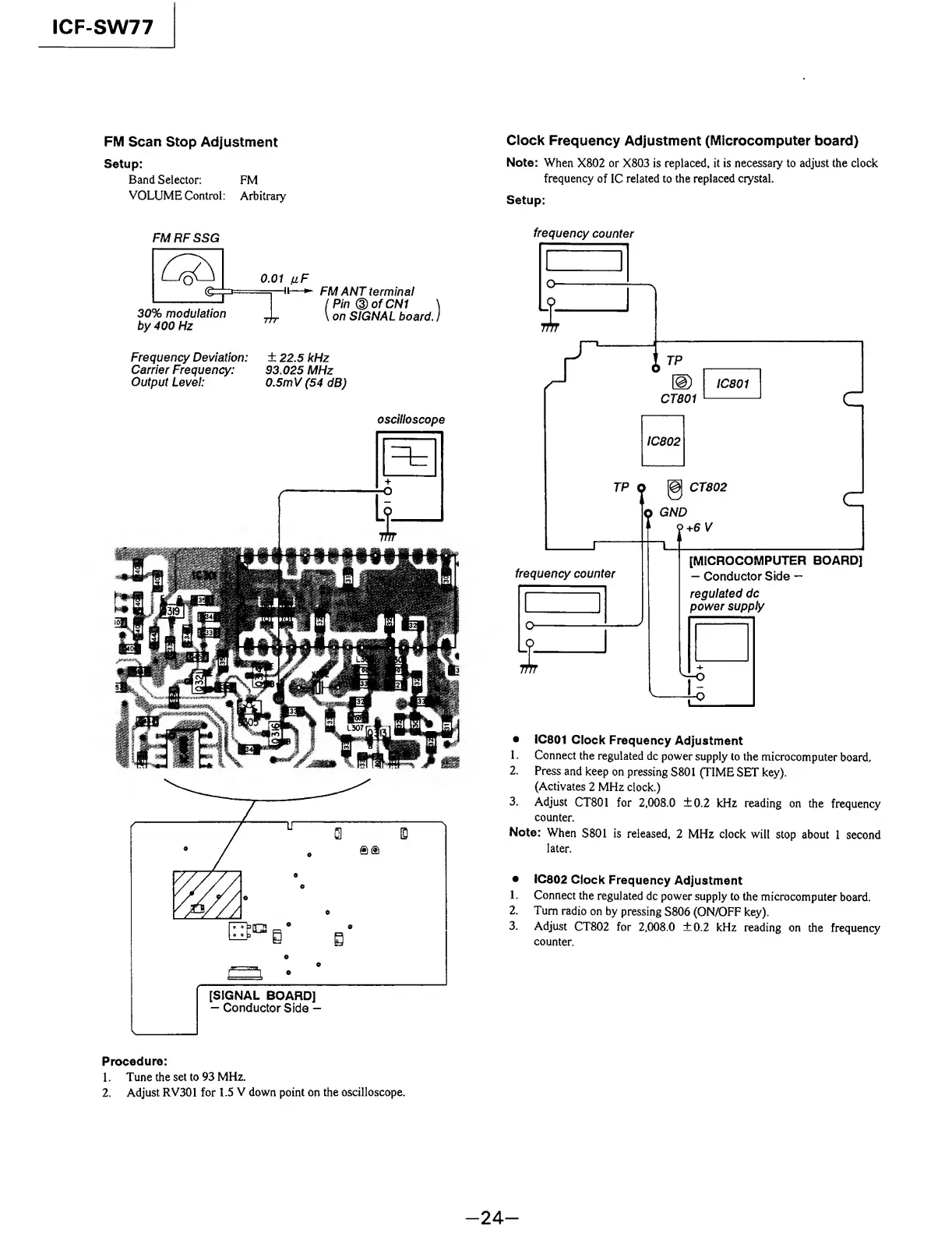
Sony ICF-SW77 - FM Scan Stop Adjustment; Clock Frequency Adjustment (Microcomputer board)

Sony ICF-SW77
33 pages
Print Icon
To Next Page IconTo Next Page
To Previous Page IconTo Previous Page
Loading...
ICF-SW77
FM
Scan
Stop
Adjustment
Setup:
Band
Selector:
FM
VOLUME
Control:
Arbitrary
Clock
Frequency
Adjustment
(Microcomputer
board)
Note:
When
X802
or
X803
is
replaced,
it
is
necessary
to
adjust
the
clock
frequency
of
IC
related
to
the
replaced
crystal.
Setup:
FMRFSSG
FM
ANT
terminal
lPin®ofCN1
\
\
on
SIGNAL
board,
j
Frequency
Deviation:
±
22.5
kHz
Carrier
Frequency:
93.025
MHz
Output
Level:
0.5m
V
(54
dB)
oscilloscope
frequency
counter
IC801
Clock
Frequency
Adjustment
1.
Connect
the
regulated
dc
power
supply
to
the
microcomputer
board.
2.
Press
and
keep
on
pressing
S801
(TIME
SET
key).
(Activates
2
MHz
clock.)
3.
Adjust
CT801
for
2,008.0
±0.2
kHz
reading
on
the
frequency
counter.
Note:
When
S801
is
released,
2
MHz
clock
will
stop
about
1
second
later.
IC802
Clock
Frequency
Adjustment
1.
Connect
the
regulated
dc
power
supply
to
the
microcomputer
board.
2.
Turn
radio
on
by
pressing
S806
(ON/OFF
key).
3.
Adjust
CT802
for
2,008.0
±0.2
kHz
reading
on
the
frequency
counter.
Procedure:
1.
Tune
the
set
to
93
MHz.
2.
Adjust
RV301
for
1.5
V
down
point
on
the
oscilloscope.
-
2
4
-

Other manuals for Sony ICF-SW77

Related product manuals