EasyManua.ls Logo

Sony ICF-SW77 - Direct Tuning Procedures; How to Tune In a Station Directly; To Improve Receiving Conditions

Sony ICF-SW77
33 pages
Print Icon
To Next Page IconTo Next Page
To Previous Page IconTo Previous Page
Loading...
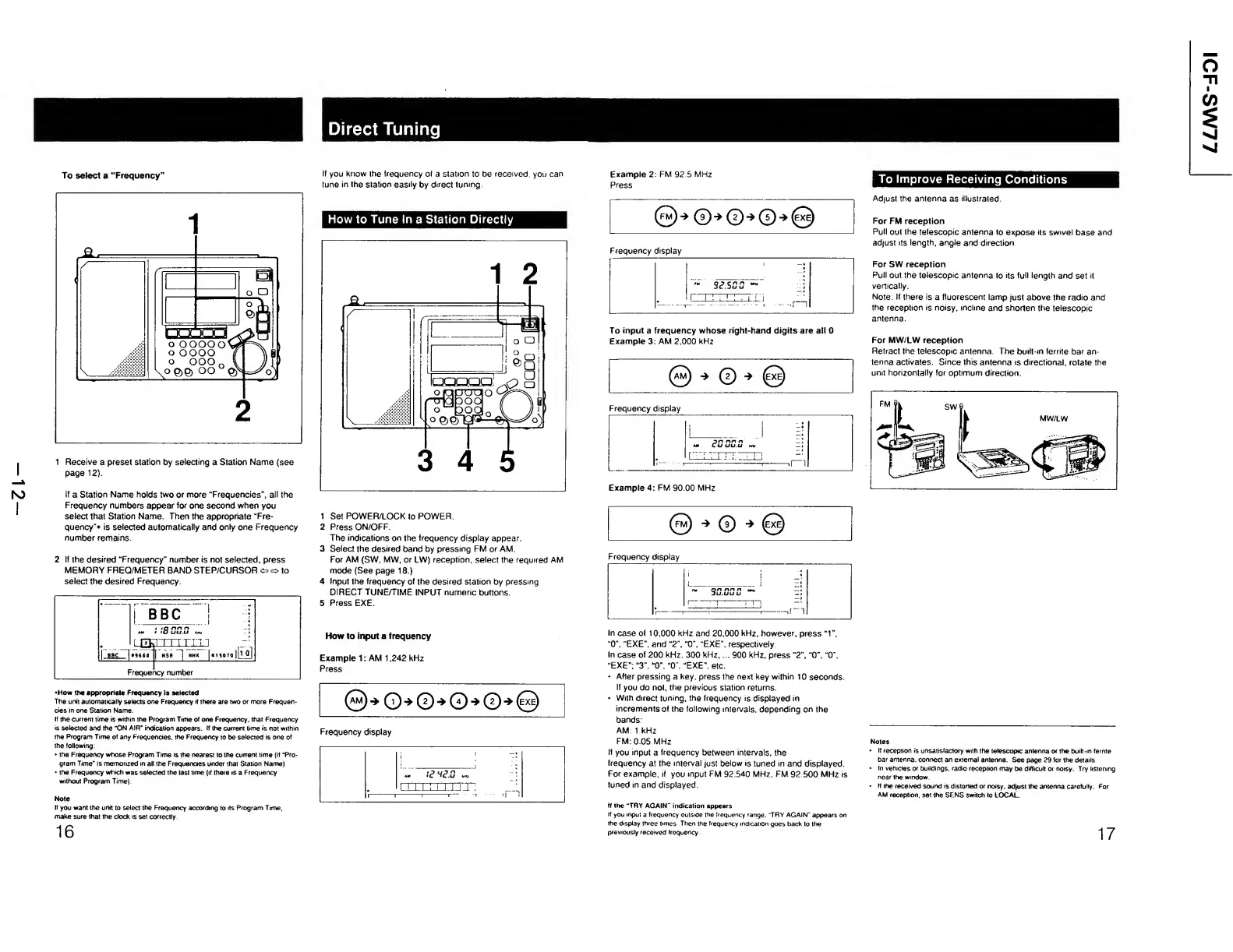
Direct
Tuning
To
select
a
“Frequency”
1
R
eceive
a
preset
station
by
selecting
a
Station
Name
{see
page
12).
If
a
Station
Name
holds
two
or
more
“Frequencies”,
all
the
Frequency
numbers
appear
for
one
second
when
you
select
that
Station
Name.
Then
the
appropriate
“Fre¬
quency"*
is
selected
automatically
and
only
one
Frequency
number
remains.
2
I
f
the
desired
“Frequency"
number
is
not
selected,
press
MEMORY
FREQ/METER
BAND
STEP/CURSOR
^
o
to
select
the
desired
Frequency.
•How
the
appropriate
Frequency
is
selected
The
unit
automatically
selects
one
Frequency
It
there
are
two
or
more
Frequen¬
cies
in
one
Station
Name.
If
the
current
time
is
within
the
Program
Time
of
one
Frequency,
that
Frequency
is
selected
and
the
“ON
AIR“
indication
appears.
If
the
current
time
is
not
within
the
Program
Time
of
any
Frequencies,
the
Frequency
to
be
selected
is
one
of
the
following:
the
Frequency
whose
Program
Time
is
the
nearest
to
the
current
time
(if
“Pro¬
gram
Time’
is
memorized
in
all
the
Frequencies
under
that
Station
Name)
the
Frequency
which
was
selected
the
last
time
(if
there
is
a
Frequency
without
Program
Time)
Note
If
you
want
the
unit
to
select
the
Frequency
according
to
its
Program
Time,
make
sure
that
the
clock
is
set
correctly
16
If
you
know
the
frequency
of
a
station
to
be
received,
you
can
tune
in
the
station
easily
by
direct
tuning
How
to
Tune
In
a
Station
Directly
1
Set
POWER/LOCK
to
POWER.
2
Press
ON/OFF.
The
indications
on
the
frequency
display
appear.
3
Select
the
desired
band
by
pressing
FM
or
AM.
For
AM
(SW,
MW,
or
LW)
reception,
select
the
required
AM
mode
(See
page
18.)
4
Input
the
frequency
of
the
desired
station
by
pressing
DIRECT
TUNE/TIME
INPUT
numeric
buttons.
5
Press
EXE.
How
to
input
a
frequency
Example
1:
AM
1,242
kHz
Press
®
)•*
O
*
©
*
0
-
»©-»(0
Frequency
display
LIXLI
i'l.T'l
1
;
Example
2
Press
FM
92.5
MHz
0
)*
©‘*©'*©*(0
Frequency
display
|
9JSSS
-
^
To
input
a
frequency
whose
right-hand
digits
are
all
0
Example
3:
AM
2,000
kHz
Frequency
display
1
-
esss.s
_
=;
'
-.1-
1
-
-
1
-ll
II
Example
4:
FM
90.00
MHz
(fm)
(7)
*
(exe)
Frequency
display
In
case
of
10,000
kHz
and
20,000
kHz,
however,
press
“1”.
"
0
•exE”.
and
“2
”,
“0”,
“EXE",
respectively
In
case
of
200
kHz.
300
kHz,...
900
kHz,
press
“2”,
"0”,
“0”,
"EXE";
“3”.
“0”,
“O
',
“EXE",
etc.
-
After
pressing
a
key.
press
the
next
key
within
10
seconds.
If
you
do
not,
the
previous
station
returns.
*
With
direct
tuning,
the
frequency
is
displayed
in
increments
of
the
following
intervals,
depending
on
the
bands:
AM:
1
kHz
FM:
0.05
MHz
If
you
input
a
frequency
between
intervals,
the
frequency
at
the
interval
just
below
is
tuned
in
and
displayed.
For
example,
if
you
input
FM
92.540
MHz.
FM
92.500
MHz
is
tuned
in
and
displayed.
tf
the
“TRY
AGAIN''
indication
appears
If
you
input
a
frequency
outside
the
frequency
range.
'TRY
AGAIN'
appears
on
the
display
three
times
Then
the
frequency
indication
goes
back
to
the
previously
received
Irequency
To
Improve
Receiving
Conditions
Adjust
the
antenna
as
illustrated.
For
FM
reception
Pull
out
the
telescopic
antenna
to
expose
its
swivel
base
and
adjust
its
length,
angle
and
direction.
For
SW
reception
Pull
out
the
telescopic
antenna
to
its
full
length
and
set
it
vertically.
Note:
If
there
is
a
fluorescent
lamp
just
above
the
radio
and
the
reception
is
noisy,
incline
and
shorten
the
telescopic
antenna.
For
MW/LW
reception
Retract
the
telescopic
antenna.
The
built-in
ferrite
bar
an¬
tenna
activates.
Since
this
antenna
is
directional,
rotate
the
unit
horizontally
for
optimum
direction.
Notes
If
reception
is
unsatisfactory
with
the
telescopic
antenna
or
the
built-in
temte
bar
antenna,
connect
an
external
antenna.
See
page
29
for
the
details
In
vehicles
or
buildings,
radio
reception
may
be
difficult
or
noisy.
Try
listening
near
the
window.
If
the
received
sound
is
distorted
or
noisy,
adjust
the
antenna
carefully.
For
AM
reception,
set
the
SENS
switch
to
LOCAL.
17

Other manuals for Sony ICF-SW77

Related product manuals