EasyManua.ls Logo

Sony ICF-SW77 - Power Sources; Setting the Clock

Sony ICF-SW77
33 pages
Print Icon
To Next Page IconTo Next Page
To Previous Page IconTo Previous Page
Loading...
Power
Sources
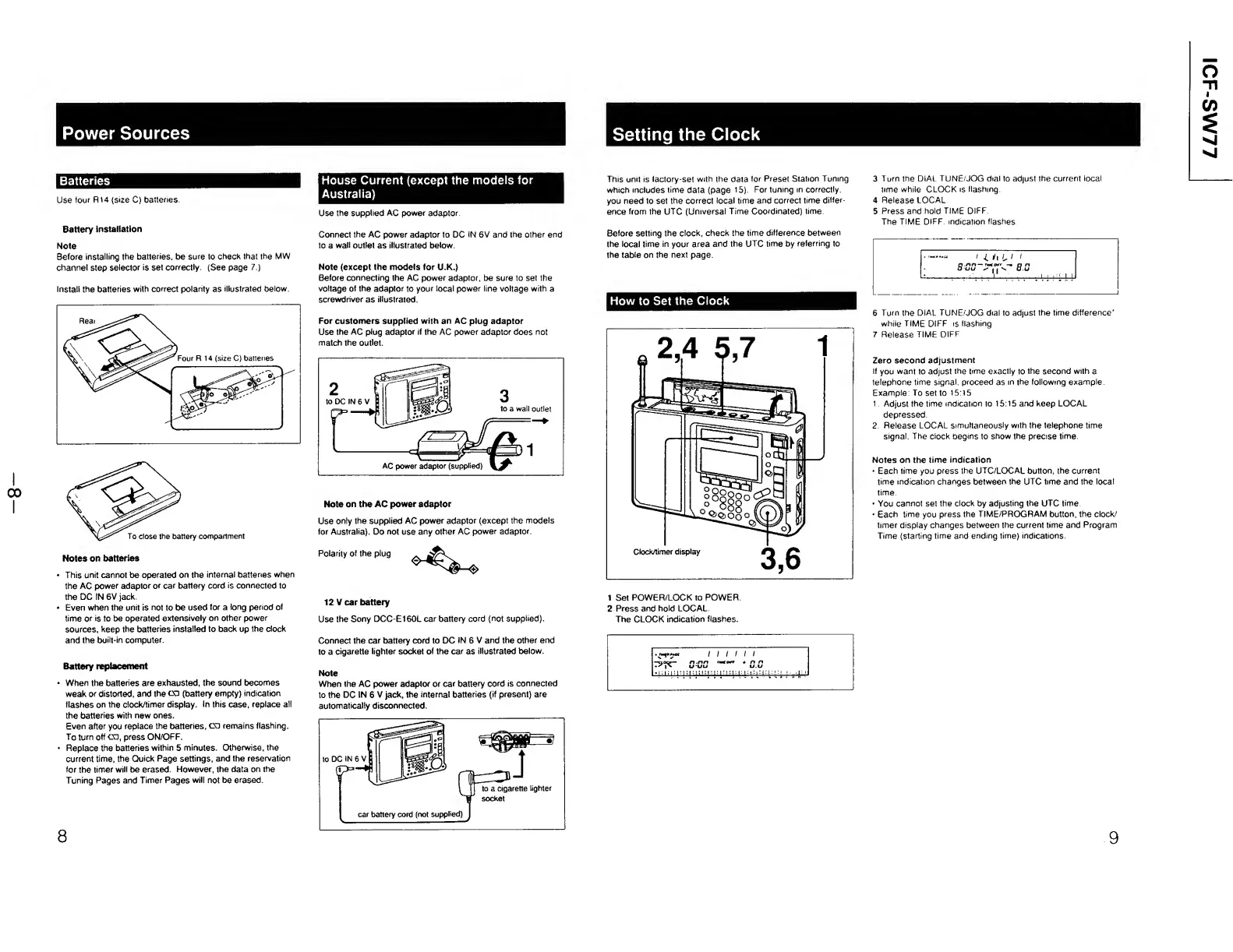
Batteries
Use
four
R14
(size
C)
batteries.
Battery
installation
Note
Before
installing
the
batteries,
be
sure
to
check
that
the
MW
channel
step
selector
is
set
correctly.
(See
page
7.)
Install
the
batteries
with
correct
polarity
as
illustrated
below
House
Current
(except
the
models
for
Australia)
Use
the
supplied
AC
power
adaptor.
Connect
the
AC
power
adaptor
to
DC
IN
6V
and
the
other
end
to
a
wall
outlet
as
illustrated
below.
Note
(except
the
models
for
U.K.)
Before
connecting
the
AC
power
adaptor,
be
sure
to
set
the
voltage
ot
the
adaptor
to
your
local
power
line
voltage
with
a
screwdriver
as
illustrated.
For
customers
supplied
with
an
AC
plug
adaptor
Use
the
AC
plug
adaptor
if
the
AC
power
adaptor
does
not
match
the
outlet.
Note
on
the
AC
power
adaptor
Use
only
the
supplied
AC
power
adaptor
(except
the
models
for
Australia).
Do
not
use
any
other
AC
power
adaptor.
Notes
on
batteries
Polarity
of
the
plug
This
unit
cannot
be
operated
on
the
internal
batteries
when
the
AC
power
adaptor
or
car
battery
cord
is
connected
to
the
DC
IN
6V
jack.
Even
when
the
unit
is
not
to
be
used
for
a
long
period
of
time
or
is
to
be
operated
extensively
on
other
power
sources,
keep
the
batteries
installed
to
back
up
the
clock
and
the
built-in
computer.
Battery
replacement
When
the
batteries
are
exhausted,
the
sound
becomes
weak
or
distorted,
and
the
CD
(battery
empty)
indication
flashes
on
the
clock/timer
display.
In
this
case,
replace
all
the
batteries
with
new
ones.
Even
after
you
replace
the
batteries,
CD
remains
flashing.
To
turn
off
CD,
press
ON/OFF.
Replace
the
batteries
within
5
minutes.
Otherwise,
the
current
time,
the
Quick
Page
settings,
and
the
reservation
for
the
timer
will
be
erased.
However,
the
data
on
the
Tuning
Pages
and
Timer
Pages
will
not
be
erased.
12
V
car
battery
Use
the
Sony
DCC-E160L
car
battery
cord
(not
supplied).
Connect
the
car
battery
cord
to
DC
IN
6
V
and
the
other
end
to
a
cigarette
lighter
socket
of
the
car
as
illustrated
below.
Note
When
the
AC
power
adaptor
or
car
battery
cord
is
connected
to
the
DC
IN
6
V
jack,
the
internal
batteries
(if
present)
are
automatically
disconnected.
socket
8
car
battery
cord
(not
supplied)
Setting
the
Clock
This
unit
is
lactory-set
with
the
data
for
Preset
Station
Tuning
which
includes
time
data
(page
15).
For
tuning
in
correctly,
you
need
to
set
the
correct
local
time
and
correct
time
differ¬
ence
from
the
UTC
(Universal
Time
Coordinated)
time
Before
setting
the
clock,
check
the
time
difference
between
the
local
time
in
your
area
and
the
UTC
time
by
referring
to
the
table
on
the
next
page.
How
to
Set
the
Clock
3
Turn
the
DIAL
TUNE/JOG
dial
to
adjust
the
current
local
time
while
CLOCK
is
flashing.
4
Release
LOCAL
5
Press
and
hold
TIME
DIFF.
The
TIME
DIFF.
indication
flashes
6
Turn
the
DIAL
TUNE/JOG
dial
to
adjust
the
time
difference'
while
TIME
DIFF
is
flashing
7
Release
TIME
DIFF.
Zero
second
adjustment
If
you
want
to
adjust
the
time
exactly
to
the
second
with
a
telephone
time
signal,
proceed
as
in
the
following
example
Example:
To
set
to
15:15
1
Adjust
the
time
indication
to
15:15
and
keep
LOCAL
depressed.
2.
Release
LOCAL
simultaneously
with
the
telephone
time
signal.
The
clock
begins
to
show
the
precise
time.
Notes
on
the
time
indication
Each
time
you
press
the
UTC/LOCAL
button,
the
current
time
indication
changes
between
the
UTC
time
and
the
local
time.
You
cannot
set
the
clock
by
adjusting
the
UTC
time.
Each
time
you
press
the
TIME/PROGRAM
button,
the
clock/
timer
display
changes
between
the
current
time
and
Program
Time
(starting
time
and
ending
time)
indications.
1
Set
POWER/LOCK
to
POWER.
2
Press
and
hold
LOCAL
The
CLOCK
indication
flashes.
9
ICF-SW77

Other manuals for Sony ICF-SW77

Related product manuals