EasyManua.ls Logo

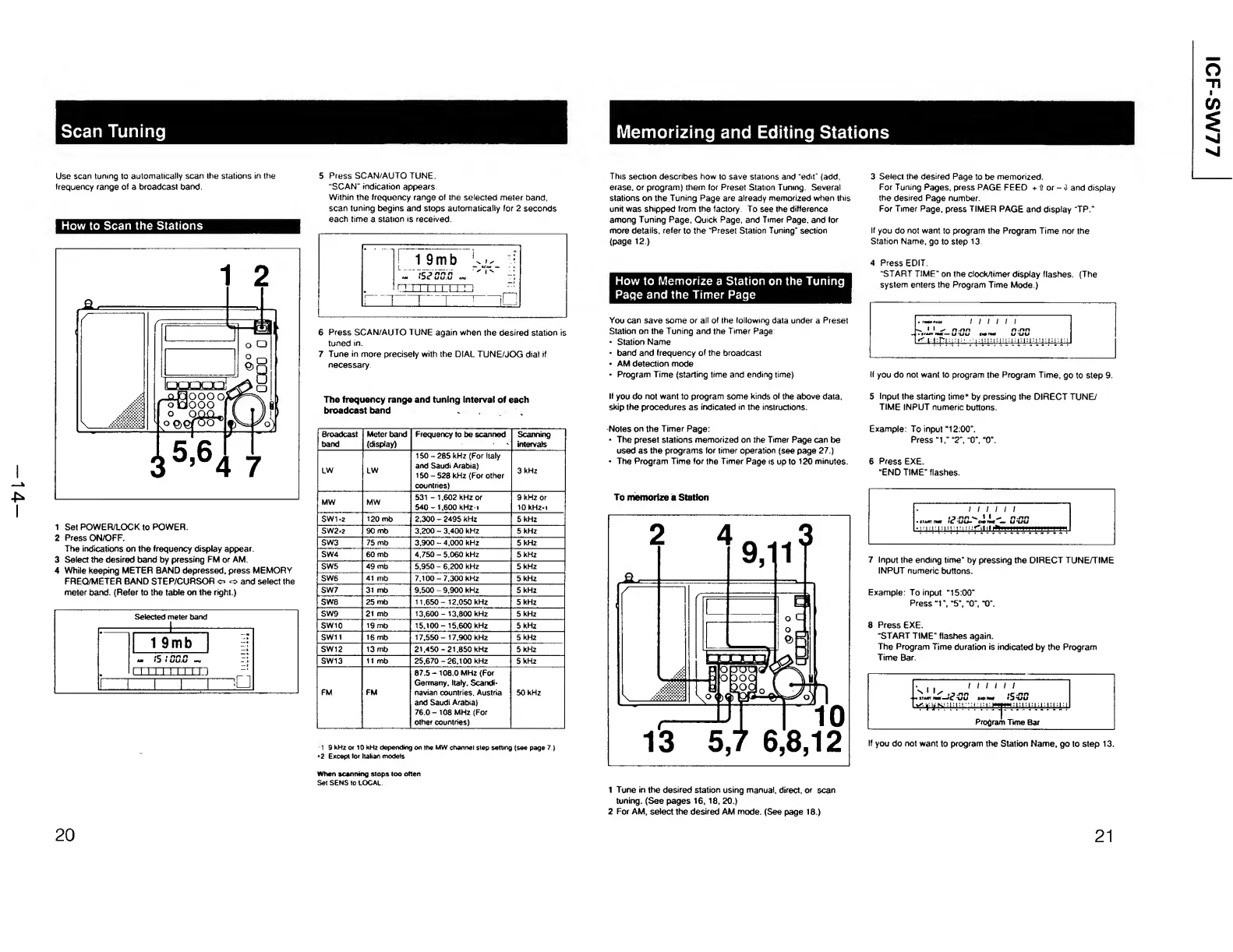
Sony ICF-SW77 - Scan Tuning Operations; How to Scan the Stations; Memorizing and Editing Stations; How to Memorize a Station on the Tuning Page and the Timer Page

Sony ICF-SW77
33 pages
Print Icon
To Next Page IconTo Next Page
To Previous Page IconTo Previous Page
Loading...
Scan
Tuning
£
I
Use
scan
tuning
to
automatically
scan
the
stations
in
the
frequency
range
of
a
broadcast
band
How
to
Scan
the
Stations
1
Set
POWER/LOCK
to
POWER.
2
Press
ON/OFF.
The
indications
on
the
frequency
display
appear.
3
Select
the
desired
band
by
pressing
FM
or
AM.
4
While
keeping
METER
BAND
depressed,
press
MEMORY
FREQ/METER
BAND
STEP/CURSOR
o
o
and
select
the
meter
band.
(Refer
to
the
table
on
the
right.)
5
P
r
ess
SCAN/AUTO
TUNE.
'SCAN'
indication
appears
Within
the
frequency
range
of
the
selected
meter
band,
scan
tuning
begins
and
stops
automatically
for
2
seconds
each
time
a
station
is
received.
6
Press
SCAN/AUTO
TUNE
again
when
the
desired
station
is
tuned
in.
7
Tune
in
more
precisely
with
the
DIAL
TUNE/JOG
dial
if
necessary
The
frequency
range
and
tuning
Interval
of
each
broadcast
band
Broadcast
band
Meter
band
(display)
Frequency
to
be
scanned
Scanning
intervals
LW
LW
150-285
kHz
(For
Italy
and
Saudi
Arabia)
150
-
528
kHz
(For
other
countries)
3
kHz
MW
MW
531
-
1,602
kHz
or
540-1,600
kHz
i
9
kHz
or
10
kHz.
i
SW1-2
120
mb
2.300
-
2495
kHz
5
kHz
SW2»2
90
mb
3,200
-
3,400
kHz
5
kHz
SW3
75
mb
3,900
-
4,000
kHz
5
kHz
SW4
60
mb
4,750
-
5,060
kHz
5
kHz
SW5
49
mb
5,950
-
6,200
kHz
5
kHz
SW6
41
mb
7,100
-
7.300
kHz
5
kHz
SW7
31
mb
9,500
-
9,900
kHz
5
kHz
SW8
25
mb
11,650-
12,050
kHz
5
kHz
SW9
21
mb
13,600-
13,800
kHz
5
kHz
SW10
19
mb
15,100-
15,600
kHz
5
kHz
SW11
16
mb
17.550-
17,900
kHz
5
kHz
SW12
13
mb
21,450
-
21,850
kHz
5
kHz
SW13
It
mb
25,670
-
26,100
kHz
5
kHz
FM
FM
87.5-
108.0
MHz
(For
Germany.
Italy.
Scandi¬
navian
countries,
Austria
and
Saudi
Arabia)
76.0-
108
MHz
(For
other
countries)
50
kHz
1
9
kHz
or
10
kHz
depending
on
the
MW
channel
step
setting
(see
page
7.)
<2
Except
lor
Italian
models
When
scanning
stops
too
often
Set
SENS
to
LOCAL
20
This
section
describes
how
to
save
stations
and
“edit"
(add,
erase,
or
program)
them
for
Preset
Station
Tuning.
Several
stations
on
the
Tuning
Page
are
already
memorized
when
this
unit
was
shipped
from
the
factory
To
see
the
difference
among
Tuning
Page,
Quick
Page,
and
Timer
Page,
and
for
more
details,
refer
to
the
“Preset
Station
Tuning"
section
(page
12.)
How
to
Memorize
a
Station
on
the
Tuning
Page
and
the
Timer
Page
You
can
save
some
or
all
of
the
following
data
under
a
Preset
Station
on
the
Tuning
and
the
Timer
Page
*
Station
Name
band
and
frequency
of
the
broadcast
AM
detection
mode
*
Program
Time
(starling
time
and
ending
time)
If
you
do
not
want
to
program
some
kinds
of
the
above
data,
skip
the
procedures
as
indicated
in
the
instructions.
Notes
on
the
Timer
Page:
The
preset
stations
memorized
on
the
Timer
Page
can
be
used
as
the
programs
for
timer
operation
(see
page
27.)
The
Program
Time
for
the
Timer
Page
is
up
to
120
minutes.
3
S
elect
the
desired
Page
to
be
memorized.
For
Tuning
Pages,
press
PAGE
FEED
+
If
or
-
i
and
display
the
desired
Page
number.
For
Timer
Page,
press
TIMER
PAGE
and
display
TP."
If
you
do
not
want
to
program
the
Program
Time
nor
the
Station
Name,
go
to
step
13
4
P
r
ess
EDIT.
"START
TIME"
on
the
clock/timer
display
flashes.
(The
system
enters
the
Program
Time
Mode.)
If
you
do
not
want
to
program
the
Program
Time,
go
to
step
9
5
Input
the
starting
time*
by
pressing
the
DIRECT
TUNE/
TIME
INPUT
numeric
buttons.
Example:
To
input
“12:00".
Press
“I,"
“2",
“0",
“0”.
6
Press
EXE.
“END
TIME"
flashes.
To
memorize
a
Station
7
I
n
put
the
ending
time*
by
pressing
the
DIRECT
TUNE/TIME
INPUT
numeric
buttons.
Example:
To
input
“15:00”
Press
“1",
“5",
“0”,
“0”.
8
P
ress
EXE.
“START
TIME"
flashes
again.
The
Program
Time
duration
is
indicated
by
the
Program
Time
Bar.
If
you
do
not
want
to
program
the
Station
Name,
go
to
step
13.
1
Tune
in
the
desired
station
using
manual,
direct,
or
scan
tuning.
(See
pages
16,
18,
20.)
2
For
AM,
select
the
desired
AM
mode.
(See
page
18.)

Other manuals for Sony ICF-SW77

Related product manuals