EasyManua.ls Logo

Sony ICF-SW77 - How to make a Station Name; To Memorize a Station on the Quick Page

Sony ICF-SW77
33 pages
Print Icon
To Next Page IconTo Next Page
To Previous Page IconTo Previous Page
Loading...
CJ1
9
P
ress
MEMORY
FREQ/METER
BAND
STEP/CURSOR
o
oro
button.
A
cursor
appears
under
one
letter
of
the
Station
Name
on
the
frequency
display.
(The
unit
enters
the
Station
Name
Editing
Mode
)
.
Ih
.....
5^150
w
1
[
.
;
.
!
J
r
_
1
N(
«
.....
:.i
lL'1
Cursor
10
Turn
the
DIAL
TUNE/JOG
dial
to
select
the
desired
char¬
acter
for
the
first
letter
of
the
Station
Name.
11
Press
MEMORY
FREQ/METER
BAND
STEP/CURSOR
O
button.
The
cursor
moves
to
the
next
letter.
Repeat
steps
10
and
11
to
make
the
desired
Station
Name
12
Press
EXE.
13
While
keeping
ENTER
depressed,
press
the
desired
station
number;
Si.
S2,
S3,
S4,
or
S5
The
memorized
Station
Name
appears
above
the
memorized
station
number
on
the
Station
Selection
Line
on
the
Fre¬
quency
display
(The
unit
goes
back
to
the
Tuning
Mode.)
Example
The
display
will
look
like
the
illustration
below
if
you
have
programmed
the
following
data;
frequency:
AM,
5975.0
kHz
starting
time;
12:00
ending
time:
15:00
AM
mode:
Wide
Station
Name:
BBC
Page
and
number:
Tuning
Page
1,
Station
number
SI
Aboul
th«
starting
lime
and
ending
time
inpot
either
the
local
time
or
the
UTC
time
depending
on
the
clock
indication
If
the
UTC
indication
is
displayed,
input
the
UTC
time,
and
il
not.
inpu!
Ihe
local
time
Once
the
Program
Time
is
memorized,
rf
you
Change
the
clock
in¬
dication
by
pressing
LOCAL/UTC.
the
Program
Time
indication
and
Program
Time
bar
changes
also
according
to
the
lime
difference
*
You
do
nol
have
to
input
a
"0"
for
time
such
as
"0:10*
Just
input
T
and
"0*
About
the
Program
Time
Mode,
the
Station
Name
Editing
Mode,
and
the
Tuning
Mode
This
unit
has
three
modes
Program
Time
Mode,
Station
Name
Editing
Mode,
and
Tuning
Mode
In
the
Program
Time
Mode,
you
can
input
the
starting
and
ending
time
In
the
Station
Name
Editing
Mode,
you
can
make
a
Station
Name
The
Tuning
Mode
is
the
normal
state
in
which
you
can
tune
in
a
station.
When
you
press
ENTER
and
S1-S5
and
memorize
a
Station
or
a
Frequency,
the
unit
goes
back
to
the
Tuning
Mode
To
exit
the
Program
Time
Mode
or
Station
Name
Editing
Mode
and
go
back
to
the
Tuning
Mode,
press
FM,
AM,
or
S1-S5.
To
exit
the
Station
Name
Editing
Mode
and
go
back
to
the
Program
Time
Mode,
press
EXE.
How
to
malc&k'StaUdn
-
You
can
use
up
to
6
characters
to
make
a
Station
Name.
The
letters
and
symbols
you
can
use
are
the
following
(53
kinds
Of
characters
and
a
blank
space):
A
B
C
D
E
F
G
JL
!
j
K
L
M
?
:
j
~
_
%
~S~
m
)
+
E
O
P
Q
R
s
T
U
V
W
X
Y
Z
.
j
~
0
~T~
2
3
4
~5~
~6~
~T~
~8~
~9~
As
you
turn
the
DIAL
TUNE/JOG
dial
clockwise,
the
letter
changes
in
the
above
order.
If
you
turn
it
counterclockwise,
it
changes
in
the
opposite
order.
Turn
the
dial
until
the
desired
letter
appears
on
the
display.
Note:
Make
sure
that
the
DIAL
LOCK
switch
is
not
locked.
To
delete
a
letter,
press
PAGE
FEED
-
<t.
To
insert
a
space,
press
PAGE
FEED
+
3.
If
you
memorize
a
station
that
does
not
have
a
Station
Name
onto
a
blank
station,
a
Station
Name
is
given
automatically.
The
symbol
and
the
frequency
number
appear
on
the
Station
Name
Area
and
on
the
Station
Selection
Line.
Example:
FM
98.0
MHz
is
memorized
as
"*98.0".
AM
15360
kHz
is
memorized
as
“*
15360”.
Notes
on
Tuning
Pages:
If
the
station
has
a
new
Station
Name,
you
cannot
memo¬
rize
it
on
a
station
number
that
already
has
a
Preset
Station
Name.
You
can
memorize
it
only
on
a
blank
station.
-
If
the
station
does
not
have
a
new
Station
Name,
you
can
either
memorize
it
on
a
blank
station
or
add
it
to
an
already
memorized
Preset
Station
Name.
(See
page
25
for
details.)
You
cannot
overwrite
a
station
on
the
Tuning
Page
except
for
the
following
cases.
If
you
want
to
erase
a
station,
see
page
24.
You
can
overwrite
a
new
station
onto
a
previously
memo¬
rized
station
if:
The
previously
saved
station
does
not
have
a
Program
Time,
but
the
new
station
with
the
same
Station
Name
and
frequency
number
has
a
Program
Time.
The
previously
saved
station
has
a
Program
Time,
but
the
new
station
with
the
same
Station
Name
and
frequency
does
not
have
a
Program
Time
*
You
can
eliminate
the
Program
Time
from
that
station
by
inputting
the
same
time
for
both
the
starting
time
and
ending
time
also.
When
you
press
the
ENTER
button
in
step
13.
the
under¬
lines
on
the
Station
Name
line
of
the
Turning
Page
flash
to
let
you
know
which
station
numbers
can
be
memorized
on
Notes
on
Timer
Page:
*
If
you
memorize
a
station
on
the
number
where
a
station
has
already
been
memorized,
the
previous
station
is
be
erased
and
replaced
by
the
new
one.
If
you
memorize
a
station
without
Station
Name
on
a
previ
ously
memorized
station,
the
Station
Name
does
not
change
but
the
programmed
data
is
replaced
by
the
new
data.
Each
station
on
the
Timer
Page
can
have
only
one
Fre¬
quency
Oempnstration
mode
This
unit
has
a
demonstration
mode
in
which
all
the
preset
stations
in
the
Tuning
Pages
are
tuned
in
for
3
seconds
each
sequentially
Press
FREE
while
keeping
METER
BAND
depressed
“DEMO
START"
is
displayed
and
the
demonstration
mode
starts
from
the
first
Page.
About
the
key
words
You
can
memorize
the
following
"key
words”
lor
the
demonstration
mode
GOTOnn'
which
means
"go
to
Page
nn
"RETURN"
which
means
"return
to
Page
1
Input
these
key
words
as
the
Station
Names
lor
the
Preset
Station
osmg
the
same
procedure
as
for
making
the
Station
Names
on
page
21
These
Station
Names
work
as
key
words
only
in
the
demonstration
mode
To
Memorize
a
Station
on
the
Quick
Page
You
can
memorize
one
of
the
following
two
data
in
a
Preset
Station
on
the
Quick
Page:
Station
Name
(of
the
Station
on
the
Tuning
Page)
band
and
frequency
of
the
broadcast
and
AM
detection
mode
To
memorize
a
station
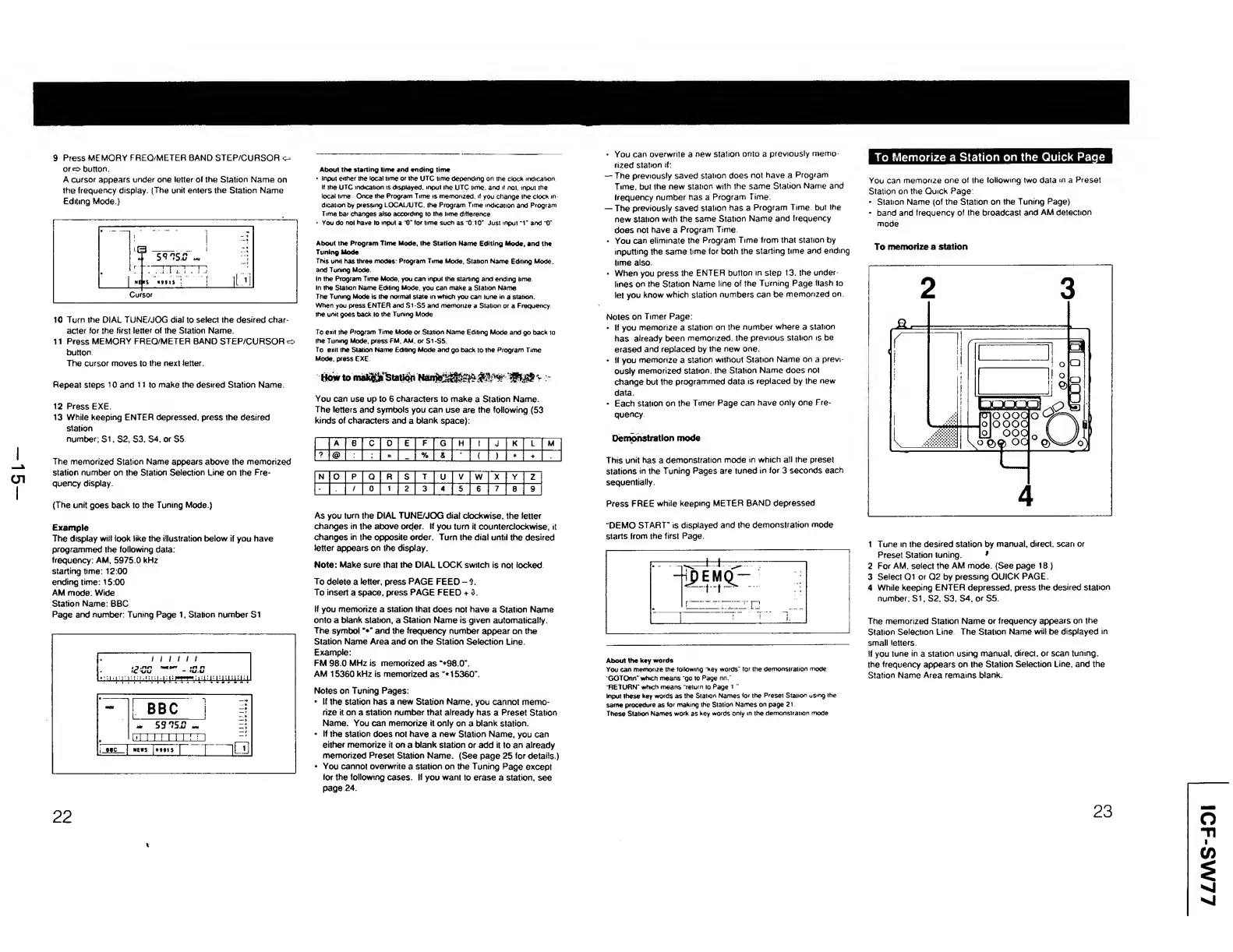
1
Tune
in
the
desired
station
by
manual,
direct,
scan
or
Preset
Station
tuning.
*
2
For
AM.
select
the
AM
mode.
(See
page
18.)
3
Select
G1
or
Q2
by
pressing
QUICK
PAGE.
4
While
keeping
ENTER
depressed,
press
the
desired
station
number;
SI,
S2,
S3,
S4,
or
S5.
The
memorized
Station
Name
or
frequency
appears
on
the
Station
Selection
Line.
The
Station
Name
will
be
displayed
in
small
letters.
If
you
tune
in
a
station
using
manual,
direct,
or
scan
tuning,
the
frequency
appears
on
the
Station
Selection
Line,
and
the
Station
Name
Area
remains
blank.
22
23
ICF-SW77

Other manuals for Sony ICF-SW77

Related product manuals