EasyManua.ls Logo

Sony ICF-SW77 - Erasing Stations and Frequencies; How to Erase a Frequency or a Station; Adding Frequencies to Stations; How to Add a Frequency

Sony ICF-SW77
33 pages
Print Icon
To Next Page IconTo Next Page
To Previous Page IconTo Previous Page
Loading...
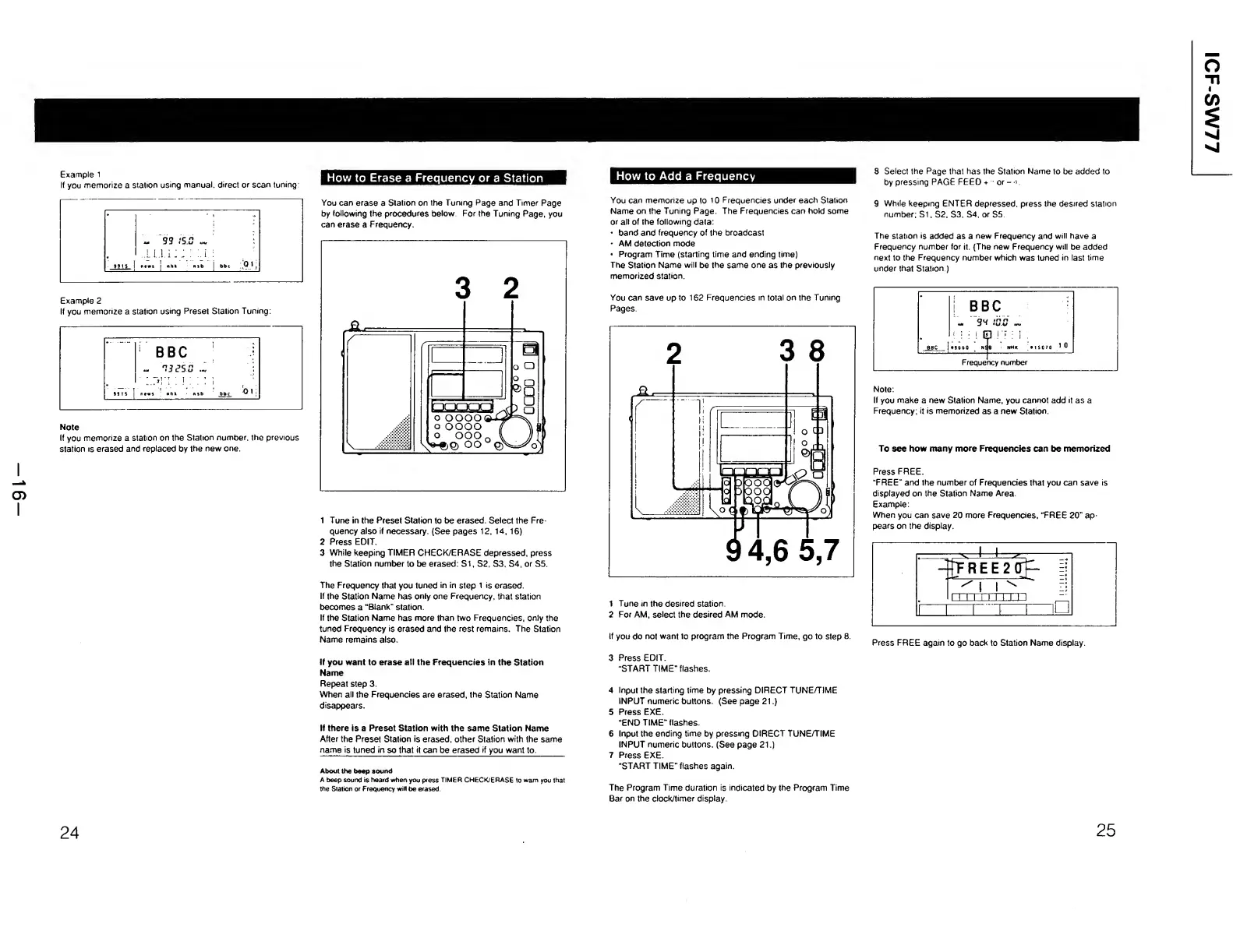
Example
1
If
you
memorize
a
station
using
manual,
direct
or
scan
tuning:
How
to
Erase
a
Frequency
or
a
Station
Example
2
If
you
memorize
a
station
using
Preset
Station
Tuning:
Note
If
you
memorize
a
station
on
the
Station
number,
the
previous
station
is
erased
and
replaced
by
the
new
one.
You
can
erase
a
Station
on
the
Tuning
Page
and
Timer
Page
by
following
the
procedures
below
For
the
Tuning
Page,
you
can
erase
a
Frequency.
1
Tune
in
the
Preset
Station
to
be
erased.
Select
the
Fre¬
quency
also
if
necessary.
{See
pages
12.
14,
16)
2
Press
EDIT.
3
While
keeping
TIMER
CHECK/ERASE
depressed,
press
the
Station
number
to
be
erased:
SI,
S2,
S3,
S4,
or
S5.
The
Frequency
that
you
tuned
in
in
step
1
is
erased.
If
the
Station
Name
has
only
one
Frequency,
that
station
becomes
a
“Blank"
station.
If
the
Station
Name
has
more
than
two
Frequencies,
only
the
tuned
Frequency
is
erased
and
the
rest
remains.
The
Station
Name
remains
also.
If
you
want
to
erase
all
the
Frequencies
in
the
Station
Name
Repeat
step
3.
When
all
the
Frequencies
are
erased,
the
Station
Name
disappears.
If
there
is
a
Preset
Station
with
the
same
Station
Name
After
the
Preset
Station
is
erased,
other
Station
with
the
same
name
is
tuned
in
so
that
it
can
be
erased
if
you
want
to.
_
About
the
beep
sound
A
beep
sound
is
heard
when
you
press
TIMER
CHECK/ERASE
to
warn
you
that
the
Station
or
Frequency
will
be
erased.
24
How
to
Add
a
Frequency
You
can
memorize
up
to
10
Frequencies
under
each
Station
Name
on
the
Tuning
Page.
The
Frequencies
can
hold
some
or
all
of
the
following
data:
band
and
frequency
of
the
broadcast
AM
detection
mode
Program
Time
(starting
time
and
ending
time)
The
Station
Name
will
be
the
same
one
as
the
previously
memorized
station.
S
Select
the
Page
that
has
the
Station
Name
to
be
added
to
by
pressing
PAGE
FEED
+
or
-
'
9
While
keeping
ENTER
depressed,
press
the
desired
station
number;
Si,
S2,
S3,
S4,
or
S5.
The
station
is
added
as
a
new
Frequency
and
will
have
a
Frequency
number
for
it.
{The
new
Frequency
will
be
added
next
to
the
Frequency
number
which
was
tuned
in
last
time
under
that
Station
)
You
can
save
up
to
162
Frequencies
in
total
on
the
Tuning
Pages.
1
Tune
in
the
desired
station.
2
For
AM,
select
the
desired
AM
mode.
Note:
If
you
make
a
new
Station
Name,
you
cannot
add
it
as
a
Frequency;
it
is
memorized
as
a
new
Station.
To
see
how
many
more
Frequencies
can
be
memorized
Press
FREE.
“FREE"
and
the
number
of
Frequencies
that
you
can
save
is
displayed
on
the
Station
Name
Area.
Example:
When
you
can
save
20
more
Frequencies,
“FREE
20"
ap¬
pears
on
the
display.
If
you
do
not
want
to
program
the
Program
Time,
go
to
step
8.
3
P
ress
EDIT.
“START
TIME"
flashes.
Press
FREE
again
to
go
back
to
Station
Name
display.
4
Input
the
starting
time
by
pressing
DIRECT
TUNE/TIME
INPUT
numeric
buttons.
(See
page
21.)
5
Press
EXE.
“END
TIME"
flashes.
6
Input
the
ending
time
by
pressing
DIRECT
TUNE/TIME
INPUT
numeric
buttons.
(See
page
21.)
7
Press
EXE.
“START
TIME"
flashes
again.
The
Program
Time
duration
is
indicated
by
the
Program
Time
Bar
on
the
clocMimer
display.
25

Other manuals for Sony ICF-SW77

Related product manuals