EasyManua.ls Logo

Sony ICF-SW77 - SERVICING NOTES; Notes on Repairing Microcomputer Board; Microcomputer Board Checking; LCD 802 Replacing Procedure

Sony ICF-SW77
33 pages
Print Icon
To Next Page IconTo Next Page
To Previous Page IconTo Previous Page
Loading...
TABLE
OF
CONTENTS
Section
Title
Page
Specifications
.
1
Features
.
2
1.
SERVICING
NOTES
Notes
on
Repairing
Microcomputer
Board
*
*
3
Microcomputer
Board
Checking
.
3
LCD
802
Replacing
Procedure
.
4
Points
of
the
Frequency
Coverage
Adjustment
.
5
2.
GENERAL
Location
and
Function
of
Controls
.
6
Power
Sources
.
8
Setting
the
Clock
.
8
Tips
for
Better
Reception
.
9
Preset
Station
Tuning
.
10
Direct
Tuning
.
12
Manual
Tuning
.
13
Scan
Tuning
.
14
Memorizing
and
Editing
Stations
.
14
Sleep
Timer
Operation
.
17
How
to
Set
the
Timer
.
17
External
Antenna
Connection
.
18
Recording
a
Broadcast
.
19
3.
ELECTRICAL
ADJUSTMENTS
Main
VCO
Frequency
Adjustment
.
20
Sub
VCO
Freerun
Frequency
Adjustment
.
20
X501
(6.275
MHz)
X’tal
Adjustment
.
21
AM
1st
IF
Adjustment
.
21
FM
IF
Adjustment
.
22
SYNC
USB/LSB
Zero-beat
Adjustment
.
22
AM
Tracking
Adjustment
.
22
FM
Tracking
Adjustment
.
23
FM
Stereo
Adjustment
.
23
FM
Scan
Stop
Adjustment
.
24
Clock
Frequency
Adjustment
(Mcrocomputer
Board)
.
24
4.
DIAGRAMS
4-1.
IC
Pin
Function
.
26
4-2.
Block
Diagram
.
30
4-3.
Microcomputer
Section
Printed
Wiring
Boards
.
34
4-4.
Microcomputer
Section
Schematic
Diagram
*
39
4-5.
Signal
Section
Schematic
Diagram
.
44
4-6.
Signal
Section
Printed
Wiring
Boards
.
49
5.
EXPLODED
VIEWS
.
59
6.
ELECTRICAL
PARTS
LIST
61
ICF-SW77
SECTION
1
SERVICING
NOTES
[Note
on
Repairing
Microcomputer
Board]
The
user’s
program
schedule
data
is
memorized
in
E^ROM
IC806.
When
repairing
by
the
microcomputer
board
replacement,
unsolder
IC806
on
the
user’s
board
and
solder
it
on
the
new
board.
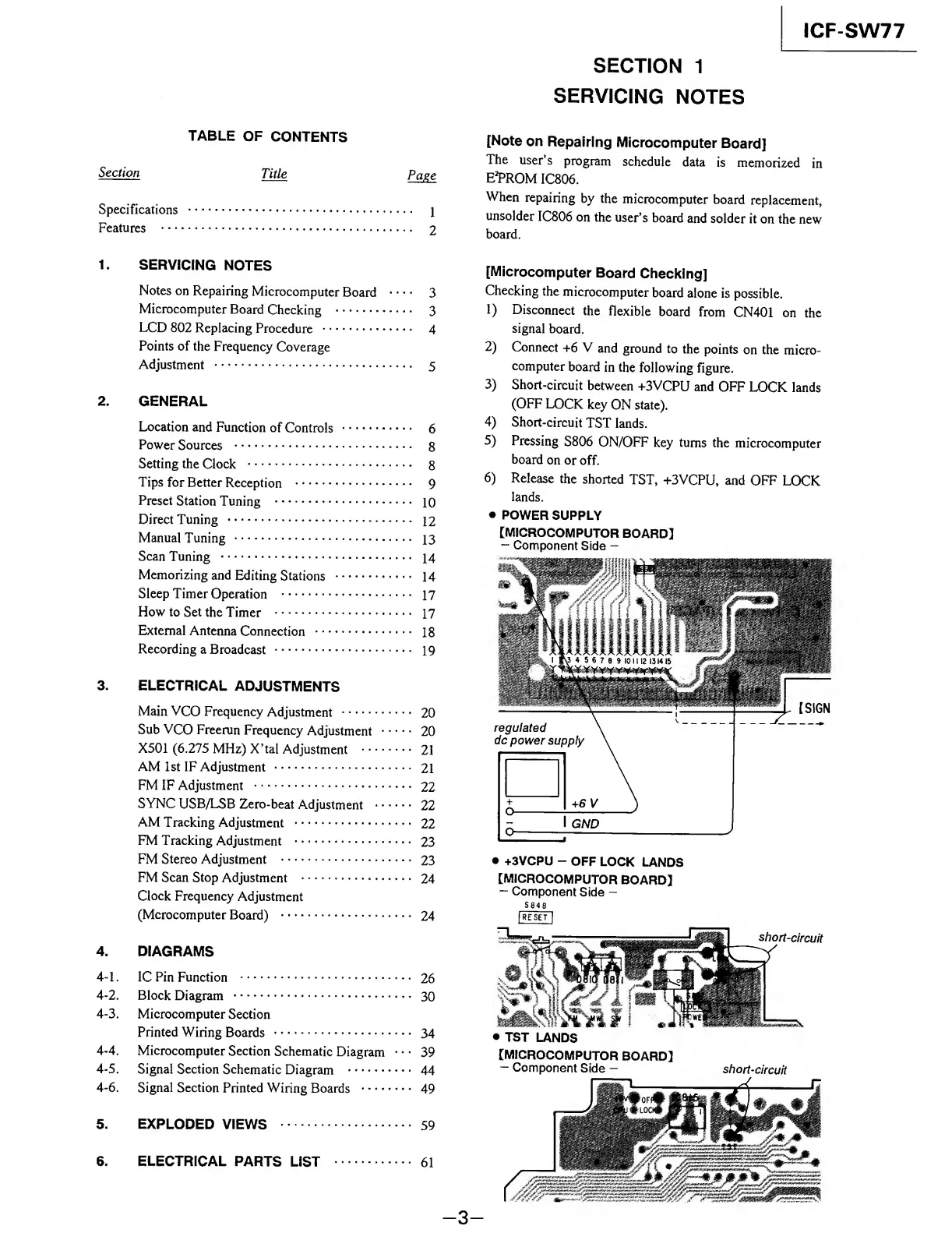
[Microcomputer
Board
Checking]
Checking
the
microcomputer
board
alone
is
possible.
1)
Disconnect
the
flexible
board
from
CN401
on
the
signal
board.
2)
Connect
+6
V
and
ground
to
the
points
on
the
micro¬
computer
board
in
the
following
figure.
3)
Short-circuit
between
+3VCPU
and
OFF
LOCK
lands
(OFF
LOCK
key
ON
state).
4)
Short-circuit
TST
lands.
5)
Pressing
S806
ON/OFF
key
turns
the
microcomputer
board
on
or
off.
6)
Release
the
shorted
TST,
+3VCPU,
and
OFF
LOCK
lands.
POWER
SUPPLY
[MICROCOMPUTOR
BOARD]
-
Component
Side
-
I
GND
+3VCPU
-
OFF
LOCK
LANDS
[MICROCOMPUTOR
BOARD]
-
Component
Side
-
S
8
4
8
|RE
SET
|
[MICROCOMPUTOR
BOARD]
-
Component
Side
-
short-circuit
-
3
-

Other manuals for Sony ICF-SW77

Related product manuals