EasyManua.ls Logo

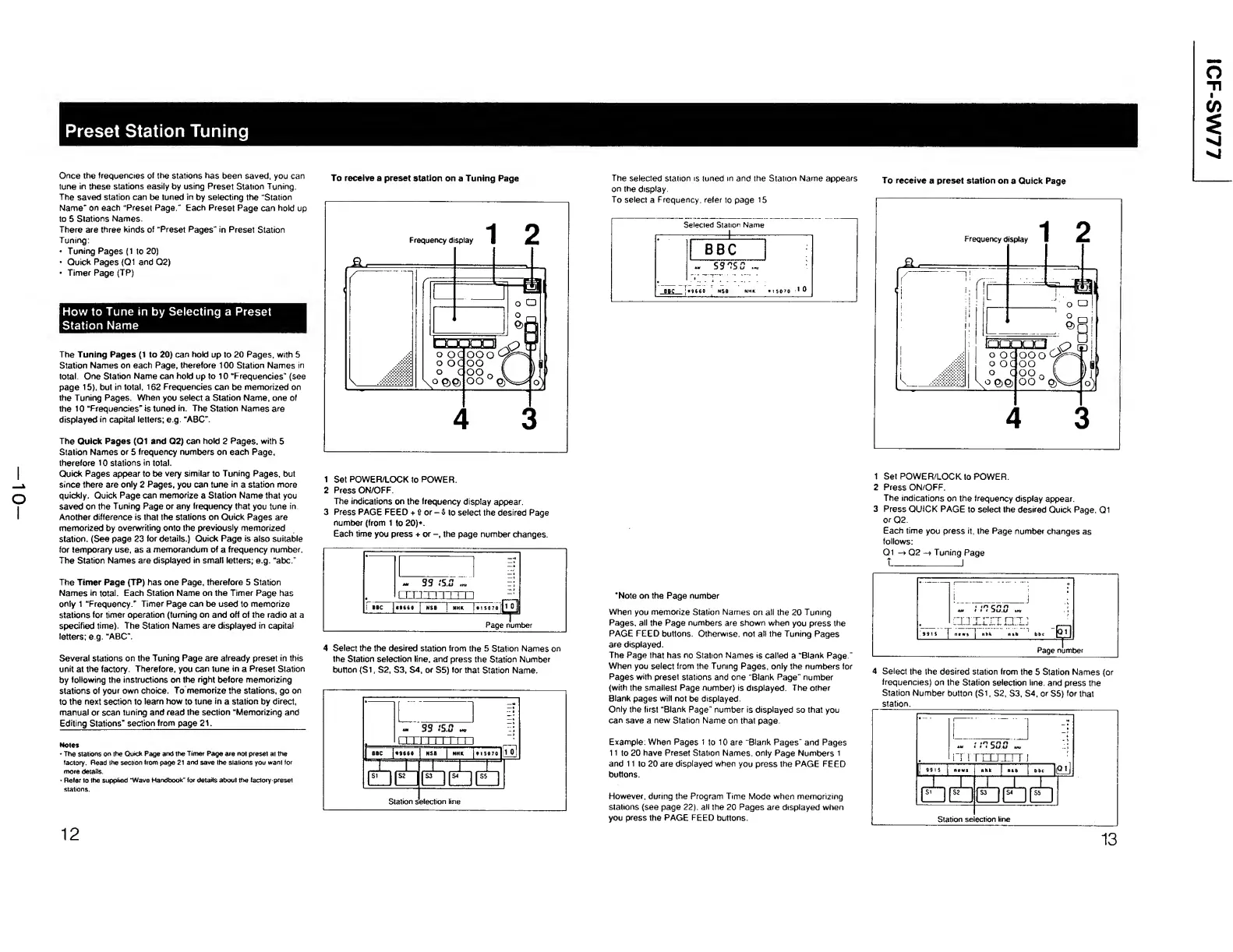
Sony ICF-SW77 - Preset Station Tuning Procedures; How to Tune in by Selecting a Preset Station Name; To receive a preset station on a Tuning Page; To receive a preset station on a Quick Page

Sony ICF-SW77
33 pages
Print Icon
To Next Page IconTo Next Page
To Previous Page IconTo Previous Page
Loading...
Preset
Station
Tuning
Once
the
frequencies
of
the
stations
has
been
saved,
you
can
tune
in
these
stations
easily
by
using
Preset
Station
Tuning,
The
saved
station
can
be
tuned
in
by
selecting
the
“Station
Name"
on
each
“Preset
Page
Each
Preset
Page
can
hold
up
to
5
Stations
Names
There
are
three
Kinds
of
“Preset
Pages"
in
Preset
Station
Tuning:
-
Tuning
Pages
(1
to
20)
Quick
Pages
<Q1
and
Q2)
Timer
Page
(TP)
How
to
Tune
in
by
Selecting
a
Preset
Station
Name
The
Tuning
Pages
(1
to
20)
can
hold
up
to
20
Pages,
with
5
Station
Names
on
each
Page,
therefore
100
Station
Names
in
total.
One
Station
Name
can
hold
up
to
10
“Frequencies''
(see
page
15).
but
in
total,
162
Frequencies
can
be
memorized
on
the
Tuning
Pages.
When
you
select
a
Station
Name,
one
of
the
10
“Frequencies"
is
tuned
in.
The
Station
Names
are
displayed
in
capital
letters;
e
g
“ABC”.
The
Quick
Pages
(Q1
and
Q2)
can
hold
2
Pages,
with
5
Station
Names
or
5
frequency
numbers
on
each
Page,
therefore
10
stations
in
total.
Quick
Pages
appear
to
be
very
similar
to
Tuning
Pages,
but
since
there
are
only
2
Pages,
you
can
tune
in
a
station
more
quickly.
Quick
Page
can
memorize
a
Station
Name
that
you
saved
on
the
Tuning
Page
or
any
frequency
that
you
tune
in
Another
difference
is
that
the
stations
on
Quick
Pages
are
memorized
by
overwriting
onto
the
previously
memorized
station.
(See
page
23
for
details.)
Quick
Page
is
also
suitable
for
temporary
use,
as
a
memorandum
of
a
frequency
number.
The
Station
Names
are
displayed
in
smalt
letters;
e.g.
"abc.”
The
Timer
Page
(TP)
has
one
Page,
therefore
5
Station
Names
in
total.
Each
Station
Name
on
the
Timer
Page
has
only
1
"Frequency."
Timer
Page
can
be
used
to
memorize
stations
for
timer
operation
(turning
on
and
off
of
the
radio
at
a
specified
time).
The
Station
Names
are
displayed
in
capital
letters;
e.g.
“ABC”.
Several
stations
on
the
Tuning
Page
are
already
preset
in
this
unit
at
the
factory.
Therefore,
you
can
tune
in
a
Preset
Station
by
following
the
instructions
on
the
right
before
memorizing
stations
of
your
own
choice.
To
memorize
the
stations,
go
on
to
the
next
section
to
learn
how
to
tune
in
a
station
by
direct,
manual
or
scan
tuning
and
read
the
section
“Memorizing
and
Editing
Stations"
section
from
page
21.
_
Notes
*
The
stations
on
the
Quick
Page
and
the
Timer
Page
are
not
preset
at
the
factory.
Read
the
section
from
page
21
and
save
the
stations
you
want
for
more
details.
Refer
lo
the
supplied
“Wave
Handbook"
for
details
about
the
factory
preset
stations.
To
receive
a
preset
station
on
a
Tuning
Page
1
Set
POWER/LOCK
to
POWER.
2
Press
ON/OFF
The
indications
on
the
frequency
display
appear.
3
Press
PAGE
FEED
+
flor-Dto
select
the
desired
Page
number
(from
1
to
20)*.
Each
time
you
press
+
or
the
page
number
changes.
«.
33
iS.O
.«,
ri
rTTITTTTTn
BBC
J
*9660
j
MSB
]
NHK
|
tl
5070
[|<
0
]
1
Page
number
4
S
elect
the
the
desired
station
from
the
5
Station
Names
on
the
Station
selection
line,
and
press
the
Station
Number
button
(Si,
S2,
S3,
S4,
or
S5)
for
that
Station
Name.
12
The
selected
station
is
tuned
in
and
the
Station
Name
appears
on
the
display
To
select
a
Frequency,
refer
to
page
15
1
Set
POWER/LOCK
to
POWER.
2
Press
ON/OFF.
The
indications
on
the
frequency
display
appear.
3
Press
QUICK
PAGE
to
select
the
desired
Quick
Page,
Ql
or
Q2.
Each
time
you
press
it,
the
Page
number
changes
as
follows:
Ql
->
Q2
Tuning
Page
t__J
‘Note
on
the
Page
number
When
you
memorize
Station
Names
on
all
the
20
Tuning
Pages,
all
the
Page
numbers
are
shown
when
you
press
the
PAGE
FEED
buttons.
Otherwise,
not
all
the
Tuning
Pages
are
displayed.
The
Page
that
has
no
Station
Names
is
called
a
“Blank
Page
"
When
you
select
from
the
Tuning
Pages,
only
the
numbers
for
Pages
with
preset
stations
and
one
"Blank
Page"
number
(with
the
smallest
Page
number)
is
displayed.
The
other
Blank
pages
will
not
be
displayed.
Only
the
first
“Blank
Page"
number
is
displayed
so
that
you
can
save
a
new
Station
Name
on
that
page
Example:
When
Pages
1
to
10
are
"Blank
Pages
"
and
Pages
11
to
20
have
Preset
Station
Names,
only
Page
Numbers
1
and
11
to
20
are
displayed
when
you
press
the
PAGE
FEED
buttons.
Flowever,
during
the
Program
Time
Mode
when
memorizing
stations
(see
page
22).
all
the
20
Pages
are
displayed
when
you
press
the
PAGE
FEED
buttons.
I
-
..
\
:
Liiimnu
KVVTVJ
ne.s
|
nhk
nth
bbc
Page
number
4
Select
the
the
desired
station
from
the
5
Station
Names
(or
frequencies)
on
the
Station
selection
line,
and
press
the
Station
Number
button
(Si.
S2,
S3,
S4,
or
$5)
for
that
station.
13
To
receive
a
preset
station
on
a
Quick
Page
1CF-SW77

Other manuals for Sony ICF-SW77

Related product manuals