EasyManua.ls Logo

Sony ICF-SW77 - GENERAL; Location and Function of Controls; Power Sources; Setting the Clock

Sony ICF-SW77
33 pages
Print Icon
To Next Page IconTo Next Page
To Previous Page IconTo Previous Page
Loading...
ICF-SW77
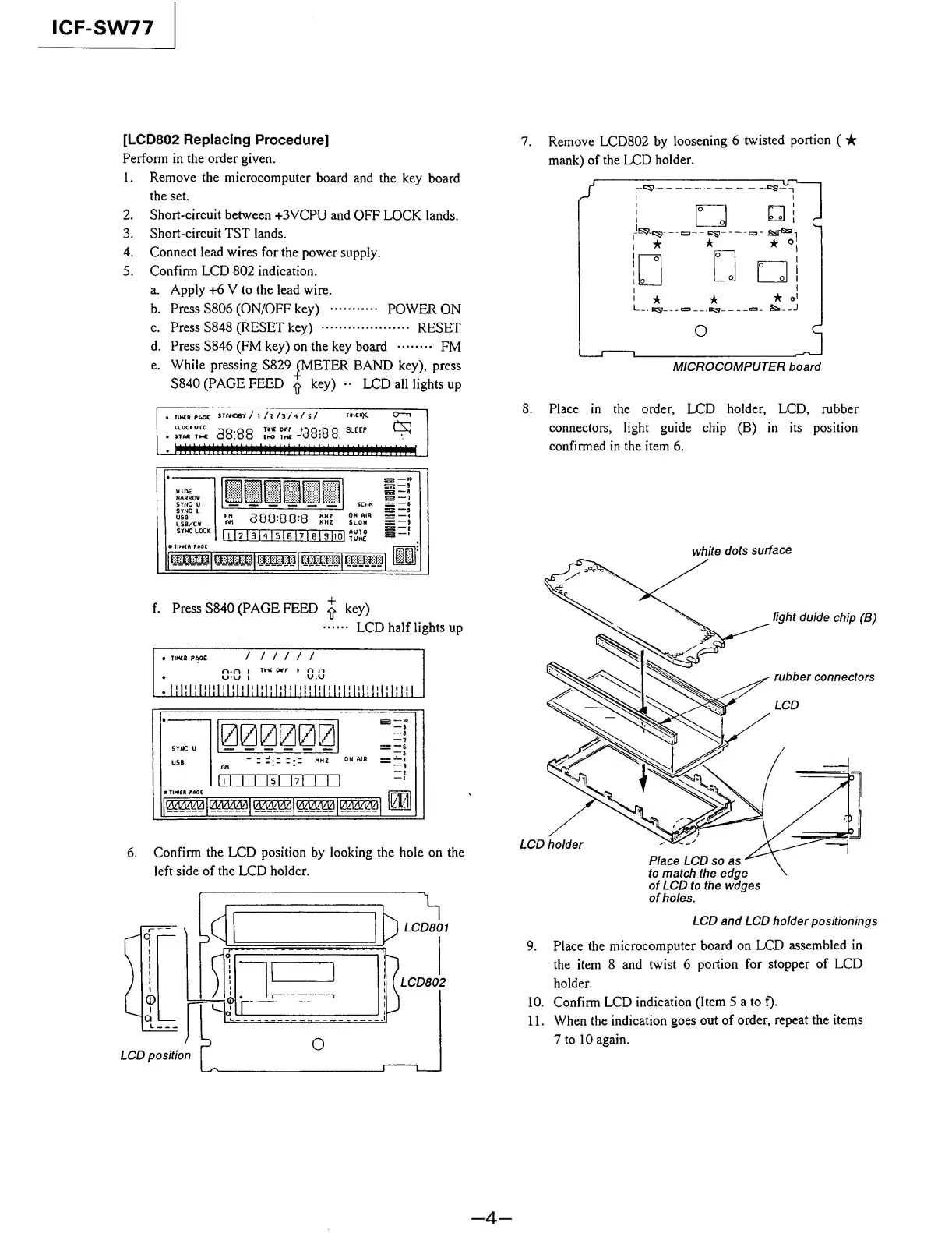
[LCD802
Replacing
Procedure]
Perform
in
the
order
given.
1.
Remove
the
microcomputer
board
and
the
key
board
the
set.
2.
Short-circuit
between
+3VCPU
and
OFF
LOCK
lands.
3.
Short-circuit
TST
lands.
4.
Connect
lead
wires
for
the
power
supply.
5.
Confirm
LCD
802
indication.
a.
Apply
+6
V
to
the
lead
wire.
b.
Press
S806
(ON/OFF
key)
.
POWER
ON
c.
Press
S848
(RESET
key)
.
RESET
d.
Press
S846
(FM
key)
on
the
key
board
.
FM
e.
While
pressing
S829
(METER
BAND
key),
press
S840
(PAGE
FEED
£
key)
••
LCD
all
lights
up
TIMCR
PACK
STANO0Y
/
1
/|
/3
A
/
s/
r
'
CH
X
0~n
cioccutc
3Q.QQ
tihc
Oirr
00-0
0
SLEEP
iiu
tm
00.00
(ho
int
-00:0
0
H
I
I
'
l
l
l
l
l
l
l
l
ll
l
l
M
H
'
llllllllllllllllllllllllllllll
i:
-i
WIDE
HARROW
SYNC
U
9THC
L
USD
LSB/'CW
STMC
LOCK
i!
m
11
"
BE*
SCAN
=
—6
F
rS
888:88:8
PSi
OH
AIR
=
—1
slow
as
~~i
hl2l3Dl5lBl7l0l9llQl
Unit
A
PACT
?mm\
mmm\
f.
P
ress
S840
(PAGE
FEED
£
key)
.
LCD
half
lights
up
TIMiB
PAOC
/
11
/
1
/
n.n
t
rut
orr
t
n
n
UU
l
u.u
t
——
SYMC
U
USB
00
00
00
i
l
7
-
Z
Z•Z
Z
I
MHZ
Art
ON
AIR
ES
“I
5
]
111
1
ITsITTTTT
TINIER
PACT
Inni
msm
c
mm
t
mm
i
mm
IkMl
|
6.
C
onfirm
the
LCD
position
by
looking
the
hole
on
the
left
side
of
the
LCD
holder.
^LCD801
LCD802
7.
R
emove
LCD802
by
loosening
6
twisted
portion
(
mank)
of
the
LCD
holder.
8.
P
lace
in
the
order,
LCD
holder,
LCD,
rubber
connectors,
light
guide
chip
(B)
in
its
position
confirmed
in
the
item
6.
white
dots
surface
LCD
and
LCD
holder
positionings
9.
Place
the
microcomputer
board
on
LCD
assembled
in
the
item
8
and
twist
6
portion
for
stopper
of
LCD
holder.
10.
Confirm
LCD
indication
(Item
5
a
to
f).
11.
When
the
indication
goes
out
of
order,
repeat
the
items
7
to
10
again.
-
4
-

Other manuals for Sony ICF-SW77

Related product manuals