EasyManua.ls Logo

Sony ICF-SW77 - EXPLODED VIEWS; ELECTRICAL PARTS LIST

Sony ICF-SW77
33 pages
Print Icon
To Next Page IconTo Next Page
To Previous Page IconTo Previous Page
Loading...
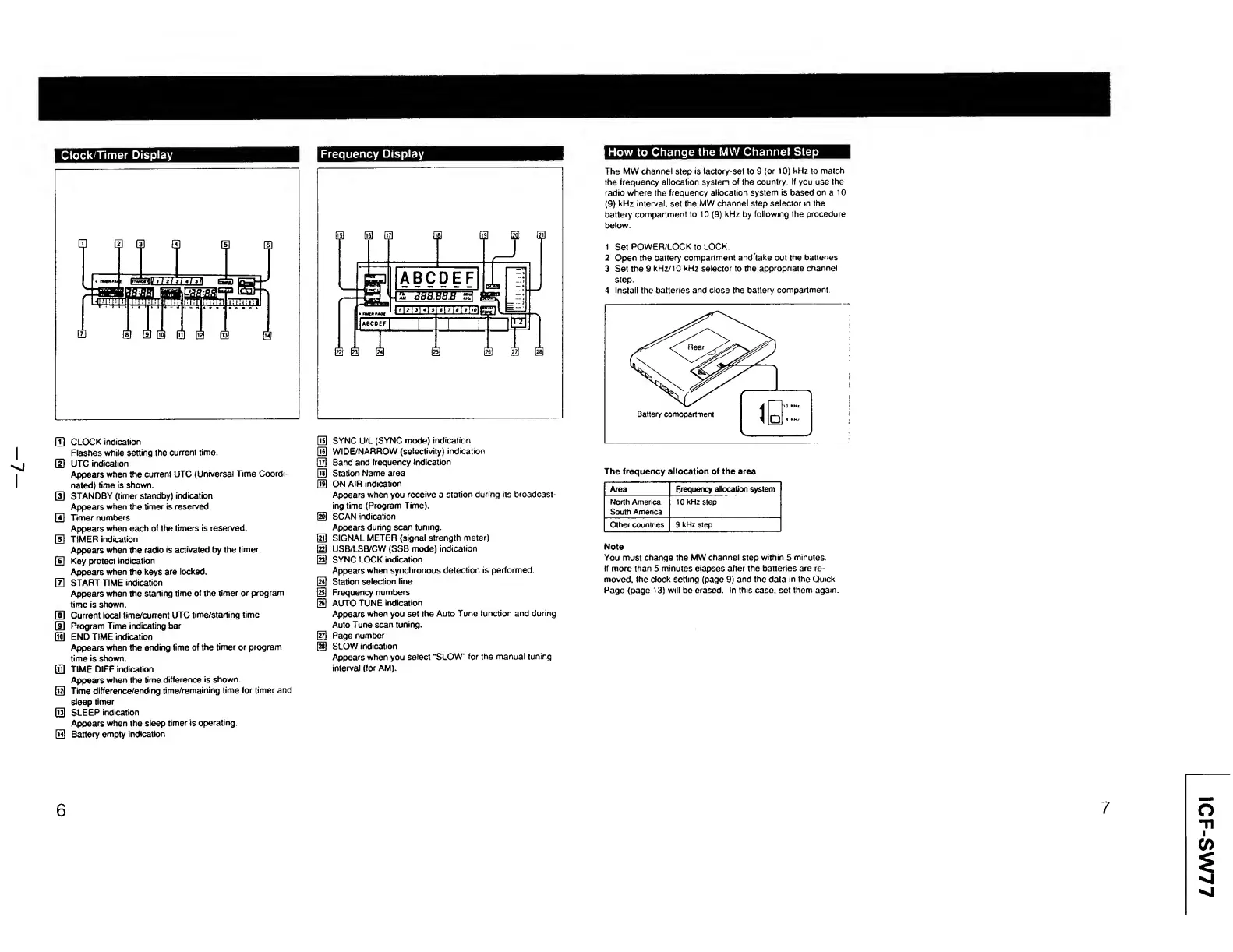
Clock/Timer
Display
Frequency
Display
How
to
Change
the
MW
Channel
Step
i
•'j
i
(T)
CLOCK
indication
Flashes
while
setting
the
current
time.
[D
UTC
indication
Appears
when
the
current
UTC
(Universal
Time
Coordi¬
nated)
time
is
shown.
0
STANDBY
(timer
standby)
indication
Appears
when
the
timer
is
reserved.
GO
Timer
numbers
Appears
when
each
of
the
timers
is
reserved.
[H
TIMER
indication
Appears
when
the
radio
is
activated
by
the
timer.
(D
Key
protect
indication
Appears
when
the
keys
are
locked.
0
START
TIME
indication
Appears
when
the
starting
time
of
the
timer
or
program
time
is
shown.
0
Current
local
time/current
UTC
time/starting
time
®
Program
Time
indicating
bar
(1
END
TIME
indication
Appears
when
the
ending
time
of
the
timer
or
program
time
is
shown.
0
TIME
DIFF
indication
Appears
when
the
time
difference
is
shown,
d
Time
difference/ending
time/remaining
time
for
timer
and
sleep
timer
d
SLEEP
indication
Appears
when
the
sleep
timer
is
operating,
d
Battery
empty
indication
dH
SYNC
U/L
(SYNC
mode)
indication
QU
WIDE/NARROW
(selectivity)
indication
QXl
Band
and
frequency
indication
dS
Station
Name
area
OH
ON
AIR
indication
Appears
when
you
receive
a
station
during
its
broadcast¬
ing
time
(Program
Time),
d
SCAN
indication
Appears
during
scan
tuning,
d
SIGNAL
METER
(signal
strength
meter)
@
USB/LSB/CW
(SSB
mode)
indication
@
SYNC
LOCK
indication
Appears
when
synchronous
detection
is
performed.
[
24
)
Station
selection
line
@
Frequency
numbers
@
AUTO
TUNE
indication
Appears
when
you
set
the
Auto
Tune
function
and
during
Auto
Tune
scan
tuning.
@
Page
number
@
SLOW
indication
Appears
when
you
select
“SLOW”
for
the
manual
tuning
interval
(for
AM).
The
MW
channel
step
is
factory-set
to
9
(or
10)
kHz
to
match
the
frequency
allocation
system
of
the
country
If
you
use
the
radio
where
the
frequency
allocation
system
is
based
on
a
10
(9)
kHz
interval,
set
the
MW
channel
step
selector
in
the
battery
compartment
to
10
(9)
kHz
by
following
the
procedure
below.
1
Set
POWER/LOCK
to
LOCK.
2
Open
the
battery
compartment
and'take
out
the
batteries.
3
Set
the
9
kHz/10
kHz
selector
to
the
appropriate
channel
step.
4
Install
the
batteries
and
close
the
battery
compartment.
The
frequency
allocation
of
the
area
Area
Frequency
allocation
system
North
America.
South
America
10
kHz
step
Other
countries
9
kHz
step
Note
You
must
change
the
MW
channel
step
within
5
minutes.
If
more
than
5
minutes
elapses
after
the
batteries
are
re¬
moved.
the
clock
setting
(page
9)
and
the
data
in
the
Quick
Page
(page
13}
will
be
erased.
In
this
case,
set
them
again
6
7
ICF-SW77

Other manuals for Sony ICF-SW77

Related product manuals