Parts Identifications
13
Overview
See the pages enclosed in parentheses ( ) for
details about the corresponding function and how
to use it.
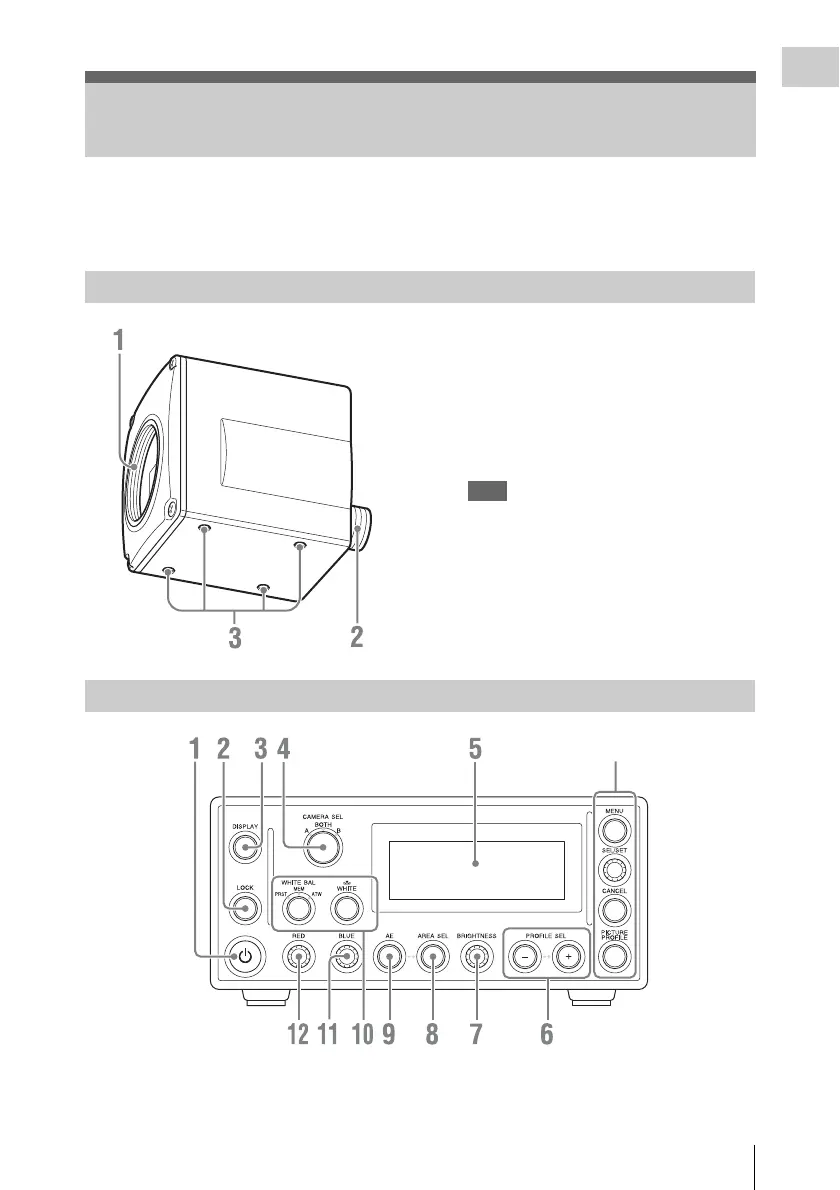
1. Lens mount (page 16)
2. Camera cable connector (20-pin) (page 17)
3. Screw holes (M3, depth: 2.5 mm (
1
/
8
inches))
Use these holes to attach the supplied tripod
adaptor to the camera head for mounting it on
a wall, ceiling or tripod.
Note
For extended shooting sessions, we
recommend using the supplied tripod adaptor
and stabilizing the camera head on a tripod.
1. On/Standby button (1) (page 21) 2. LOCK button
Inhibits actions of the other buttons and
knobs.
Parts Identifications
Camera head
Camera control unit (CCU) front panel
Menu operation block (page 14)












 To Next Page