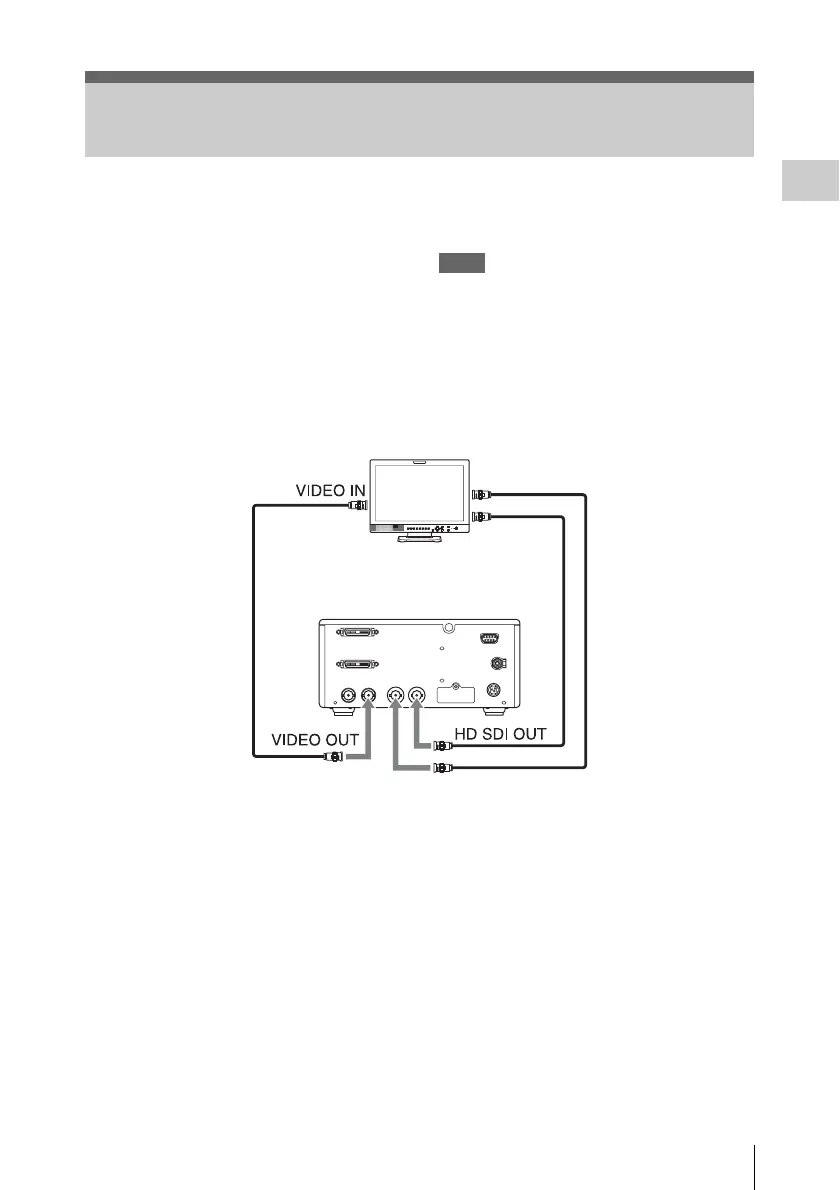
Connecting Video Monitors
19
Preparations
The camera output picture is output from all of
the video output connectors (VIDEO OUT, and
HD SDI OUT A, B connectors) on the CCU rear
panel.
Signals picked up by camera A are output from
the HD SDI OUT A connector, and signals picked
up by camera B are output from the HD SDI OUT
B connector.
The VIDEO OUT connector outputs signals from
camera A when CAMERA SEL is set to A or
BOTH, and signals from camera B when
CAMERA SEL is set to B.
You can check the camera output picture by
connecting a monitor that supports the respective
output signal to any of the connectors.
Notes
• Before connecting the cables, press the On/
Standby (1) button to set the unit to the standby
state.
• Connect a video monitor to each connector only
via a cable. If you use a conversion adaptor, the
camera output picture is not output correctly.
To select the output mode (aspect ratio) for SD
signal
When using an SD signal down-converted for
output from the VIDEO OUT connector, you can
select the output mode in “Down Converter” (see
page 41) of the VIDEO SET menu.
Squeeze: To horizontally reduce a 16:9 picture to
output a 4:3 picture
Letterbox: To mask the upper and lower areas of
a 4:3 picture to display a shrunken 16:9
picture in the center of the screen
Edge Crop: To cut the both sides of a 16:9
picture to output a 4:3 picture
Connecting Video Monitors
a) 75 Ω coaxial cable
b) Component video cable with BNC connectors
Video monitor
SDI input connector
a) b)
CCU
b)













 To Next Page