Parts Identifications
14
Overview
3. DISPLAY button (page 23)
4. CAMERA SEL (camera selection) button
(page 26)
5. Front panel display (page 23)
6. PROFILE SEL (profile selection) + and –
buttons (page 32)
7. BRIGHTNESS knob (page 30)
8. AREA SEL (light measurement area
selection) button (page 29)
9. AE (automatic exposure) button (page 29)
10. White balance adjustment section (page
27)
11. BLUE (blue gain) knob (page 28)
12. RED (red gain) knob (page 28)
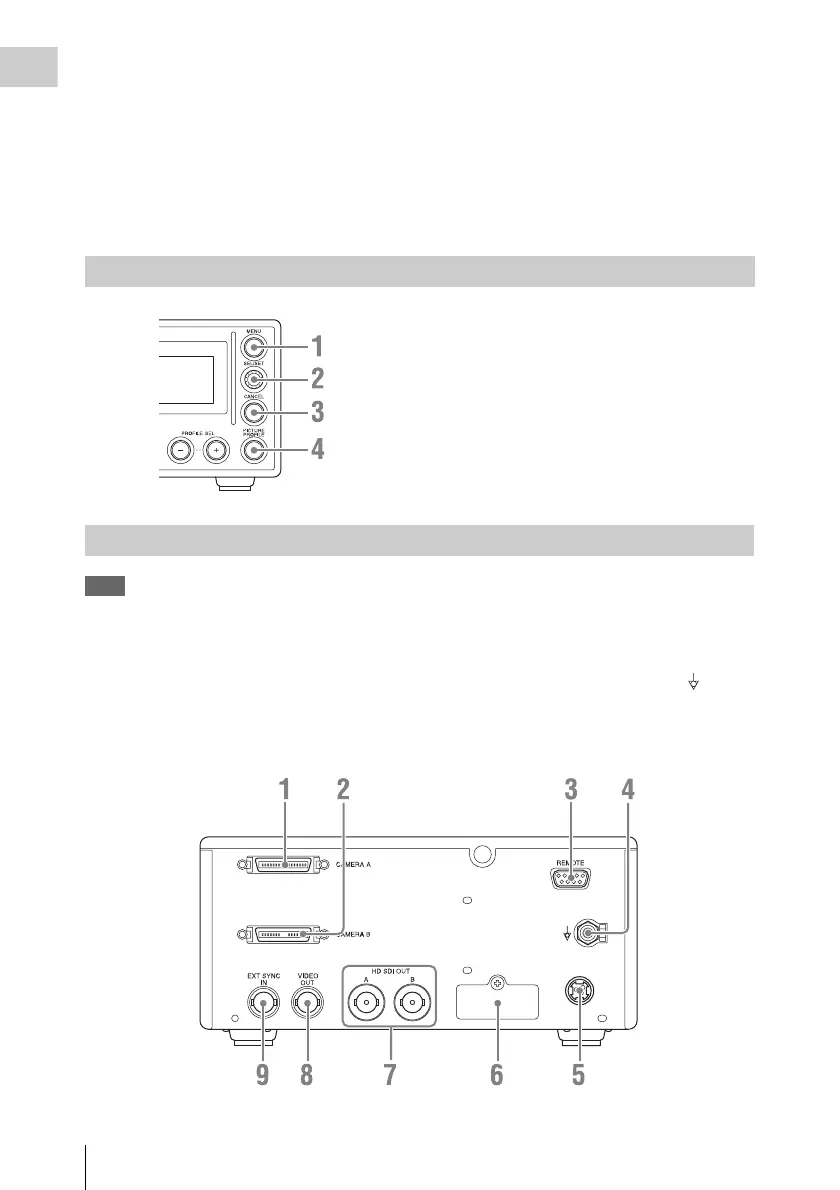
1. MENU button (page 38)
2. SEL/SET knob (page 38)
3. CANCEL button (page 38)
4. PICTURE PROFILE button (page 32)
Note
When the unit is shipped from the factory,
connector covers are attached to the following
connectors.
• HD SDI OUT A, B
• EXT SYNC IN
• VIDEO OUT
To use one of these connectors, remove the cover
(see page 18).
1. CAMERA A connector (page 17)
2. CAMERA B connector (page 17)
3. REMOTE connector (D-sub 9-pin, RS-
232C) (page 20)
4. Equipotential ground terminal ( )
Use to make an equipotential ground
connection.
Menu operation block
Camera control unit (CCU) rear panel












 To Next Page