12
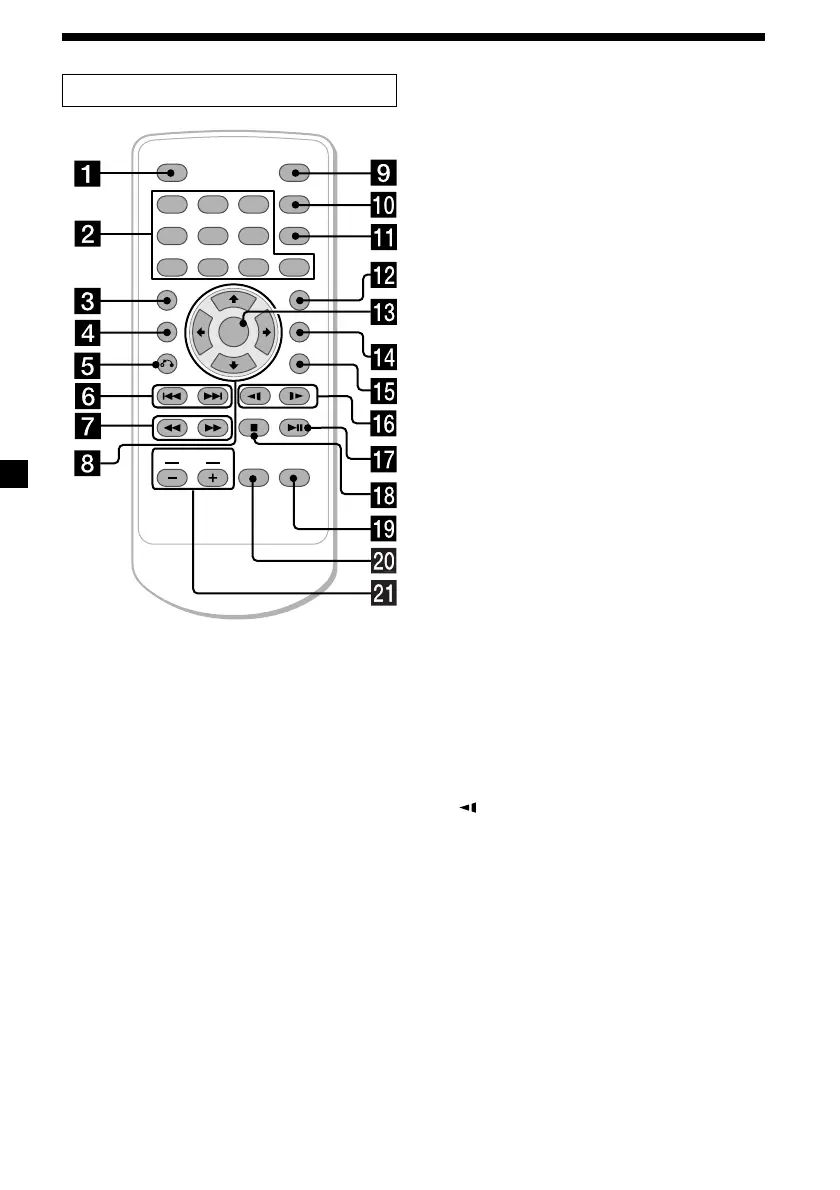
Card remote commander RM-X137
ENTER
SEARCH
POWER
DISPLAY
CLEAR
SETUP
AUDIO
ANGLE
SUBTITLE
MENU
TOP MENU
INPUT
123
456
7890
VOL
Refer to the pages listed for details.
1 DISPLAY button 16
To display the time information of the disc.
2 Number buttons (0 to 9) 14, 20, 24
3 TOP MENU button 18
To display the top menu of a recorded
DVD.
4 M ENU button 18, 20
To display the recorded DVD menu, or to
turn on/off the PBC (Playback control)
menu of a Video CD.
5 O (return) button 20
6 ./> (previous/ next) buttons 14, 20
7 m (fast reverse)/
M (fast forw ard) buttons 14
8 M/,/m/ < buttons 14, 15, 18, 21
9 POWER (on/off) button 13
To turn on/off the player.
q; SEARCH button 14
To specify a desired point on a disc by
chapter, title, or track.
qa CLEAR button
qs SUBTITLE button 17
To change the subtitle language while
playing a DVD.
qd ENTER button 14, 21
To enter a setting.
qf ANGLE button 19
To select the multiple angles of view while
playing a DVD.
qg AUDIO button 19
To change the audio output/audio
language.
qh
(slow reverse)/y (slow forw ard)
buttons 14
qj u (play/pause) button 13, 14, 15, 20
qk x (stop) button 14, 15
ql SETUP button 22
Used to perform menu operations.
w; INPUT button 26
To select the input source.
wa VOL (–/+) buttons 13, 27
To turn up or down the volume.
The corresponding buttons of the card
remote commander control the same
functions as those on the player.
Instructions in this manual describe how to use
the player by mainly using the card remote
commander.
Tip
Ref er to “ Replacing the lit hium batt ery of t he card
remot e commander” f or det ails on how to replace
the bat tery (page 31).
Downloaded from: https://www.usersmanualguide.com/















 To Next Page