11
MV-65ST
D
IS
C IN
R
E
SE
T
6
7
8
9
0
qa
qd
qs
qf
qg
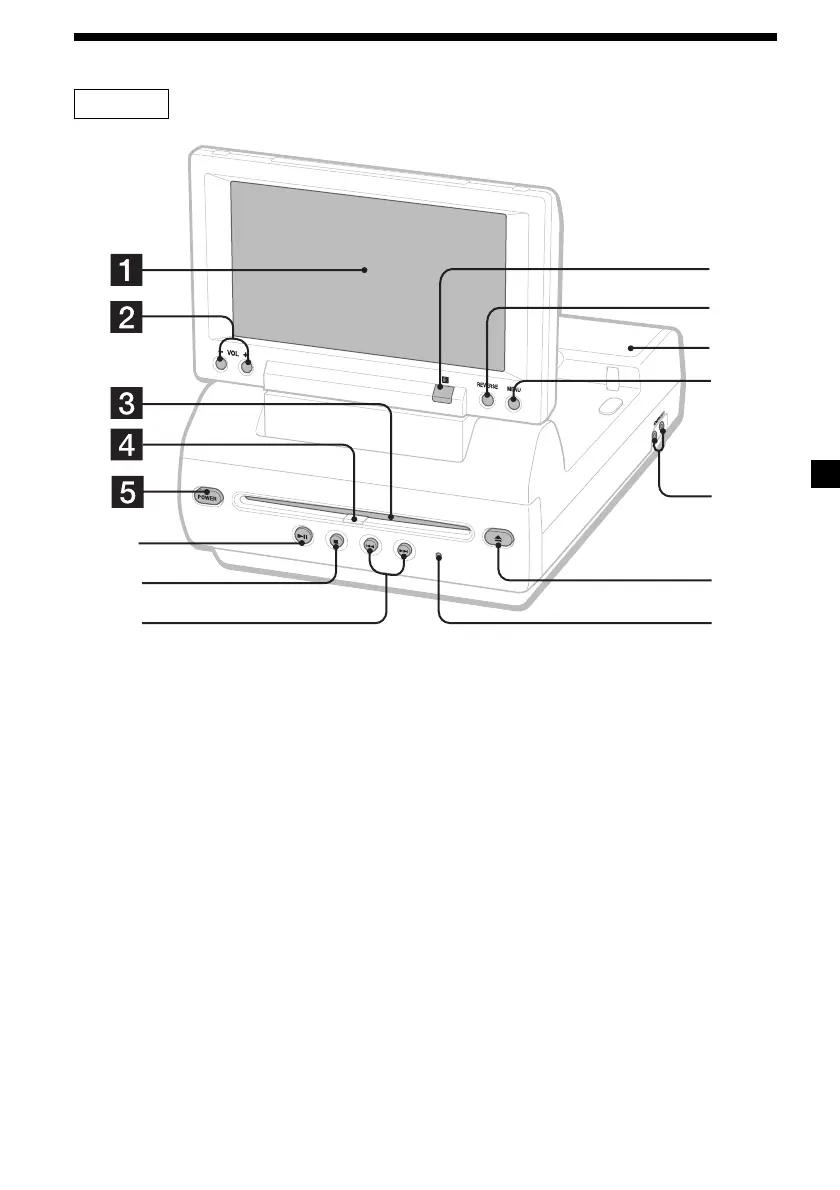
Refer to the pages listed for details.
1 M onitor
2 VOL –/+ buttons 13, 27
To turn up or down the volume or to select
the item during menu operation.
3 Disc slot
4 DISC IN light
When a disc is in the player, the DISC IN
light glows orange.
5 POWER (on/off) button 13
To turn on/off the player.
6 u (play/pause) button 13, 14, 15, 20
7 x (stop) button 14, 15
8 . (previous)/> (next) buttons 14,
20
9 Receptor for the card remote
commander
q; Reverse button 10, 30
To switch images upside down and
reverse the output of the audio channels.
qa Speakers (left/right)
qs M ENU button 27
To make various display settings and FM
transmitter setting.
qd HEADPHONES jacks
To connect the headphones. 2 sets of
headphones can be connected.
qf Z (eject) button 14
Available to eject a disc from the player
even when the player is turned off.
qg RESET button 10
Note
Even when t he player is t urned of f by pressing
(POWER), you can eject a disc from t he player,
though you cannot insert a disc.
continue to next page t
Location of controls
Downloaded from: https://www.usersmanualguide.com/















 To Next Page