33
About M P3 files
MP3 (MPEG 1 Audio Layer-3) is a standard
technology and format for compressing a
sound sequence. The file is compressed to
about 1/10 of its original size. Sounds outside
the range of human hearing are compressed
while the sounds we can hear are not
compressed.
Recommended M P3 file format
Sampling frequency 32k, 44.1k, 48k
(Hz)
Bitrate (bps) 128k
Notes on discs
You can play MP3 files recorded on CD-ROMs,
CD-Rs, and CD-RWs.
The disc must be in the ISO 9660* level 1 or
level 2 format, or Joliet in the expansion
format.
* ISO 9660 Format
The most common international standard
for the logical format of files and folders on
a CD-ROM.
There are several specification levels. In
Level 1, file names must be in the 8.3 format
(no more than 8 characters in the name, no
more than 3 characters in the extension
“.MP3”) and in capital letters. Folder names
can be no longer than 8 characters. There can
be no more than 8 nested folder levels. Level
2 specifications allow file names up to 31
characters long.
Each folder can have up to 8 trees.
For Joliet in the expansion format, make sure
of the contents of the writing software, etc.
Notes
• Wit h formats other than ISO 9660 level 1 and
level 2, f older names or file names may not be
displayed correctly.
• When naming, be sure t o add t he file ext ension
“ .M P3” to the f ile name.
• If you put t he extension “ .M P3” to a f ile ot her
than M P3, t he player cannot recognize the f ile
properly and w ill generate random noise t hat
could damage your speakers.
• The f ollowing discs take a longer t ime to st art
playback.
— a disc recorded wit h complicat ed tree
st ructure.
— a disc to which data can be added.
• A high-bit rat e MP3 f ile such as 320 kbps may not
play back properly.
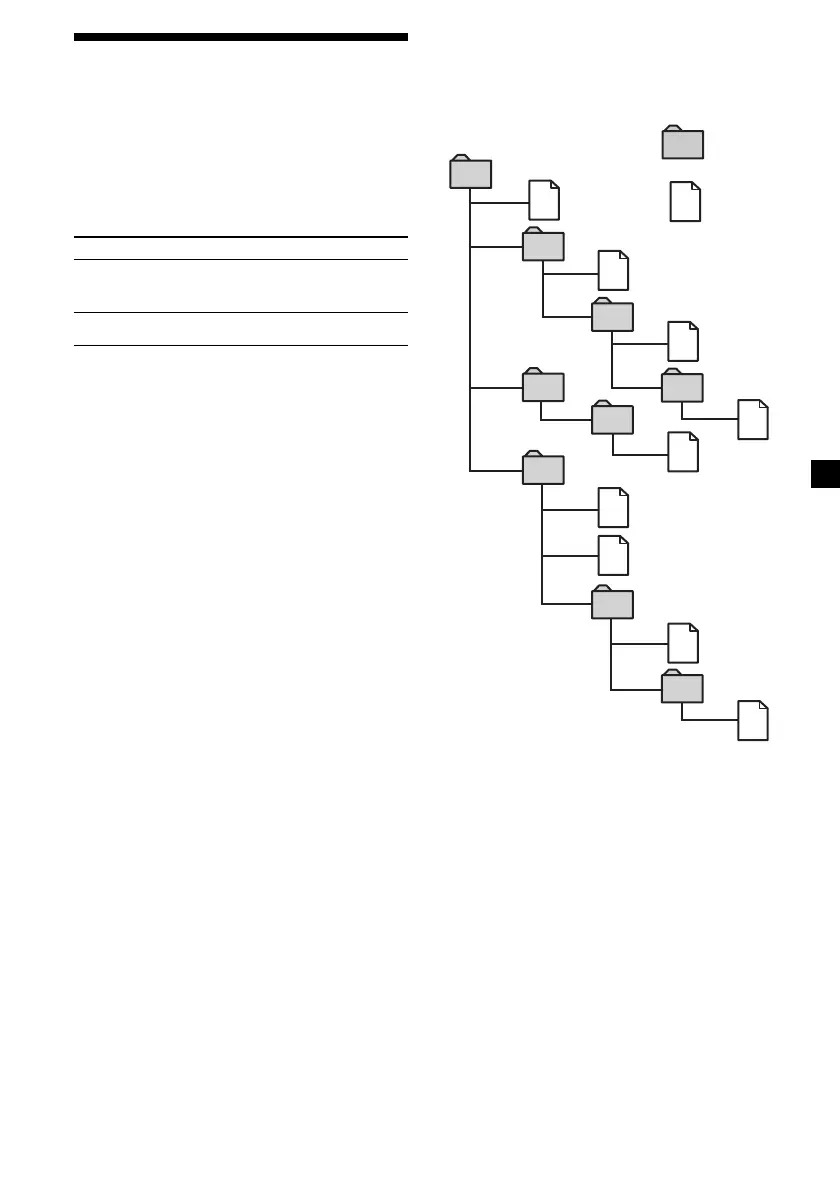
The playback order of the M P3 files
The playback order of the folders and files is as
follows:
9
3
7
8
2
4
6
1
5
Tree 1 Tree 2 Tree 3 Tree 4 Tree 5
(root)
Tip
To specify a desired playback order, bef ore the
folder or f ile name, input t he order by number
(e.g., “ 01,” “ 02” ), then record cont ents ont o a disc
(The order dif f ers depending on t he writ ing
softw are).
Folder
(album)
M P3 file
(track)
Downloaded from: https://www.usersmanualguide.com/















 To Next Page