12
Microcomputer Version Display
Procedure:
1. Enter the service mode, then rotate [ AMS ] (MD) knob to display “<1> Version”, and press the [ AMS ] (MD).
2. The CD and MD microcomputer versions are displayed on the upper line and lower line respectively.
3. To exit from the mode, press the x (MD) button and [ AMS ] (MD) knob simultaneously.
FL Display Test
Procedure:
1. Enter the service mode, then rotate [ AMS ] (MD) knob to display “<2> FLD”, and press the [ AMS ] (MD).
2. The fluorescent display tube turns ON fully. Each time the [ AMS ] (MD) knob is pressed, the display changes such as
[Full ON] t [Partial ON] t [Selected menu].
3. To exit from the mode, press the x (MD) button and [ AMS ] (MD) knob simultaneously.
Key/Jog Input Test
Procedure:
1. Enter the service mode, then rotate [ AMS ] (MD) knob to display “<3> Key/Jog”, and press the [ AMS ] (MD).
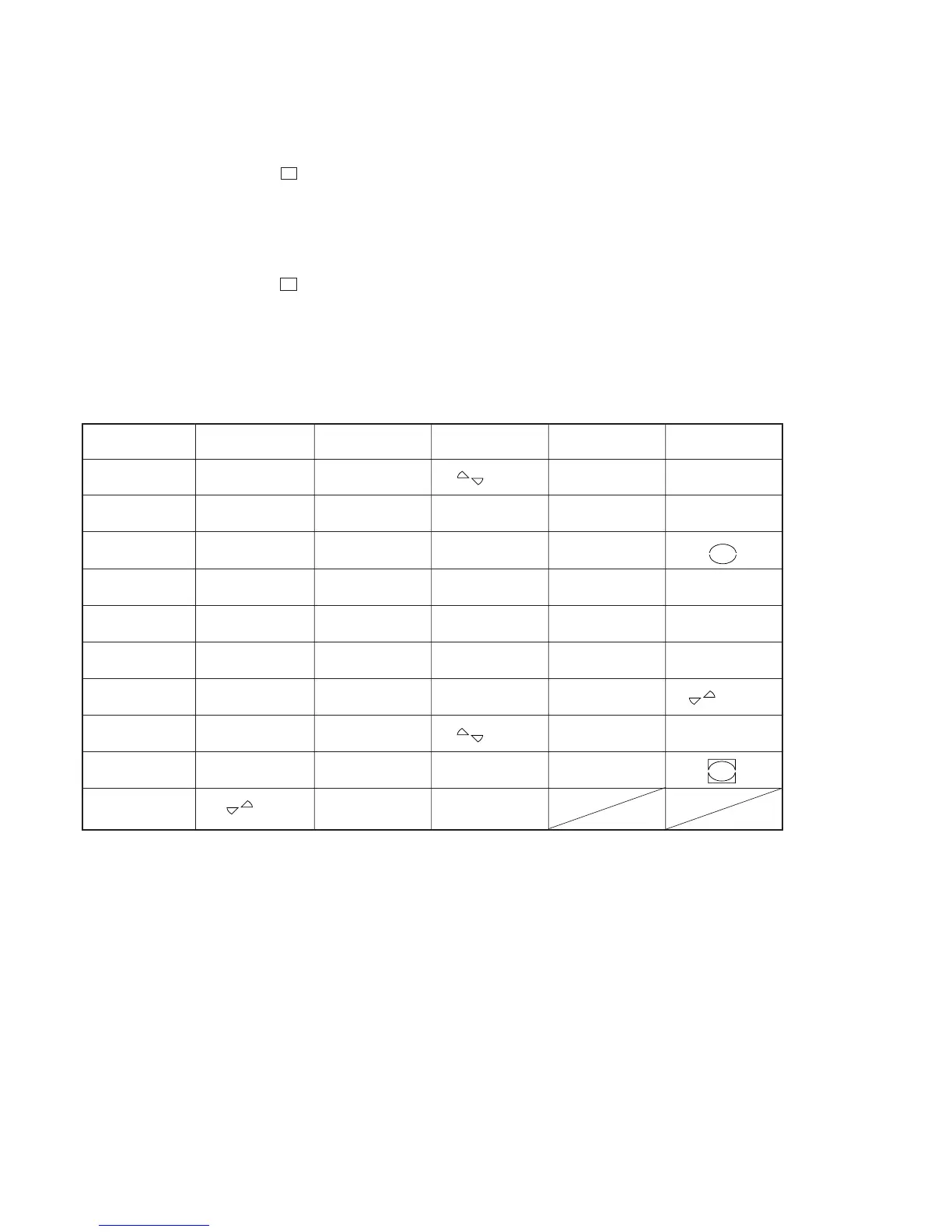
2. KEY=29 is displayed, and each time a key is pressed, the corresponding pictograph goes off and numeric value is counted down.
When all keys were pressed, KEY=0 is displayed.
Correspondence between KEY and pictorial display
lL
lL
lL
lL
lL
KEY Pictorial display KEY Pictorial display KEY Pictorial display
l AMS L
[DISC] (upper) m (CD) (CD)
CD SYNCHRO
X 4
(CD) HIGH
x (CD)
[CD]
l AMS L
[DISC] (under)
CD SYNCHRO
SYNC
(MD) NORMAL
X (CD) X (upper) CLEAR (MD)
[TRACK] (under)
A
OPNE/CLOSE
H (CD) H (upper) TIME MD MONO x (MD)
[MD]
?/1 [OVER]
PLAY MODE
L.SYNC X (MD) X (under)
MD
PLAY MODE
OPT INPUT COAX H (MD) H (under)
CD
TIME CD CD DISPLAY ANALOG M (MD) (MD)
CLEAR (CD)
[TRACK]
m (MD) (MD) REC z (MD) [REC]
(upper)
REC-IT (CD) REC IT YES TOC A EJECT
M (CD) (CD) MENU/NO [EDIT]
Software Reset
Procedure:
1. Enter the service mode, then rotate [ AMS ] (MD) knob to display “<6> Initial”, and press the [ AMS ] (MD).
2. The microcomputer resets the software, and the power is turned off.
lL
lL
lL
lL
lL
lL



 To Next Page