36-GB
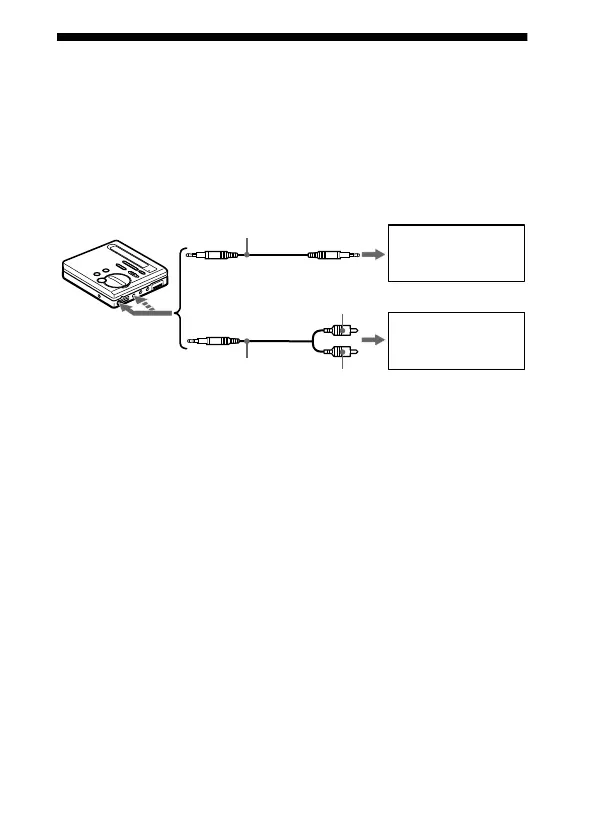
Connecting to a stereo system
Connect the i1 (or i2) jack of the recorder to the LINE IN jacks of
an amplifier or a tape player with a line cable (RK-G129 or RK-
G136, not supplied). The output is analog. The recorder plays the
MD digitally and sends analog signals to the externally connected
equipment.
When connecting a line cable (not supplied) to the i1 (or i2) jack
of the recorder, be sure to set the “BEEP” setting to “BEEP OFF”.
This keeps the beep sound out of the recorded signal or the output
from the externally connected equipment.
1 Press ENTER, press >MENU. repeatedly until “BEEP”
flashes in the display, and then press ENTER again.
2 Press MENU. repeatedly until “BEEP OFF” flashes in the
display, and then press ENTER.
Portable DAT
recorder, etc.
Stereo system,
etc.
to LINE IN
2 phono plugs
L (white)
Stereo
mini-plug
R (red)
RK-G136
(not supplied)
RK-G129
(not supplied)
to i1 (or i2)



 To Next Page
 Loading...