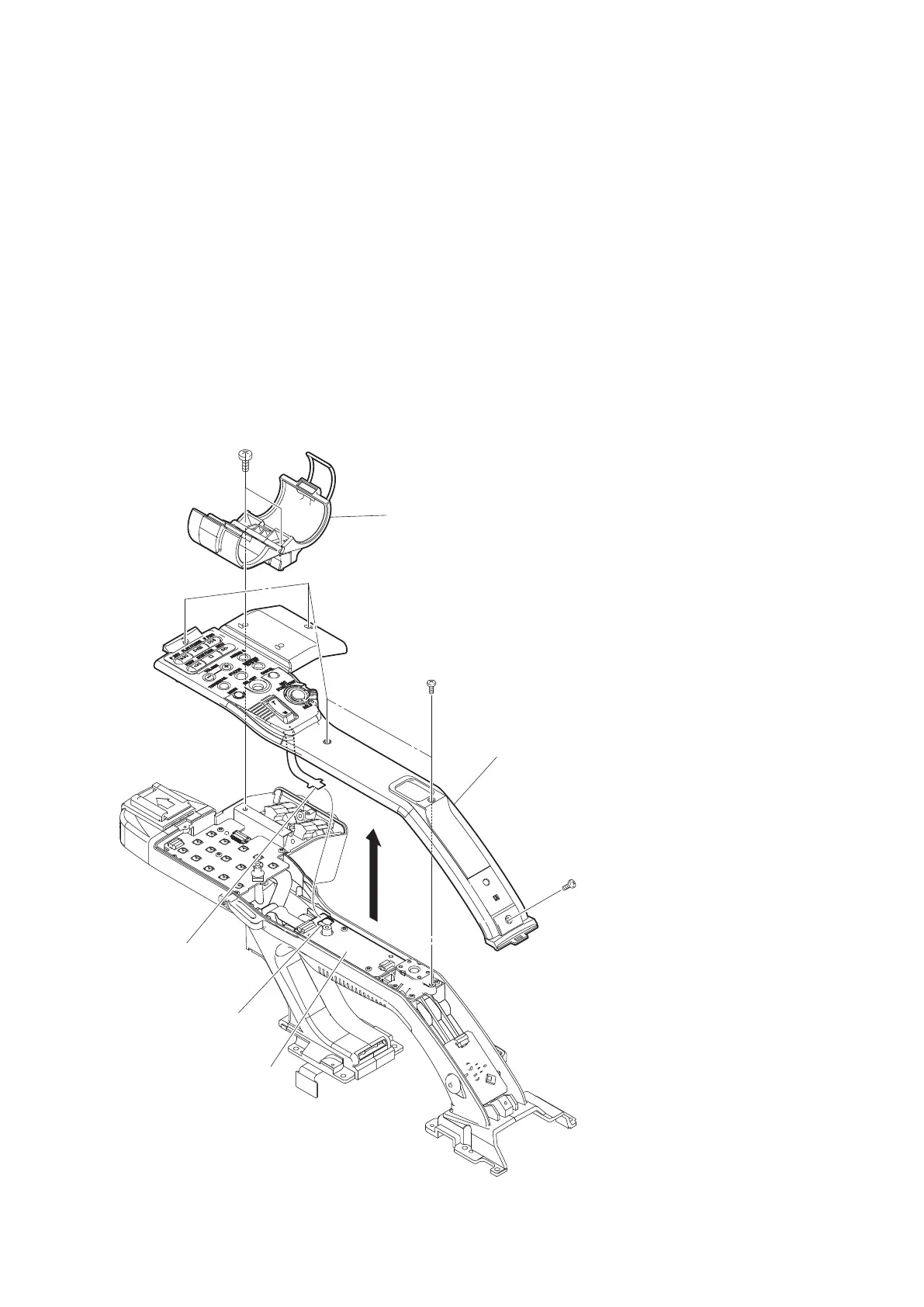
2-11-2. Handle U-case Assembly
Preparation
1. Remove the bottom panel assembly. (Refer to “2-5. Bottom Panel Assembly”)
2. Remove the inside panel assembly. (Refer to “2-6-1. Inside Panel Assembly”)
3. Remove the outside panel assembly. (Refer to “2-7-1. Outside Panel Assembly”)
4. Remove the rear panel assembly. (Refer to “2-8. Rear Panel Assembly”)
5. Remove the handle assembly. (Refer to “2-11-1. Handle Assembly”)
Procedure
1. Open the microphone holder assembly.
2. Remove the two screws (P2.6 x 5) to detach the microphone holder assembly.
3. Remove the five screws (P2 x 5) and lift up the handle U-case assembly.
4. Disconnect the flexible board from the connector (CN101) on the HN-411 board and detach the handle U-case
assembly.
Microphone holder assembly
P2.6 x 5
P2 x 5
Handle U-case assembly
P2 x 5
Flexible board
CN101
HN-411 board
5. Install the removed parts by reversing the steps of removal.
PMW-300
2-35



 To Next Page