EasyManua.ls Logo

Sony RCD-W1 - Tray Door, Front Panel, and Board Removal; Tray Door & Front Panel Assy; HP, FL, and VOL Board Removal

Sony RCD-W1
78 pages
Print Icon
To Next Page IconTo Next Page
To Previous Page IconTo Previous Page
Loading...
10
RCD-W1
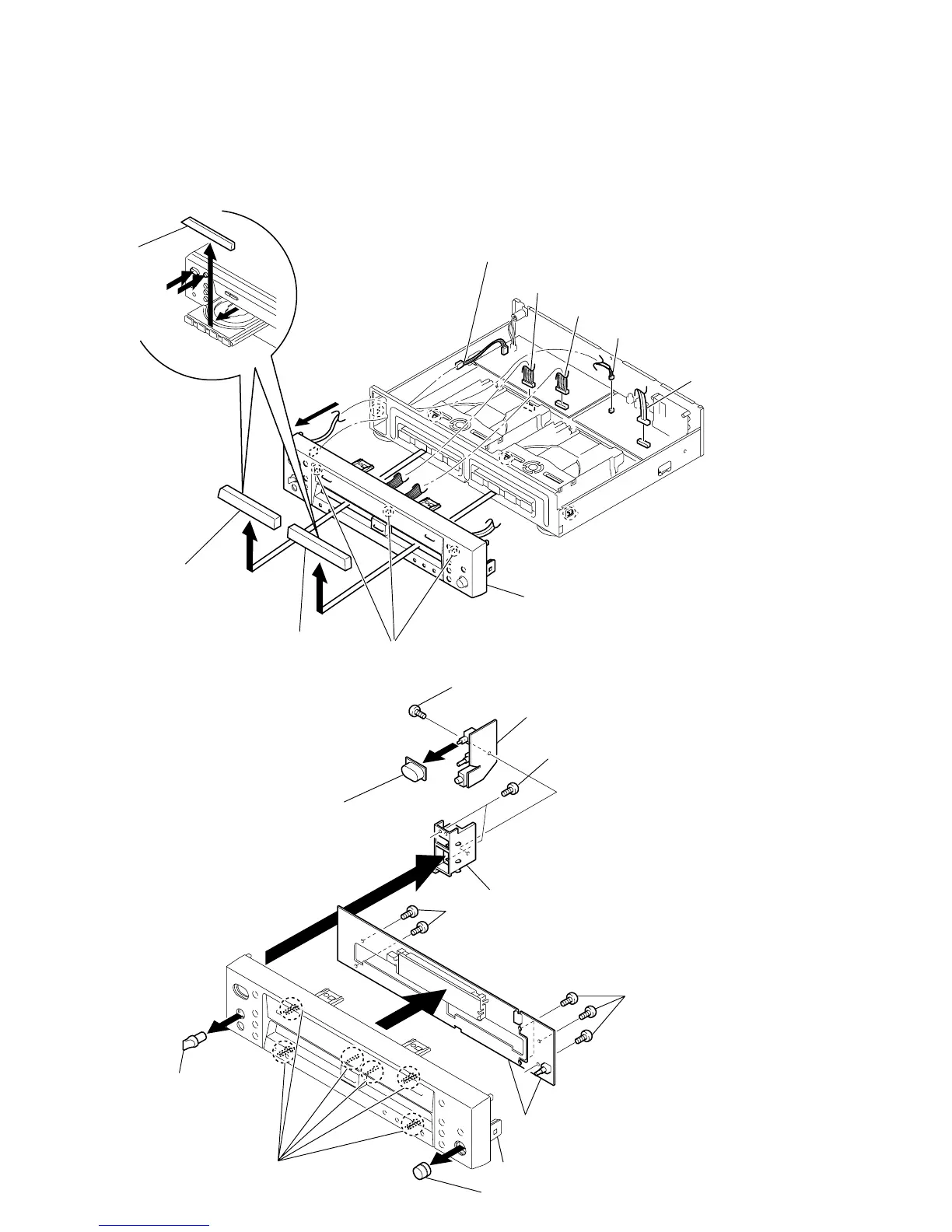
3-2. TRAY DOOR, FRONT PANEL ASSY
Note:After No.2 removal, remove in the state power turns off.
6
1
Connector (PN901)
Tray door
Turn power on by pressing POWER button in the drrow
A
direction and press OPEN/CLOSE button in the drrow
B
to open the tray.
Then remove the tray door in the drow
C
direction.
(In the case of DECK B, remove it in the same manner.)
5
Connector (PN603)
4
Connector (PN904)
3
Connector (PN401)
2
Connector (PN501

)
9
Front panel assy
7
8
A
B
C
Claws
Tray door (Rec)
(deck B)
Tray door (Play)
(deck A)
3-3. HP BOARD, FL BOARD, VOL BOARD
7
Screw (Special)
8
HP board
3
Two screws (Special)
5
4
PWB holder
0
Two screws (Special)
9
Four screws (Special
)
qs
FL board and VOL board
1
REC VOL knob
qa
Claws
Front panel
6
POWER knob
2
P/VOLUME knob

Table of Contents

Related product manuals