21
Menus
• Settings for the output signals from the camera (page
18)
• Flange focal length setting (page 16)
4 Adjust the eyepiece focus as well as the contrast and
brightness of the viewfinder image.
For viewfinder settings, refer to the operation manual for
the viewfinder.
5 If required, switch on the center marker and/or safety
zone and zebra pattern in the viewfinder image, using
the OPERATION menu.
6 Check the sound system settings.
• Microphone connections
• Settings of the AUDIO IN switches
• Settings on the VTR (Refer to the operation manual for
the VTR.)
7 Adjust the white balance and black balance (page 14).
8 Turn the focusing ring so that the subject is sharply in
focus.
9 Set up the VTR according to your shooting objectives
then start recording, using the button on the VTR.
For details on VTR setup and operations, refer to the
operation manual for your VTR.
10When shooting is finished, stop recording, using the
button on the VTR.
Menus
The menus displayed on the viewfinder screen enable various
settings of the camera.
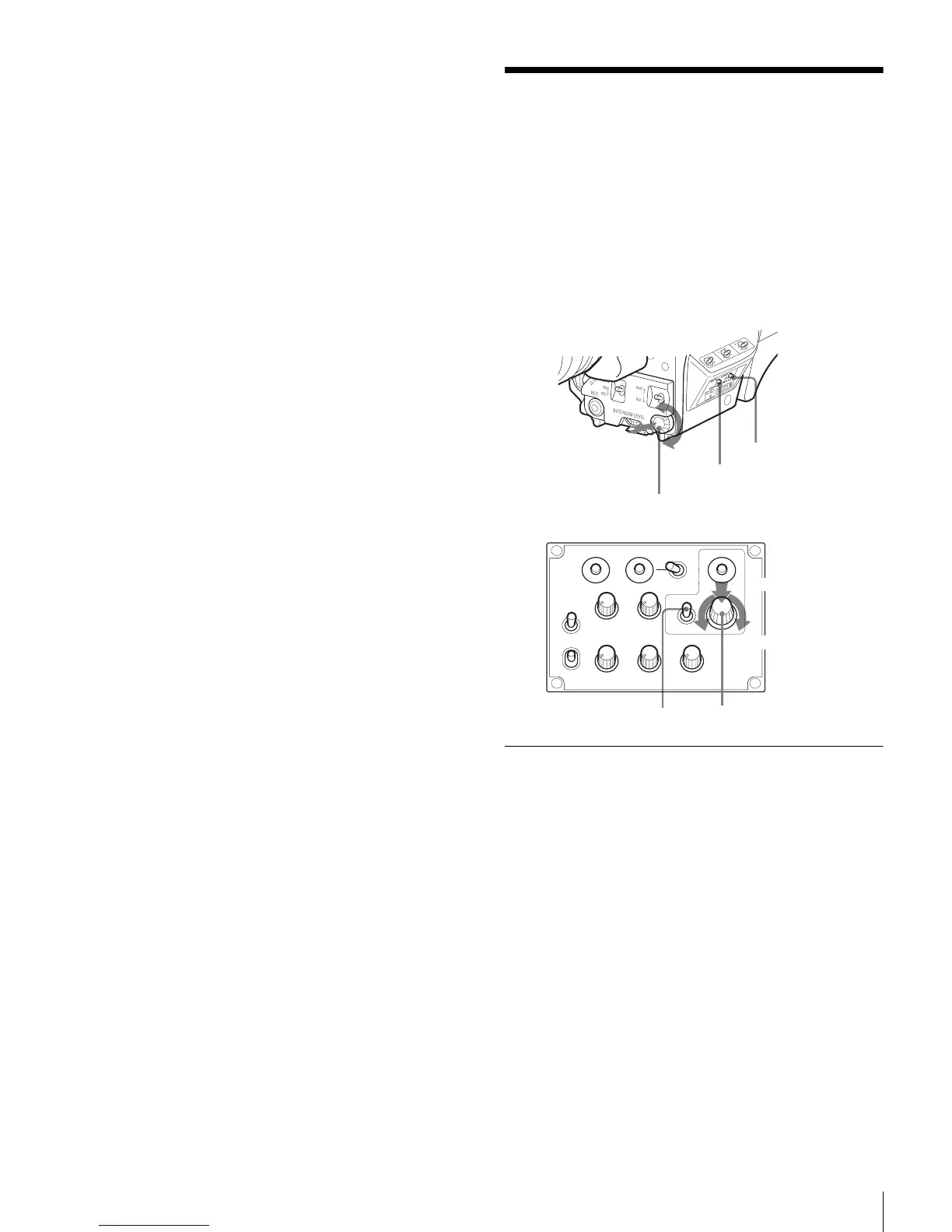
The following controls are used to operate the menus.
To enter Menu mode, you can use the DISPLAY/MENU switch
either on the side or on the rear operation panel.
The menu control knob at the low on the front panel and that
on the rear operation panel function the same. Rotate the knob
to select menu items or values and push on it to register
(enter) the selection.
Displaying Menu Pages
To display a menu page
Set the DISPLAY/MENU switch to MENU.
The menu page last accessed will be displayed. If it is the first
time, the CONTENTS page of the USER menu will be
displayed.
To display the TOP MENU screen
If you set the DISPLAY/MENU switch to MENU while holding
the menu control knob pressed, “TOP” is displayed at the
upper right corner of the screen.
Turn the menu control knob to move the pointer (
,) on the
display to “TOP” and push on the knob. The TOP MENU
screen is displayed, listing the available menus.
PGM1
ENG PROD TRACKER
PGM2
ASSIGNABLE
234
RET1 RET
PROD
ENG
OFF
LINE
LEVEL
REAR
FRONT
MIC
DISPLAY
MENU
OFF
INTERCOM EARPHONE
DISPLAY/MENU switch
STATUS/CANCEL switch
Menu control knob
Push on
Rotate
Front right
Rear operation panel
DISPLAY/MENU switch
Menu control knob
Push on
Rotate











 To Next Page