32
Menus
MAINTENANCE Menu
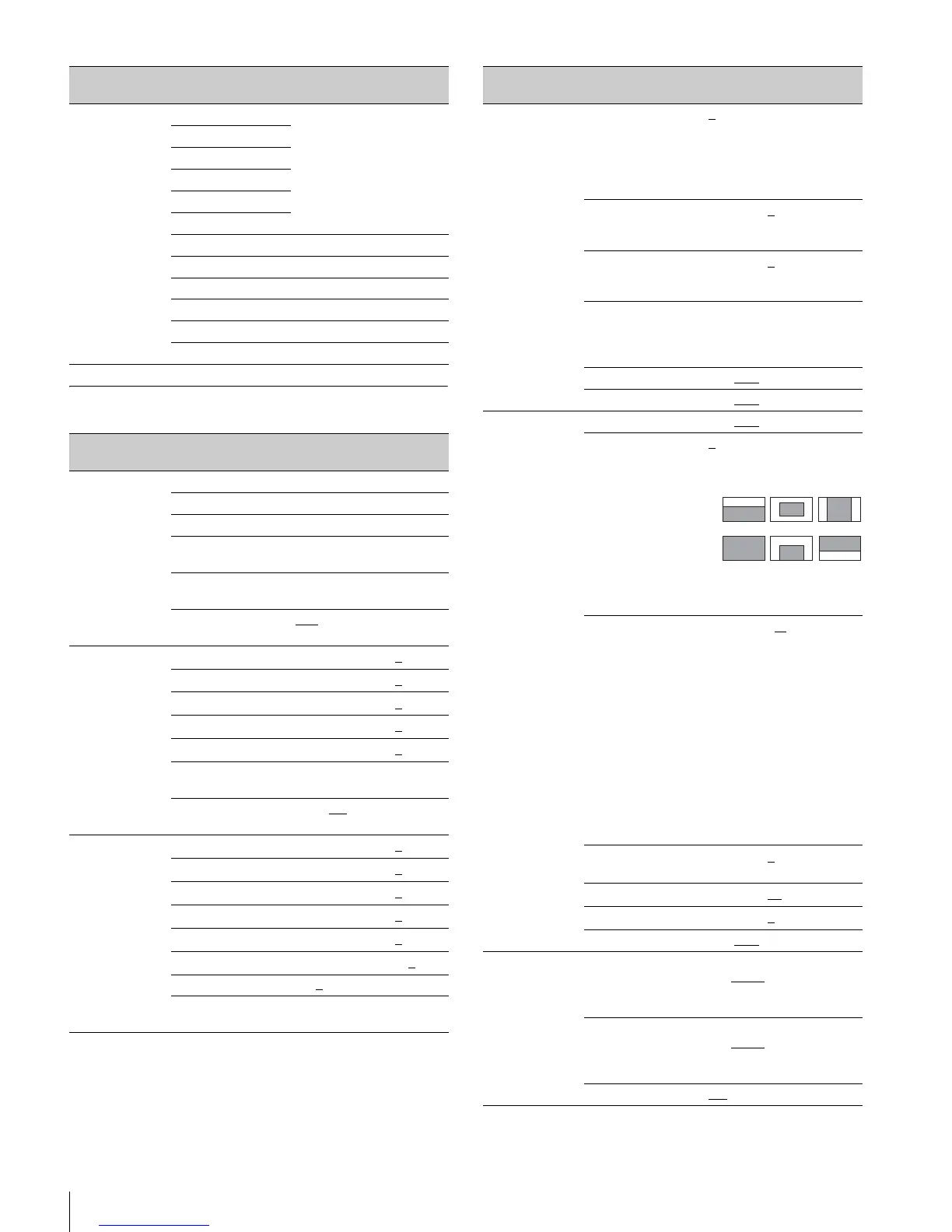
<SCENE FILE>
P15
See “FILE
menu” F02.
1 To store and read scene
files (paint data).
2
3
4
5
STORE
STANDARD Execute by ENTER.
READ (MS→CAM) Execute by ENTER.
WRITE (CAM→MS) Execute by ENTER.
FILE ID Max.16 characters
CAM CODE Display only
DATE Display only
Page title
Page No.
Item Settings
<AUTO
SETUP>
M01
AUTO BLACK Execute by ENTER.
AUTO WHITE Execute by ENTER.
AUTO LEVEL Execute by ENTER.
AUTO WHITE
SHADING
Execute by ENTER.
AUTO BLACK
SHADING
Execute by ENTER.
TEST OFF
, SAW, 3STEP,
10STEP
<WHITE
SHADING>
M02
V SAW
R/G/B:
–99 to 99 0
V PARA
R/G/B:
–99 to 99 0
H SAW
R/G/B:
–99 to 99 0
H PARA
R/G/B:
–99 to 99 0
WHITE
R/G/B:
–99 to 99 0
AUTO WHITE
SHADING
Execute by ENTER.
WHITE SHAD
MODE
RGB, RB
<BLACK
SHADING>
M03
V SAW
R/G/B:
–99 to 99 0
V PARA
R/G/B:
–99 to 99 0
H SAW
R/G/B:
–99 to 99 0
H PARA
R/G/B:
–99 to 99 0
BLK SET
R/G/B:
–99 to 99 0
BLACK
R/G/B/M:
–99 to 99 0
MASTER GAIN −3, 0, 3, 6, 9, 12 dB
AUTO BLACK
SHADING
Execute by ENTER.
Page title
Page No.
Item Settings
<OHB MATRIX>
M04
PHASE
Select an axis
(angle) for which
the OHB matrix
adjustment to be
made.
0
, 23, 45, 68, 90, 113, 135,
158, 180, 203, 225, 248,
270, 293, 315, 338
HUE
Independently set
for 16 axes.
–99 to 99 0
SAT
Independently set
for 16 axes.
–99 to 99 0
ALL CLEAR Execute by ENTER.
The HUE and SAT
values for all PHASE
settings are cleared.
OHB MATRIX ON, OFF
MATRIX ON, OFF
<AUTO IRIS>
M05
AUTO IRIS ON, OFF
WINDOW 1, 2, 3, 4, 5, 6
Select the auto iris
windows:
The shaded parts
indicate the area where
light detection occurs.
OVERRIDE
–99 to 99, - -
Set the override to
temporarily change the
reference value for
brightness of the
automatic iris level in the
range of ±2 steps.
–99: Two steps to fully
closed iris
99: Two steps to fully
open iris
- - : OFF
The setting returns to
“ - - ” when the power is
turned off.
IRIS LEVEL
–99 to 99 0
±4 steps
APL RATIO
–99 to 99 65
IRIS GAIN
–99 to 99 0
IRIS CLOSE ON, OFF
<MIC GAIN>
M06 (U15)
Settings in ( ):
When a CCU
is connected
(cannot be
changed)
MIC1 20 dB, 30 dB, 40 dB, 50
dB, 60 dB
, (20 dB), (30
dB), (40 dB), (50 dB), (60
dB)
MIC2 20 dB, 30 dB, 40 dB, 50
dB, 60 dB
, (20 dB), (30
dB), (40 dB), (50 dB), (60
dB)
FRONT MIC +48V ON
, OFF
Page title
Page No.
Item Settings
123
456











 To Next Page