— 5 —
SERVICE NOTE
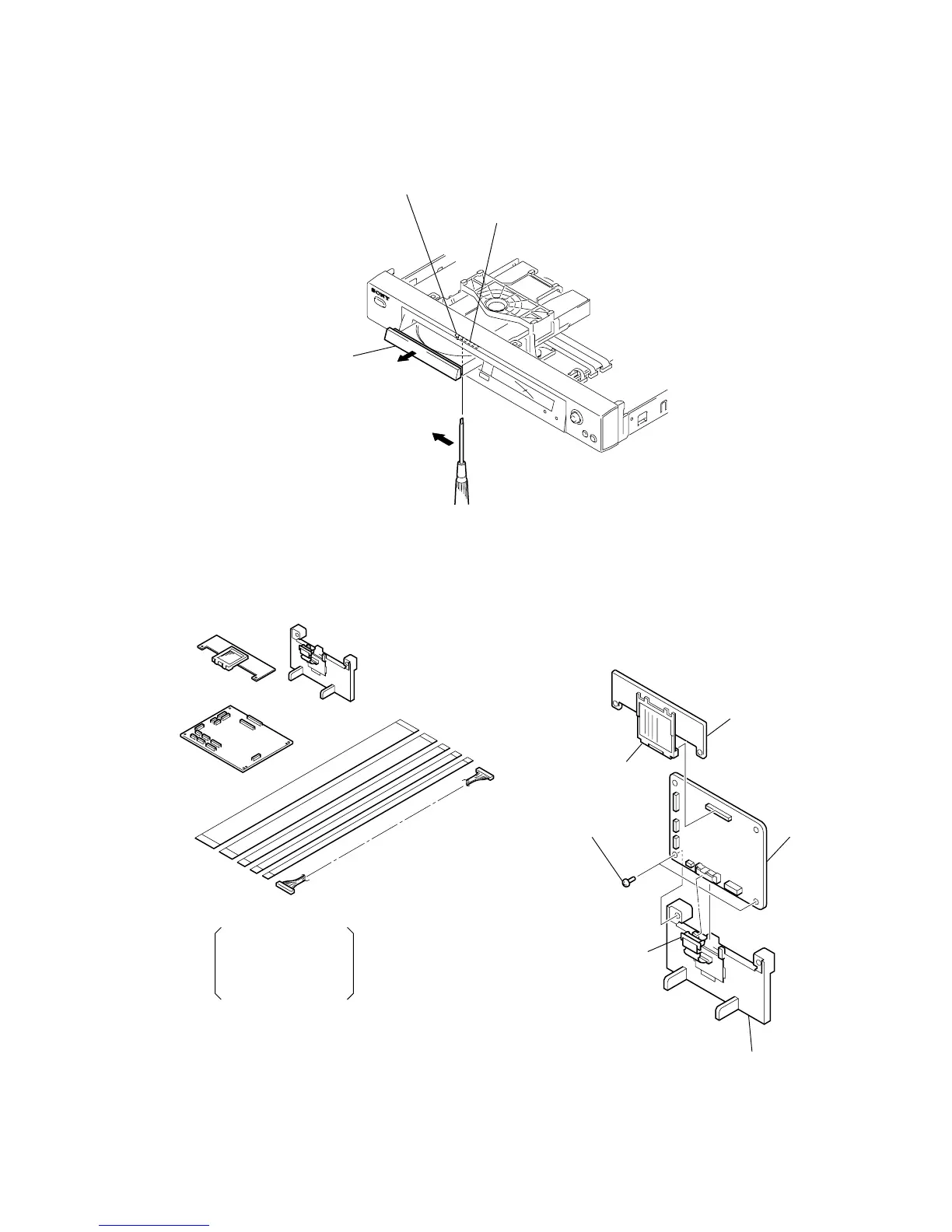
1. DISC REMOVAL PROCEDURE (at POWER OFF)
1) Insert a tapering driver into the aperture of the unit bottom, and move the lever of chuck cam in the direction of the arrow A. (See Fig. 1)
2) Draw out the tray in the direction of the arrow B, and remove a disc. (See Fig. 1)
2. HOW TO SERVICE MB-103 BOARD
• Jig
1) Remove the upper case from the main unit. (Refer to 2-1)
2) Remove the MB-103 board. (Refer to 2-7)
3) Set the removed MB-103 board and CK-122 board to the stand
as shown in Fig. 2.
Tray
The lever of a zipper cam
Hole
B
A
CK-120 board
(J-6090-127-A)
CK-122 board
(J-6090-129-A)
FFC 26P J-6090-117-A,
FFC 9P J-6090-118-A,
FFC 5P J-6090-119-A,
FFC 15P J-6090-121-A,
FFC 25P J-6090-122-A
Harness 6P (J-6090-126-A)
Flexible
flat cable five
Stand
(CK-121 board)
(J-6090-132-A)
4 Two screws (B3)
1 MB-103 board
6 CK-122 board
2 Stand
3 Connector (CN101)
5 Connector (CN601)
Fig. 1.
Fig. 2.



 To Next Page