7-3
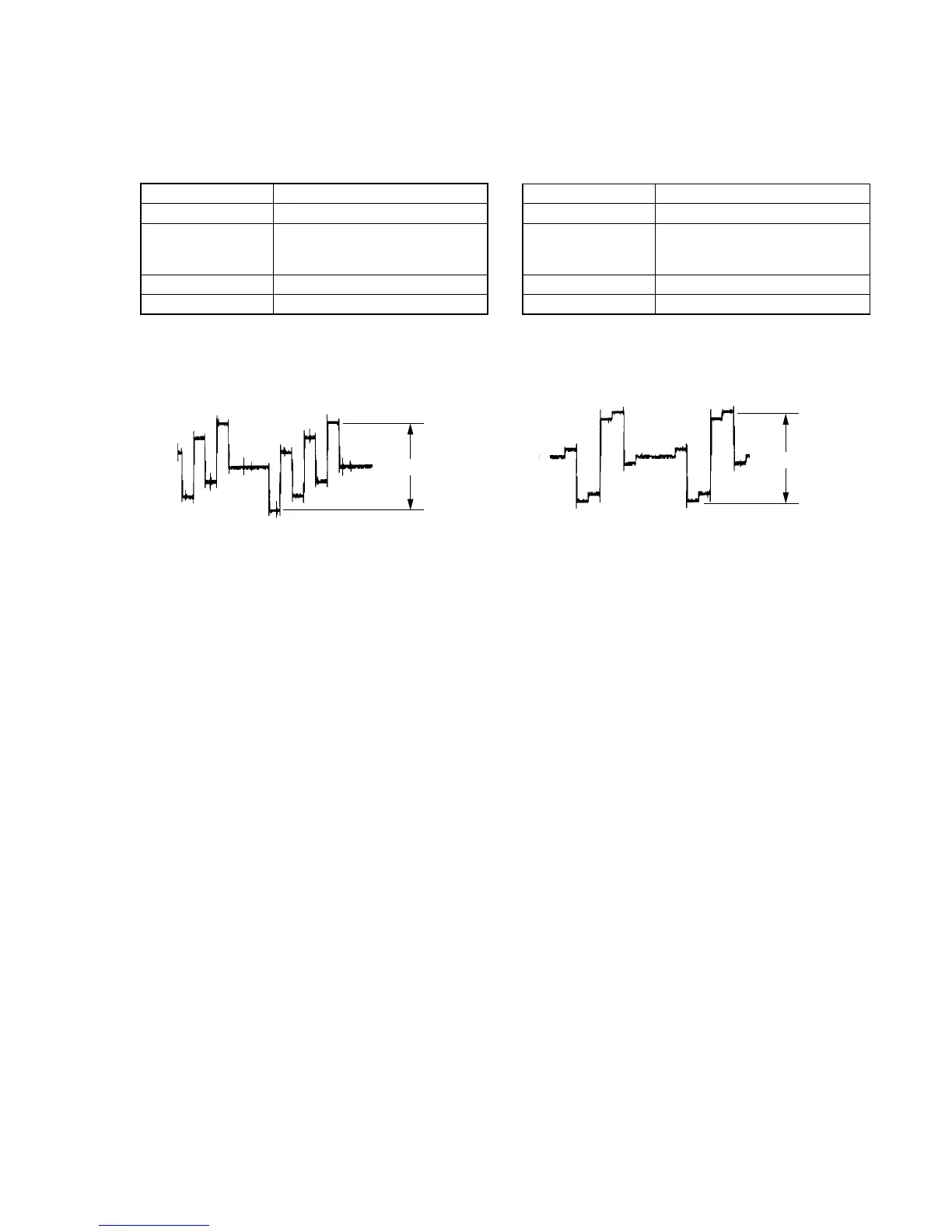
5. Checking Component Video Output B-Y
<Purpose>
This checks component video output B-Y. If it is incorrect, correct
color will not be displayed when connected to, for instance,
component input projector.
Mode Video level adjustment in test mode
Signal Color bars
Test point COMPONENT VIDEO OUT (CB)
connector, D1 VIDEO OUT connector,
Pin 3 (75 Ω terminated)
Instrument Oscilloscope
Specification 700 ± 50 mVp-p
Checking method:
1) In the test mode initial menu “6” Video Level Adjustment, set
so that color bars are generated.
2) Confirm that the B-Y level is 700 ± 50 mVp-p.
Fig. 7-5.
6. Checking Component Video Output R-Y
<Purpose>
This checks component video output R-Y. If it is incorrect, correct
color will not be displayed when connected to, for instance,
component input projector.
Mode Video level adjustment in test mode
Signal Color bars
Test point COMPONENT VIDEO OUT (CR)
connector, D1 VIDEO OUT connector.
Pin 5 (75 Ω terminated)
Instrument Oscilloscope
Specification 700 ± 50 mVp-p
Checking method:
1) In the test mode initial menu “6” Video Level Adjustment, set
so that color bars are generated.
2) Confirm that the R-Y level is 700 ± 50 mVp-p.
Fig. 7-6.
700
±
50mVp-p
700
±
50mVp-p



 To Next Page