HT-MT300/MT301
13
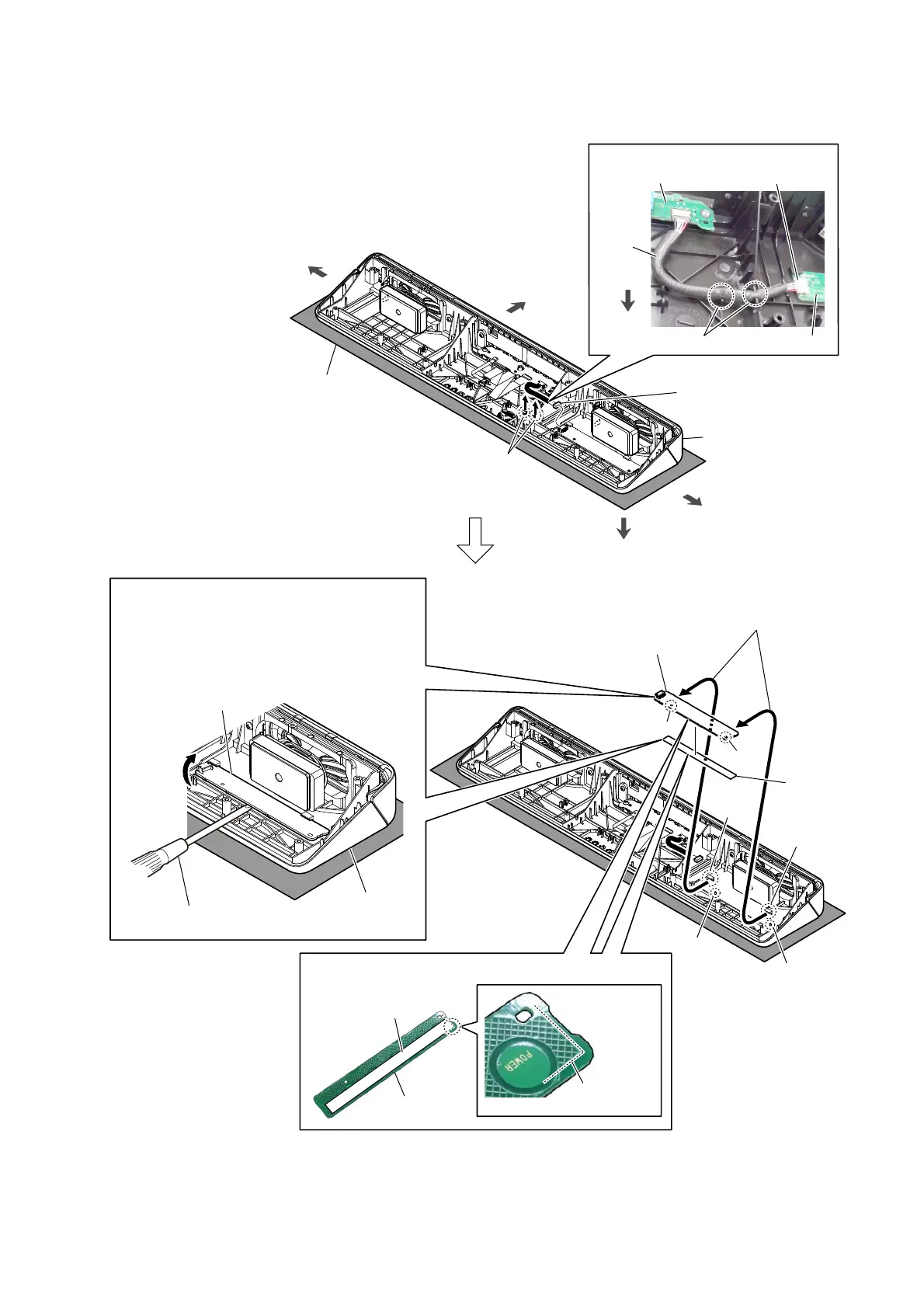
2-7. TOUCH BOARD
boss
hole
hole
boss
rib
rib
5 adhesive
(VG1)
top cabinet
TOUCH board
6 TOUCH board
Note 2:
When installing the TOUCH board,
align the two bosses and two holes.
4 Draw the TOUCH board
block out of the two ribs
in top cabinet block.
front side
left side
right side
Note 1:
Lay a soft piece of cloth under the unit
to avoid damaging the top cabinet.
TOUCH board
728&+ERDUGFDEOHVHWWLQJ
two grooves
TOUCH
board
cable
LED_CHUKEI board
CN4001
rear side
1 Draw the TOUCH board cable
out of two grooves.
top side
2 TOUCH board cable
connector (CN4001)
flathead screwdriver, etc.
3 Gradually peel off the TOUCH board with
a flathead screwdriver, etc.
Note 3:
The TOUCH board is affixed to the top cabinet
with a strong adhesive sheet.
When removing the TOUCH board, take care
so that you do not damage it.
top cabinet block
guide line
(starting point)
adhesive (VG1)
TOUCH board
3DVWLQJSRVLWLRQRIWKHDGKHVLYH9*



 To Next Page