HT-MT300/MT301
16
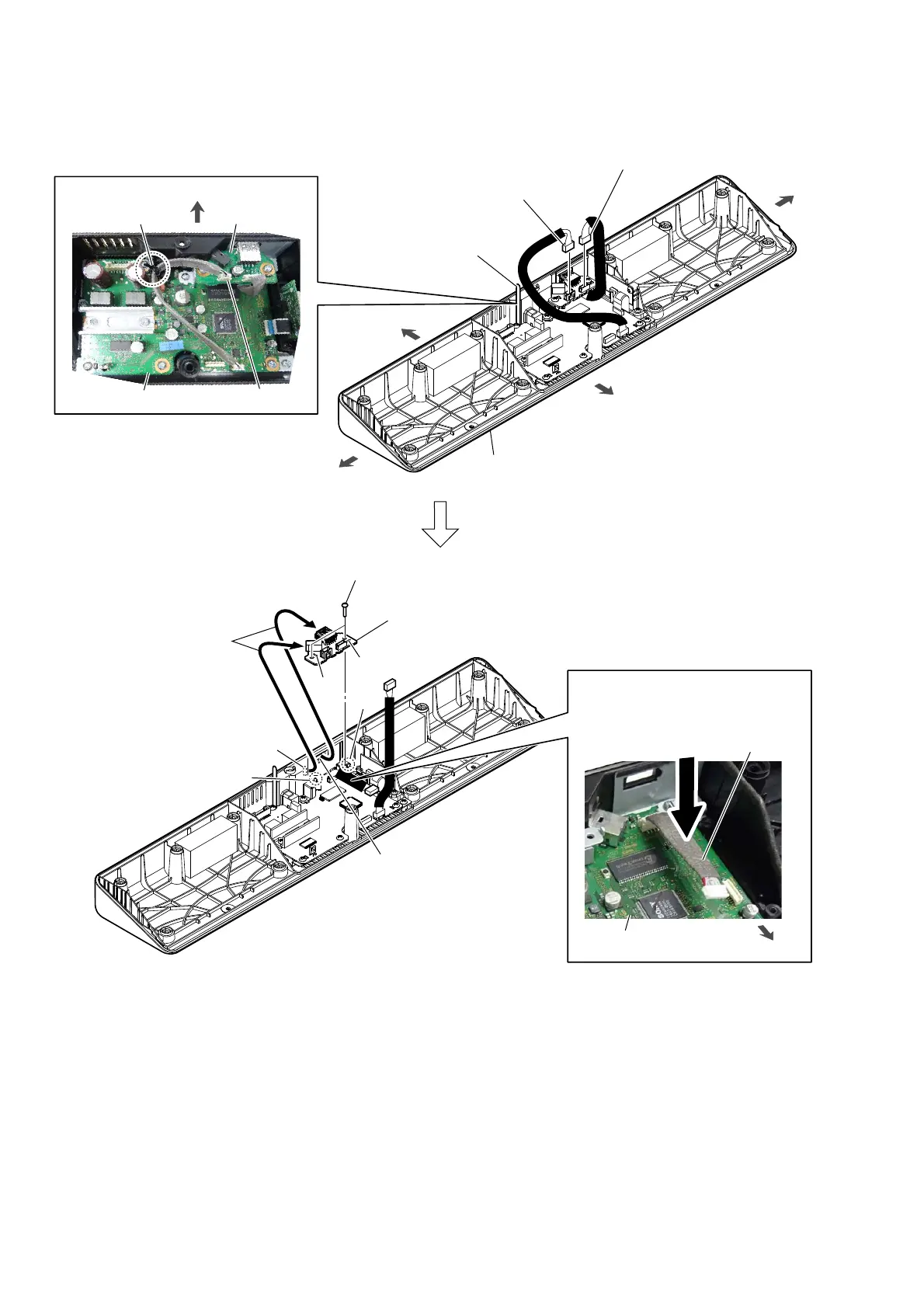
2-10. JACK BOARD
5 Draw the jack and connector
out of the two holes in bottom
cabinet block.
1 Remove the JACK board cable
from the wiring stopper.
2 JACK board cable
connector (CN6001)
3 JACK board cable
connector (CN6003)
4 two screws
(BVTP3 u 8)
hole
hole
Install the JACK board while pressing
the JACK board cable toward the MAIN
board side.
MAIN board
front side
rear side
left side
right side
:LUHVHWWLQJ
wiring stopper
JACK board
MAIN board
CN6001
rear side
hole
hole
rib
rib
6 JACK board
Note:
When installing the JACK board,
align the two ribs and two holes.
1RWHDERXWLQVWDOOLQJWKH-$&.ERDUG
front side
JACK board cable
bottom cabinet block



 To Next Page