HT-MT300/MT301
14
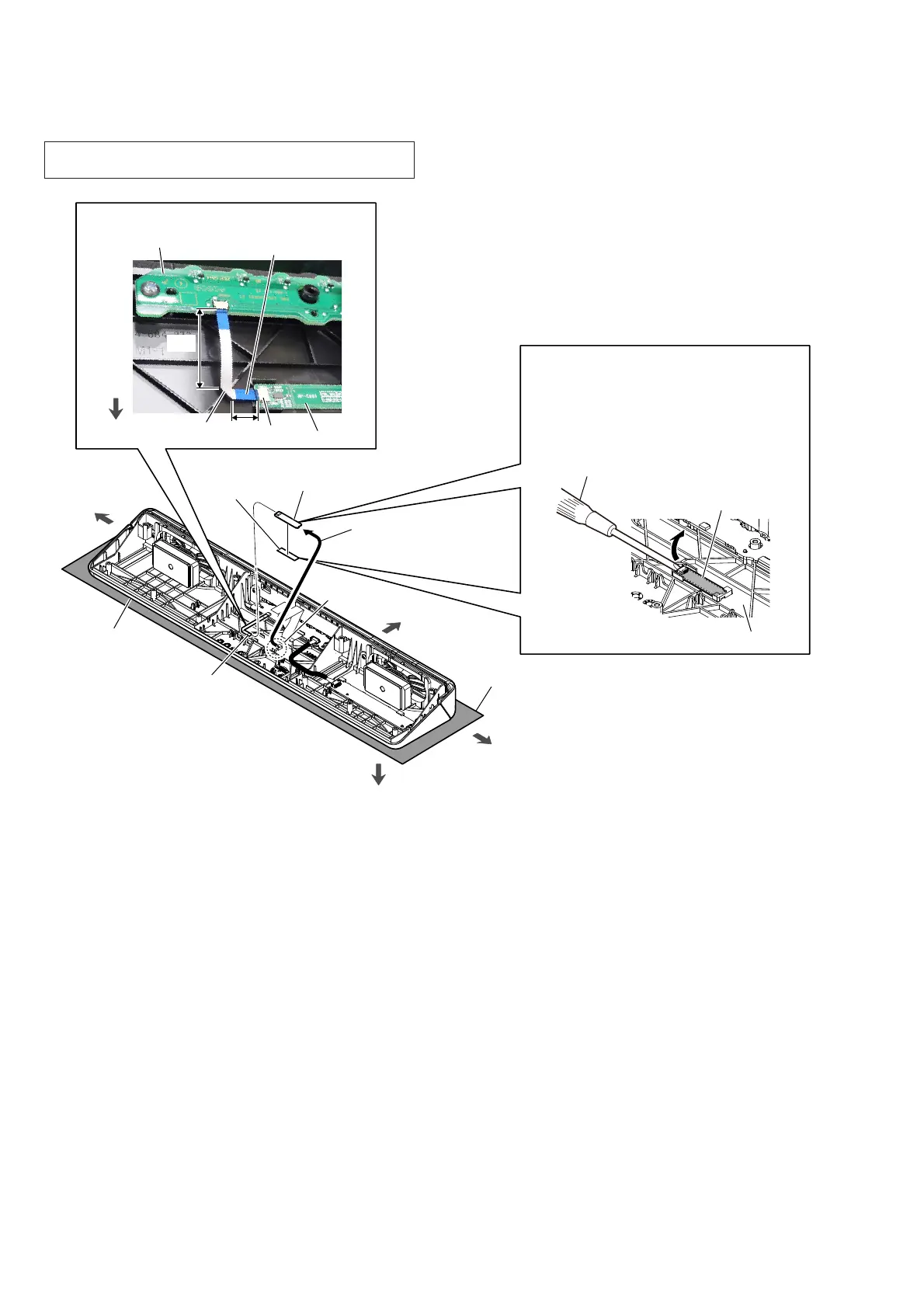
2-8. NFC BOARD
5 NFC board
3 Draw the NFC board
block out of the rib in
top cabinet block.
rib
4 double
adhesive
tape
1 FFC 6P
(CN001)
top cabinet
NFC board
front side
left side
right side
NFC board
FFC 6P
LED_CHUKEI board
)OH[LEOHIODWFDEOHVHWWLQJ
CN001
short
The opposite side
is terminal side.
rear side
flathead screwdriver, etc.
top side
Note 2:
Lay a soft piece of cloth under the unit
to avoid damaging the top cabinet.
2 Gradually peel off the NFC board with
a flathead screwdriver, etc.
Note 3:
The NFC board is affixed to the top
cabinet with a strong adhesive sheet.
When removing the NFC board, take
care so that you do not damage it.
top cabinet block
long
Note 1: When the NFC board is replaced, refer to “NFC CONNEC-
TION CHECKING METHOD” on page 4.



 To Next Page