HT-MT300/MT301
4
NFC CONNECTION CHECKING METHOD
Be sure to perform the NFC connection check, according to the fol-
lowing procedure when having work of replaced following parts.
Replacing parts for repairing that required NFC connec-
tion check
• Replacing the MAIN board of bar speaker
• Replacing the NFC board of bar speaker
• Replacing the Bluetooth module of bar speaker
NFC connection checking method
After replacing the parts, it is necessary to update the BD address
information of the NFC board.
Be sure to perform the NFC connection check of bar speaker after
the resetting both of bar speaker and subwoofer, according to the
following procedure.
Procedure:
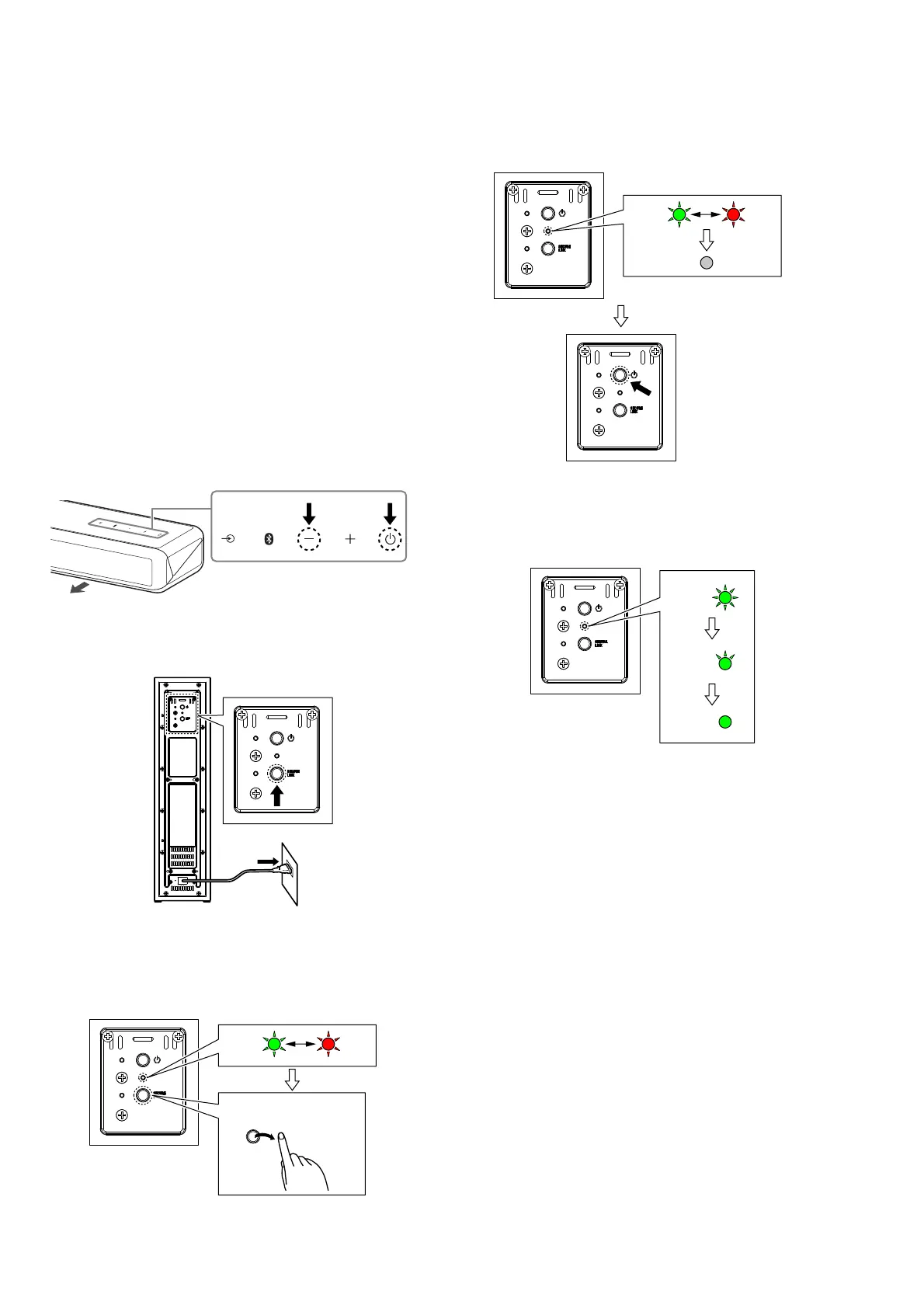
1. Connect the AC adapter to the bar speaker, and touch the two
buttons of [–] and [
1
] on the bar speaker at the same time for
about 5 seconds in the power on state.
front side
Right top surface of bar speaker
2. Hold down the [SECURE LINK] button on the subwoofer and
insert the AC power cord into the wall outlet.
Subwoofer
rear side
(rear panel)
3. Check that the LED of the subwoofer repeats fl ashing alter-
nately red and green, then release the [SECURE LINK] button
on the subwoofer.
Subwoofer (rear panel)
Green
flash
Release the
[SECURE LINK] button.
Red
flash
4. Wait for a while until the LED of the subwoofer turns off.
5. When the LED of subwoofer turns off, press the [
1
] button on
the subwoofer to turn the power on.
Light off
Subwoofer (rear panel)
Green
flash
Red
flash
6. The green LED of the subwoofer changes from fl ashing quick-
ly to fl ashing slowly, then switching from fl ashing to lights up
and completing the wireless connection.
Subwoofer (rear panel)
Green
flash
(quick)
Green
flash
(slow)
Green
lights up
– Continued on next page –



 To Next Page