17
GB
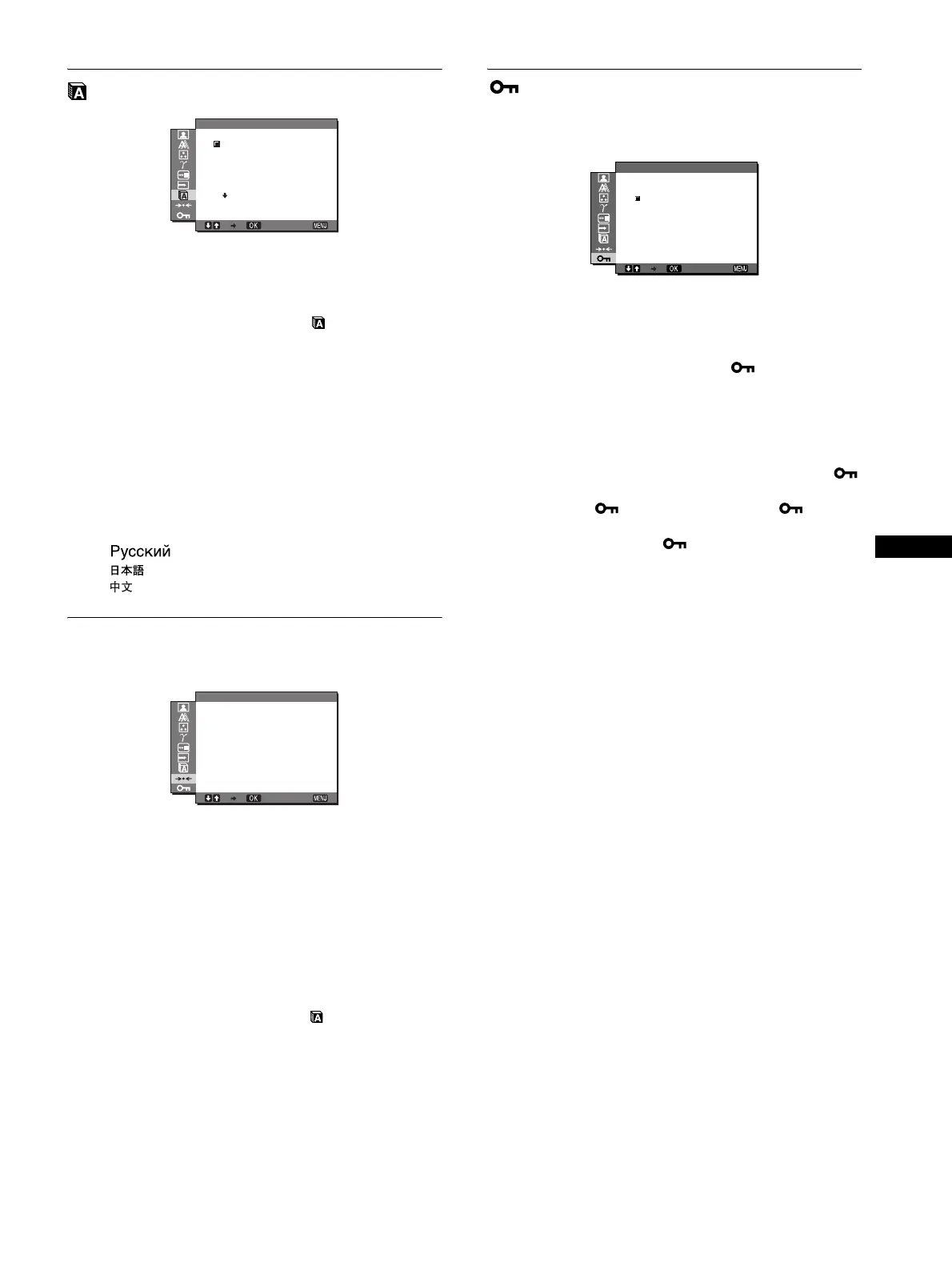
LANGUAGE menu
1 Press the MENU button.
The main menu appears on the screen.
2 Press the m/M buttons to select (LANGUAGE)
and press the OK button.
The LANGUAGE menu appears on the screen.
3 Press the m/M buttons to select a language and
press the OK button.
• English
• Français: French
• Deutsch: German
• Español: Spanish
• Italiano: Italian
• Nederlands: Dutch
• Svenska: Swedish
•: Russian
• : Japanese
•: Chinese
0 RESET menu
Reset the adjustments to the default settings.
1 Press the MENU button.
The main menu appears on the screen.
2 Press the m/M buttons to select 0 (RESET) and
press the OK button.
The RESET menu appears on the screen.
3 Press the m/M buttons to select the desired mode
and press the OK button.
• OK: To reset all of the adjustment data to the default
settings. Note that the “ LANGUAGE”
setting is not reset by this method.
• CANCEL:To cancel resetting and return to the menu
screen.
MENU LOCK menu
Lock the control of buttons to prevent accidental adjustments or
resetting.
1 Press the MENU button.
The main menu appears on the screen.
2 Press the m/M buttons to select (MENU LOCK)
and press the OK button.
The MENU LOCK menu appears on the screen.
3 Press the m/M buttons to select either “On” or “Off.”
• ON: Only the 1 (power) switch and INPUT button will
operate. If you attempt any other operation, the
icon appears on the screen.
• OFF: Set “ MENU LOCK” to off. If “ MENU
LOCK” has been set to “ON,” when you press the
MENU button, “ MENU LOCK” is
automatically selected.
EX I T
1280 1024 60Hzx /
LANGUAGE
ENGL I SH
FRANÇA I S
DEUTSCH
ESPAÑOL
I TAL I ANO
EX I T
1280 1024 60Hzx /
OK
CANCEL
RESET
EX I T
1280 1024 60Hzx/
ON
OFF
MENU LOCK


 To Next Page
 Loading...