EasyManua.ls Logo

Sony SLV-E811NP - Page 19

Sony SLV-E811NP
30 pages
Print Icon
To Next Page IconTo Next Page
To Previous Page IconTo Previous Page
Loading...
Sl-t
ee
SS
yer
SaaS
SSS
Srna
Ss
Recordi
ng
TV
Recording
TV
programmes
using
VIDEO
Plus+
(continued)
programmes
using
VIDEO
Plus+
2)
3
TAPE
SPEED
=
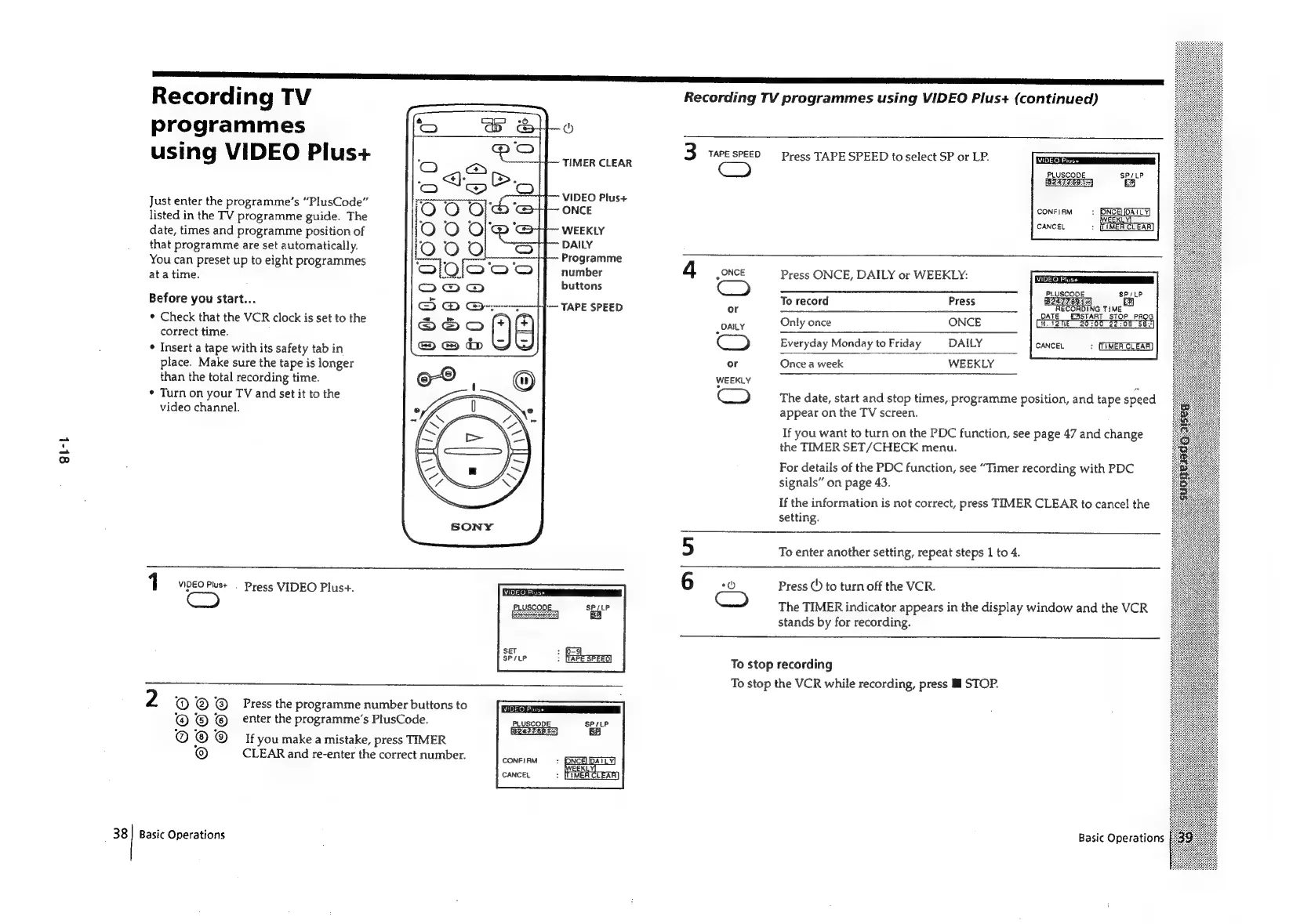
Press
TAPE
SPEED
to
select
SP
or
LP.
TIMER CLEAR
C3)
VIDEO
Plus+
ONCE
WEEKLY
DAILY
Programme
number
4
gONCE
Press
ONCE,
DAILY
or
WEEKLY:
buttons
ee
ee
eee
See
ep ee
Cnet
ea
eee
PLUSCODE
SP/LP
To
record
Press
BIST
FORT]
t-~
TAPE
SPEED
or
RECORDING
TIME
DATE
€ABSTART
STOP
PROG
0
58."
Only
once
ONCE
PLUSCODE.
SP/LP
Just
enter
the
programme’s
“PlusCode”
listed
in
the
TV
programme
guide.
The
date,
times
and
programme
position
of
that
programme
are
set
automatically.
You
can
preset
up
to
eight
programmes
at
a
time.
CONFIRM
:
PNCE
:
(LIMER
CLEAR
CANCEL
Before
you
start...
*
Check
that
the
VCR
clock
is
set
to
the
correct
time.
*
Insert
a
tape
with
its
safety
tab
in
place.
Make
sure
the
tape
is
longer
than
the
total
recording
time.
¢
Turn
on
your
TV
and
set
it
to
the
video
channel.
_
DAILY
U
Everyday
Monday
to
Friday
DAILY
CANCEL
:
or
Once
a
week
WEEKLY
WEEKLY
The
date,
start
and
stop
times,
programme
position,
and
tape
speed
appear
on
the
TV
screen.
If
you
want
to
turn
on
the
PDC
function,
see
page
47
and
change
the
TIMER
SET/CHECK
menu.
For
details
of
the
PDC
function,
see
“Timer
recording
with
PDC
signals”
on
page
43.
If
the
information
is
not
correct,
press
TIMER
CLEAR
to
cancel
the
setting.
5
To
enter
another
setting,
repeat
steps
1
to
4.
1
VIDEO
Plust
.
Press
VIDEO
Plus+.
6
ae)
Press
©)
to
turn
off
the
VCR.
VIDEO
Plus+
PLUSCOODE
SP/LP
The
TIMER
indicator
appears
in
the
display
window
and
the
VCR
stands
by
for
recording.
SET
SP/LP
To
stop
recording
To
stop
the
VCR
while
recording,
press
ll
STOP.
2
©
® ®
Press
the
programme
number
buttons
to
© ©
enter
the
programme’s
PlusCode.
PLUSCODE
SPrLP
@
©
If
youmake
a
mistake,
press
TIMER
©
CLEAR
and
re-enter
the
correct
number.
38]
Basic
Operations
Basic
Operations

Related product manuals