EasyManua.ls Logo

Sony SLV-E811NP - Connecting the VCR

Sony SLV-E811NP
30 pages
Print Icon
To Next Page IconTo Next Page
To Previous Page IconTo Previous Page
Loading...
e-b
Ea
ac
aa
ar
ae
ee
aE
I
CE
I
re
Step
2:
Setting
up
the
remote
commander
(continued)
E
e
23s
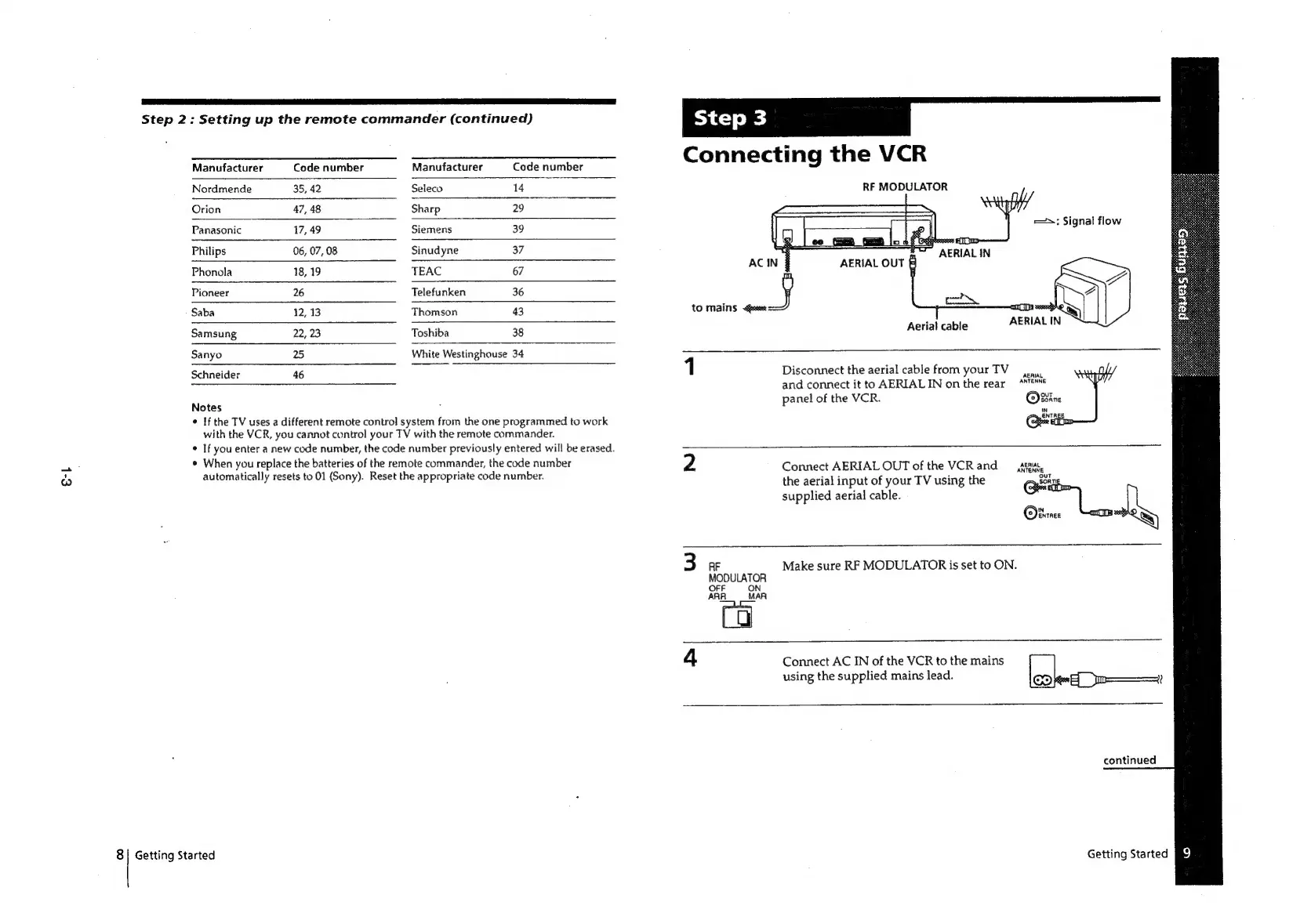
Connecting
the
VCR
Manufacturer
Code
number
Manufacturer
Code
number
Nordmende
35,
42
Seleco
14
RF
MODULATOR
Orion
47,
48
Sharp
29
Panasonic
17,49
Siemens
39
Signal
flow
Philips
06,
07,
08
Sinudyne
37
——
SO
AERIAL
IN
Phonola
18,
19
TEAC
67
AGI
BEVALOUT
Pioneer
26
Telefunken
36
Jy
_}
'
Saba
12,
13
Thomson
43
to
mains
ase
ae
Samsung
22,
23
Toshiba
38
Aerial
cable
Sanyo
25
White
Westinghouse
34
Schneider
46
1
Disconnect
the
aerial
cable
from
yourTV
and
connect
it
to
AERIALIN
onthe
rear
**EM*E
slates
panel
of
the
VCR.
Binn
¢
If
the
TV
uses
a
different
remote
control
system
from
the
one
programmed
to
work
Qe
with
the
VCR,
you
cannot
control
your
TV
with
the
remote
commander.
©
If
you
enter
a
new
code
number,
the
code
number
previously
entered
will
be
erased.
¢
When
you
replace
the
batteries
of
the
remote
commander,
the
code
number
2
Connect
AERIAL
OUT
of
the
VCR
and
‘shia
automatically
resets
to
01
(Sony).
Reset
the
appropriate
code
number.
the
aerial
input
of
your
TV
using
the
out
supplied
aerial
cable.
.C
ei.
vince
3
AF
Make
sure
RF
MODULATOR
is
set
to
ON.
MODULATOR
OFF
=
ON
ARR
_
MAR
4
Connect
AC
IN
of
the
VCR
to
the
mains
using
the
supplied
mains
lead.
CO}en—_m=——=—
continued
8|
Getting
Started
Getting
Started
[i

Related product manuals