EasyManua.ls Logo

Sony SLV-E811NP - Setting the Timer Manually

Sony SLV-E811NP
30 pages
Print Icon
To Next Page IconTo Next Page
To Previous Page IconTo Previous Page
Loading...
6l-4
40
To
record
satellite
broadcasts
If
you
connect
the
satellite
tuner
and
the
VCR,
you
can
record
satellite
programmes.
1
Turn
on
the
satellite
tuner.
2
Onthe
satellite
tuner,
select
the
satellite
programme
for
which
you
wish
to
make
a
timer
setting.
3
Repeat
the
steps
described
above.
4
Keep
the
satellite
tuner
turned
on
until
the
VCR
finishes
recording
the
satellite
programme
for
which
you
have
made
a
timer
setting.
To
use
the
VCR
after
setting
the
timer
To
use
the
VCR
before
a
timer
recording
begins,
just
press
(5.
The
TIMER
indicator
turns
off
and
the
VCR
switches
on.
Remember
to
press
(!)
to
reset
the
VCR
after
using
the
VCR.
You
can
also
do
the
following
tasks
while
the
VCR
is
recording:
*
Reset
the
counter.
¢
Display
tape
information
on
the
TV
screen.
*
Check
the
timer
settings.
¢
Watch
another
TV
programme.
Tip
*
To
cancel
the
procedure,
press
VIDEO
Plus+
before
pressing
ONCE,
DAILY
or
WEEKLY.
Note
¢
If
the
VCR
beeps
repeatedly,
this
means
that:
~The
PlusCode
is
incorrect.
-
ONCE,
DAILY,
or
WEEKLY
was
selected
incorrectly.
You
cannot
select
DAILY
or
WEEKLY
for
a
programme
that
airs
more
than
seven
days
ahead.
Basic
Operations
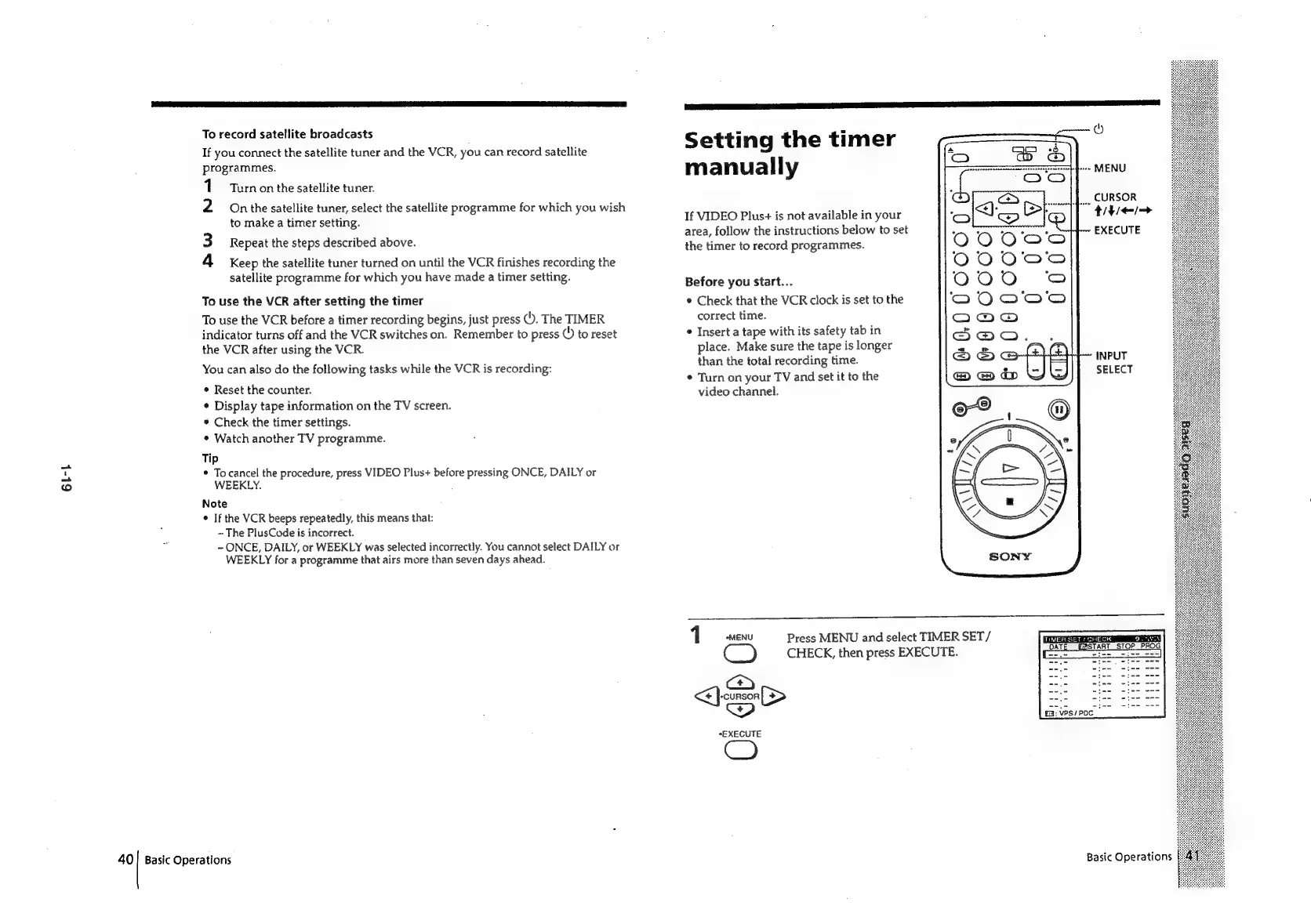
Setting
the
timer
manually
CURSOR
title
EXECUTE
If
VIDEO
Plus+
is
not
available
in
your
area,
follow
the
instructions
below
to
set
the
timer
to
record
programmes.
Before
you
start...
¢
Check
that
the
VCR
clock
is
set
to
the
correct
time.
¢
Insert
a
tape
with
its
safety
tab
in
place.
Make
sure
the
tape
is
longer
than
the
total
recording
time.
¢
Turn
on
your
TV
and
set
it
to
the
video
channel.
INPUT
SELECT
Press
MENU
and
select
TIMER
SET/
C_)
CHECK,
then
press
EXECUTE.
a>
iF)
ore
*EXECUTE
CO
Basic
Operations

Related product manuals