EasyManua.ls Logo

Sony SLV-E811NP - Playing;Searching at Various Speeds

Sony SLV-E811NP
30 pages
Print Icon
To Next Page IconTo Next Page
To Previous Page IconTo Previous Page
Loading...
Lo-b
44
Additional
Operations
Playing/searching
at
various
speeds
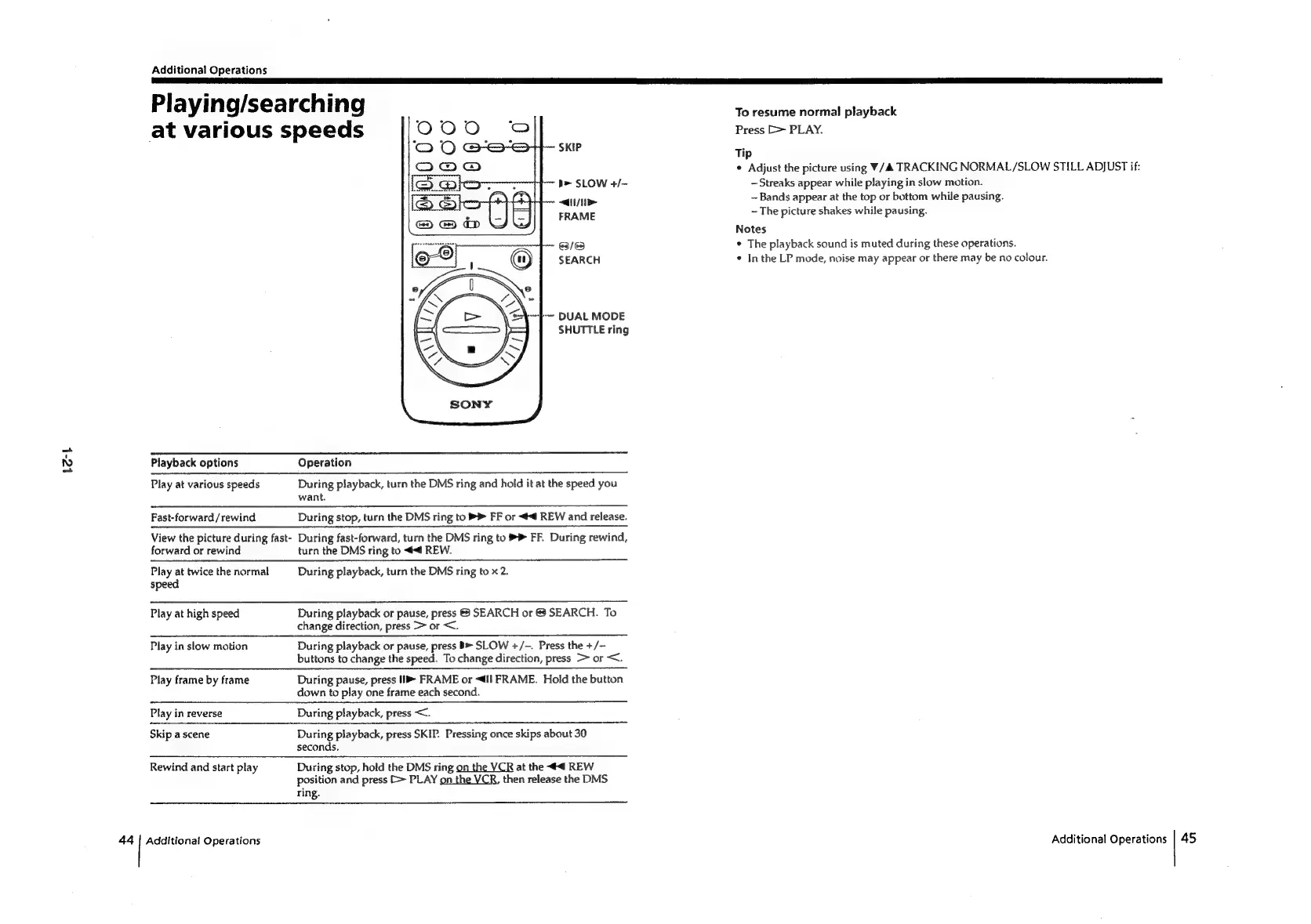
SKIP
i>
SLOW
+/-
<i
FRAME
63/63
SEARCH
~~
DUAL
MODE
SHUTTLE
ring
Playback
options
Operation
Play
at
various
speeds
During
playback,
turn
the
DMS
ring
and
hold
it
at
the
speed
you
want.
Fast-forward/rewind
During
stop,
turn
the
DMS
ring
to
>
FF
or
<4
REW
and
release.
View
the
picture
during
fast-
During
fast-forward,
turn
the
DMS
ring
to
®
FF.
During
rewind,
forward
or
rewind
turn
the
DMS
ring
to
<4
REW.
Play
at
twice
the
normal
During
playback,
turn
the
DMS
ring
to
x
2.
speed
Play
at
high
speed
During
playback
or
pause,
press
&
SEARCH
or
&
SEARCH.
To
change
direction,
press
>
or
<.
Play
in
slow
motion
During
playback
or
pause,
press
SLOW
+/-.
Press
the
+/-
buttons
to
change
the
speed.
To
change
direction,
press
>
or
<.
Play
frame
by
frame
During
pause,
press
11
FRAME
or
<4ll
FRAME.
Hold
the
button
down
to
play
one
frame
each
second.
Play
in
reverse
During
playback,
press
<.
Skip
a
scene
During
playback,
press
SKIP.
Pressing
once
skips
about
30
seconds,
Rewind
and
start
play
During
stop,
hold
the
DMS
ring
on
the
VCR
at
the
4
REW
position
and
press
[>
PLAY
on
the
VCR,
then
release
the
DMS
ring.
Additional
Operations
To
resume
normal
playback
Press
[>
PLAY.
Tip
¢
Adjust
the
picture
using
V/A
TRACKING
NORMAL/SLOW
STILL
ADJUST
if:
Streaks
appear
while
playing
in
slow
motion.
Bands
appear
at
the
top
or
bottom
while
pausing.
~
The
picture
shakes
while
pausing.
Notes
*
The
playback
sound
is
muted
during
these
operations.
¢
In
the
LP
mode,
noise
may
appear
or
there
may
be
no
colour.
Additional
Operations
45

Related product manuals