EasyManua.ls Logo

Sony SLV-E811NP - Page 21

Sony SLV-E811NP
30 pages
Print Icon
To Next Page IconTo Next Page
To Previous Page IconTo Previous Page
Loading...
Oe-1
42
Caereeeee
area
eee
reser
eee
cee
ES
Ta
I
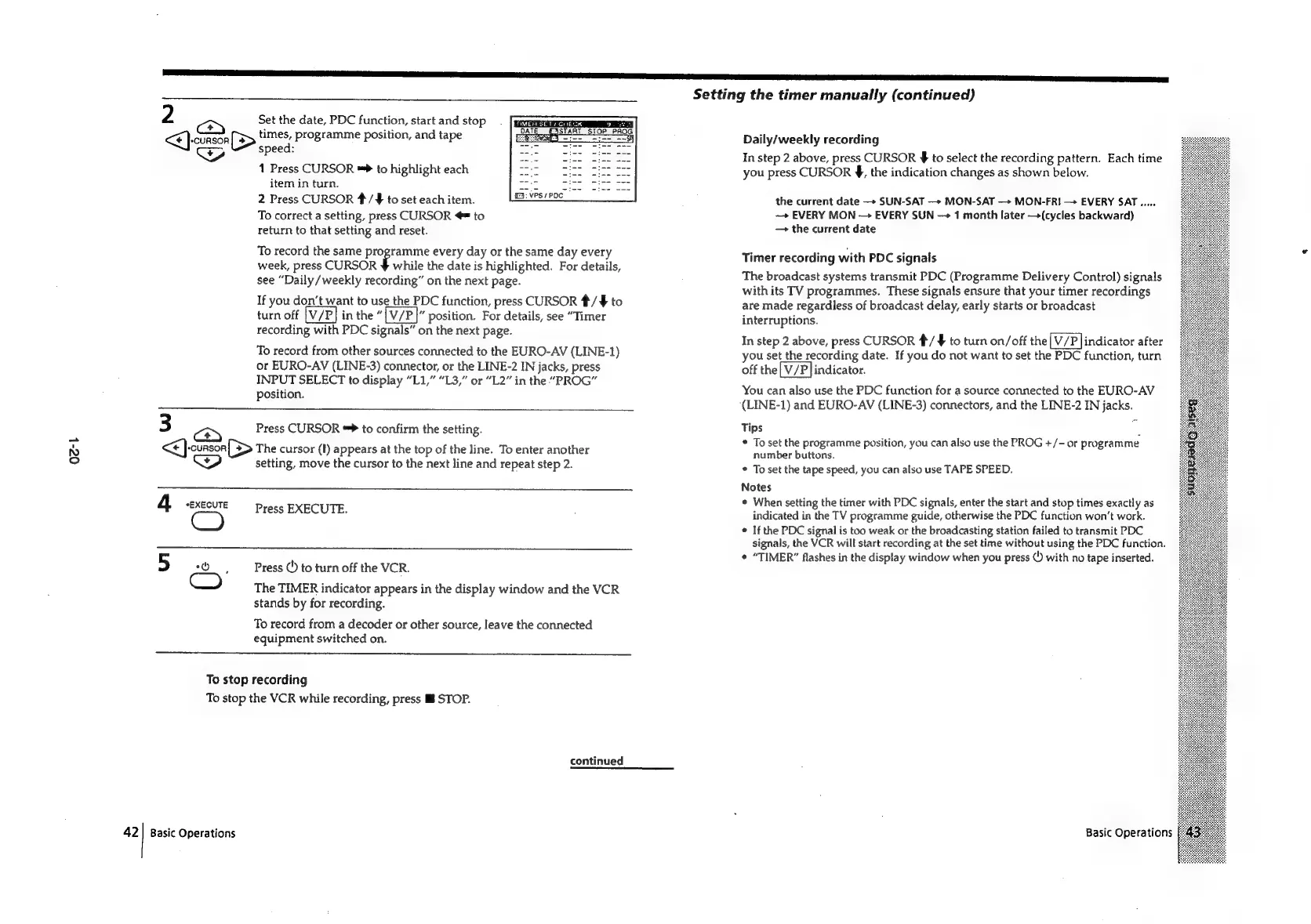
2
<¥]-cunson
[>
times,
programme
position,
and
tape
z
Set
the
date,
PDC
function,
start
and
stop
FIMEH
SET
s
CHECK
speed:
1
Press
CURSOR
™*
to
highlight
each
item
in
turn.
2
Press
CURSOR
#/F¥
to
set
each
item.
To
correct
a
setting,
press
CURSOR
@=
to
return
to
that
setting
and
reset.
To
record
the
same
programme
every
day
or
the
same
day
every
week,
press
CURSOR
¥
while
the
date
is
highlighted.
For
details,
see
“Daily
/weekly
recording”
on
the
next
page.
If
you
don’t
want
to
use
the
PDC
function,
press
CURSOR
*/
$
to
turn
off
in
the
position.
For
details,
see
“Timer
recording
with
PDC
signals”
on
the
next
page.
To
record
from
other
sources
connected
to
the
EURO-AV
(LINE-1)
or
EURO-AV
(LINE-3)
connector,
or
the
LINE-2
IN
jacks,
press
INPUT
SELECT
to
display
“L1,”
“L3,”
or
“L2”
in
the
“PROG”
position.
3
cS
Bice:
Press
CURSOR
**
to
confirm
the
setting.
(>
The
cursor
(#)
appears
at
the
top
of
the
line.
To
enter
another
setting,
move
the
cursor
to
the
next
line
and
repeat
step
2.
4
*EXECUTE
CO
Press
EXECUTE.
Press
()
to
turn
off
the
VCR.
The
TIMER
indicator
appears
in
the
display
window
and
the
VCR
stands
by
for
recording.
To
record
from
a
decoder
or
other
source,
leave
the
connected
equipment
switched
on.
To
stop
recording
To
stop
the
VCR
while
recording,
press
Mf
STOP.
Basic
Operations
continued
Setting
the
timer
manually
(continued)
Daily/weekly
recording
In
step
2
above,
press
CURSOR
$
to
select
the
recording
pattern.
Each
time
you
press
CURSOR
§,
the
indication
changes
as
shown
below.
the
current
date
+
SUN-SAT
—>
MON-SAT
—+
MON-FRI
EVERY
SAT.....
—»
EVERY
MON
—>
EVERY
SUN
1
month
later
—>(cycles
backward)
the
current
date
Timer
recording
with
PDC
signals
The
broadcast
systems
transmit
PDC
(Programme
Delivery
Control)
signals
with
its
TV
programmes.
These
signals
ensure
that
your
timer
recordings
are
made
regardless
of
broadcast
delay,
early
starts
or
broadcast
interruptions.
In
step
2
above,
press
CURSOR
#/
§
to
turn
on/off
the
indicator
after
you
set
the
recording
date.
If
you
do
not
want
to
set
the
PDC
function,
turn
off
the
indicator.
You
can
also
use
the
PDC
function
for
a
source
connected
to
the
EURO-AV
(LINE-1)
and
EURO-AV
(LINE-3)
connectors,
and
the
LINE-2
IN
jacks.
Tips
.
*
To
set
the
programme
position,
you
can
also
use
the
PROG
+/-
or
programme
number
buttons.
*
To
set
the
tape
speed,
you
can
also
use
TAPE
SPEED,
Notes
*
When
setting
the
timer
with
PDC
signals,
enter
the
start
and
stop
times
exactly
as
indicated
in
the
TV
programme
guide,
otherwise
the
PDC
function
won't
work.
°
If
the
PDC
signal
is
too
weak
or
the
broadcasting
station
failed
to
transmit
PDC
signals,
the
VCR
will
start
recording
at
the
set
time
without
using
the
PDC
function.
*
“TIMER”
flashes
in
the
display
window
when
you
press
©)
with
no
tape
inserted.
Basic
Operations

Related product manuals