EasyManua.ls Logo

Sony SLV-E811NP - Recording TV Programmes Using the Quick Timer

Sony SLV-E811NP
30 pages
Print Icon
To Next Page IconTo Next Page
To Previous Page IconTo Previous Page
Loading...
co-k
Recording
TV
programmes
using
the
quick
timer
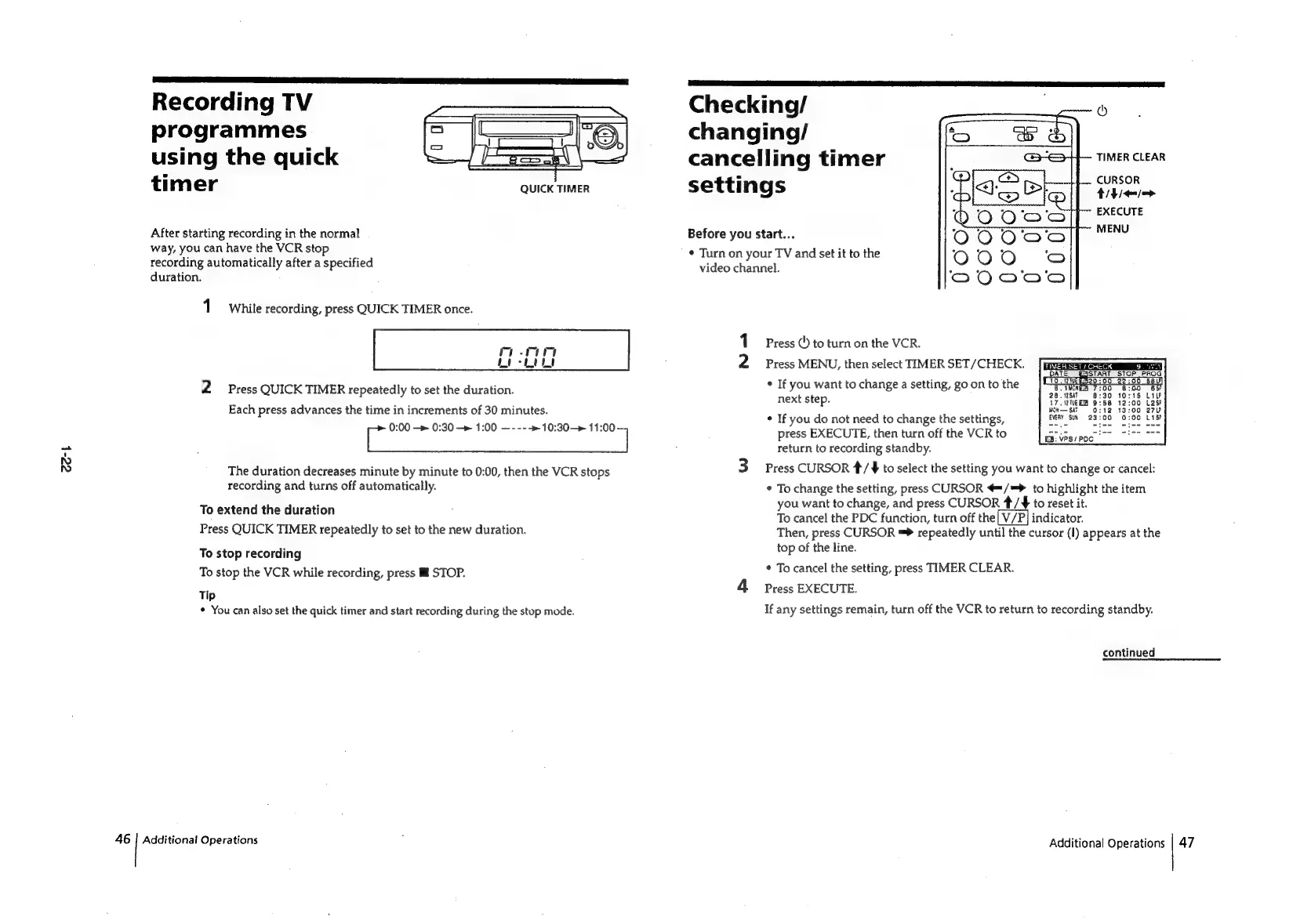
QUICK
TIMER
After
starting
recording
in
the
normal
way,
you
can
have
the
VCR
stop
recording
automatically
after
a
specified
duration.
1
while
recording,
press
QUICK
TIMER
once.
2
Press
QUICK
TIMER
repeatedly
to
set
the
duration.
Each
press
advances
the
time
in
increments
of
30
minutes.
0:00
—»
0:30
—»
1:00
—----»10:30—»
11:00
The
duration
decreases
minute
by
minute
to
0:00,
then
the
VCR
stops
recording
and
turns
off
automatically.
To
extend
the
duration
Press
QUICK
TIMER
repeatedly
to
set
to
the
new
duration.
To
stop
recording
To
stop
the
VCR
while
recording,
press
Ill
STOP.
Tip
*
You
can
also
set
the
quick
timer
and
start
recording
during
the
stop
mode.
Additional
Operations
Checking/
©
changing/
cancelling
timer
TIMER
CLEAR
settings
CURSOR
EXECUTE
MENU
Before
you
start...
¢
Turn
on
your
TV
and
set
it
to
the
video
channel.
Ny
Press
(')
to
turn
on
the
VCR.
Press
MENU,
then
select
TIMER
SET/CHECK.
¢
If
you
want
to
change
a
setting,
go
on
to
the
Bit.
‘fT
next
step.
ao
ane
et
S:
$
MON
m=
SAT
ca
*
If
you
do
not
need
to
change
the
settings,
BVT
SH
23:00
press
EXECUTE,
then
turn
off
the
VCR
to
return
to
recording
standby.
Press
CURSOR
*/
¥
to
select
the
setting
you
want
to
change
or
cancel:
*
To
change
the
setting,
press
CURSOR
@=/=
to
highlight
the
item
you
want
to
change,
and
press
CURSOR
4/
to
reset
it.
To
cancel
the
PDC
function,
turn
off
the
indicator.
Then,
press
CURSOR
=
repeatedly
until
the
cursor
(1)
appears
at
the
top
of
the
line.
*
To
cancel
the
setting,
press
TIMER
CLEAR.
Press
EXECUTE.
If
any
settings
remain,
turn
off
the
VCR
to
return
to
recording
standby.
EB:
VPS/POC_
continued
Additional
Operations
|
47

Related product manuals