EasyManua.ls Logo

Sony SLV-E811NP - Setting the Clock Manually

Sony SLV-E811NP
30 pages
Print Icon
To Next Page IconTo Next Page
To Previous Page IconTo Previous Page
Loading...
€l-l
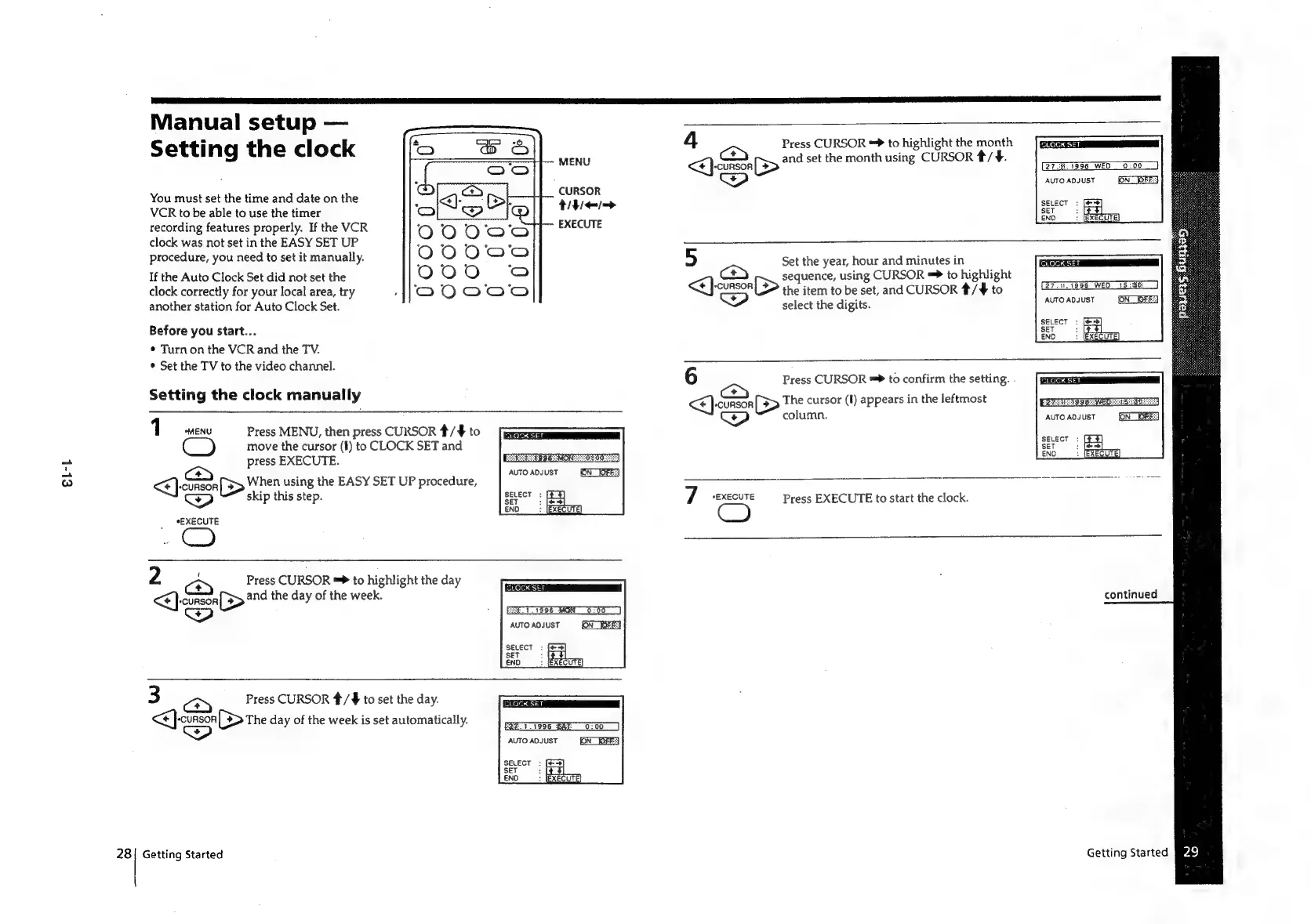
Manual
setup
Setting
the
clock
You
must
set
the
time
and
date
on
the
VCR
to
be
able
to
use
the
timer
recording
features
properly.
If
the
VCR
clock
was
not
set
in
the
EASY
SET
UP
procedure,
you
need
to
set
it
manually.
If
the
Auto
Clock
Set
did
not
set
the
clock
correctly
for
your
local
area,
try
another
station
for
Auto
Clock
Set.
Before
you
start...
¢
Turn
on
the
VCR
and
the
TV.
*
Set
the
TV
to
the
video
channel.
Setting
the
clock
manually
MENU
CURSOR
tities
EXECUTE
1
ven
Press
MENU,
then
press
CURSOR
*/
$
to
move
the
cursor
(I)
to
CLOCK
SET
and
press
EXECUTE.
Bos:
When
using
the
EASY
SET
UP
procedure,
<p)
skip
this
step.
*EXECUTE
PSEA
eSB
MON
Os
0nd
AUTO
ADJUST
ON
_WOFES
SELECT
:
SET
3
END
2
;
Press
CURSOR
**
to
highlight
the
day
<€]-ciason[S>
2nd
the
day
of
the
week.
Ww
CLOCK
SET
3
Press
CURSOR
#/¥
to
set
the
day.
<<
}.cunson
[>The
day
of
the
week
is
set
automatically.
Getting
Started
E2%.
7.1996
BAT:
AUTO
ADJUST
SELECT
:
SET
:
ENO
4
ed
Press
CURSOR
**
to
highlight
the
month
ce
and
set
the
month
using
CURSOR
/
¥.
<¢}
cunson
[>
27.
1596
WED
0:00
AUTO
ADJUST
ON”
FES
SELECT
:
SET
5
END
7
“EXECUTE
5
Set
the
year,
hour
and
minutes
in
(<>)
sequence,
using
CURSOR
=>
to
highlight
[>
the
item
to
be
set,
and
CURSOR
*/¥
to
<<}
CURSOR
7
select
the
digits.
27.N.1996
WEO
15:30:
AUTO
ADJUST
6
Press
CURSOR
to
confirm
the
setting.
.
i
[>
The
cursor
(I)
appears
in
the
leftmost
<P)
column.
Press
EXECUTE
to
start
the
clock.
AUTO
ADJUST
SELECT
:
SET
ENO
continued
Getting
Started
94g

Related product manuals