EasyManua.ls Logo

Sony SLV-E811NP - Page 15

Sony SLV-E811NP
30 pages
Print Icon
To Next Page IconTo Next Page
To Previous Page IconTo Previous Page
Loading...
vE-L
Manual
setup
Setting
the
clock
(continued)
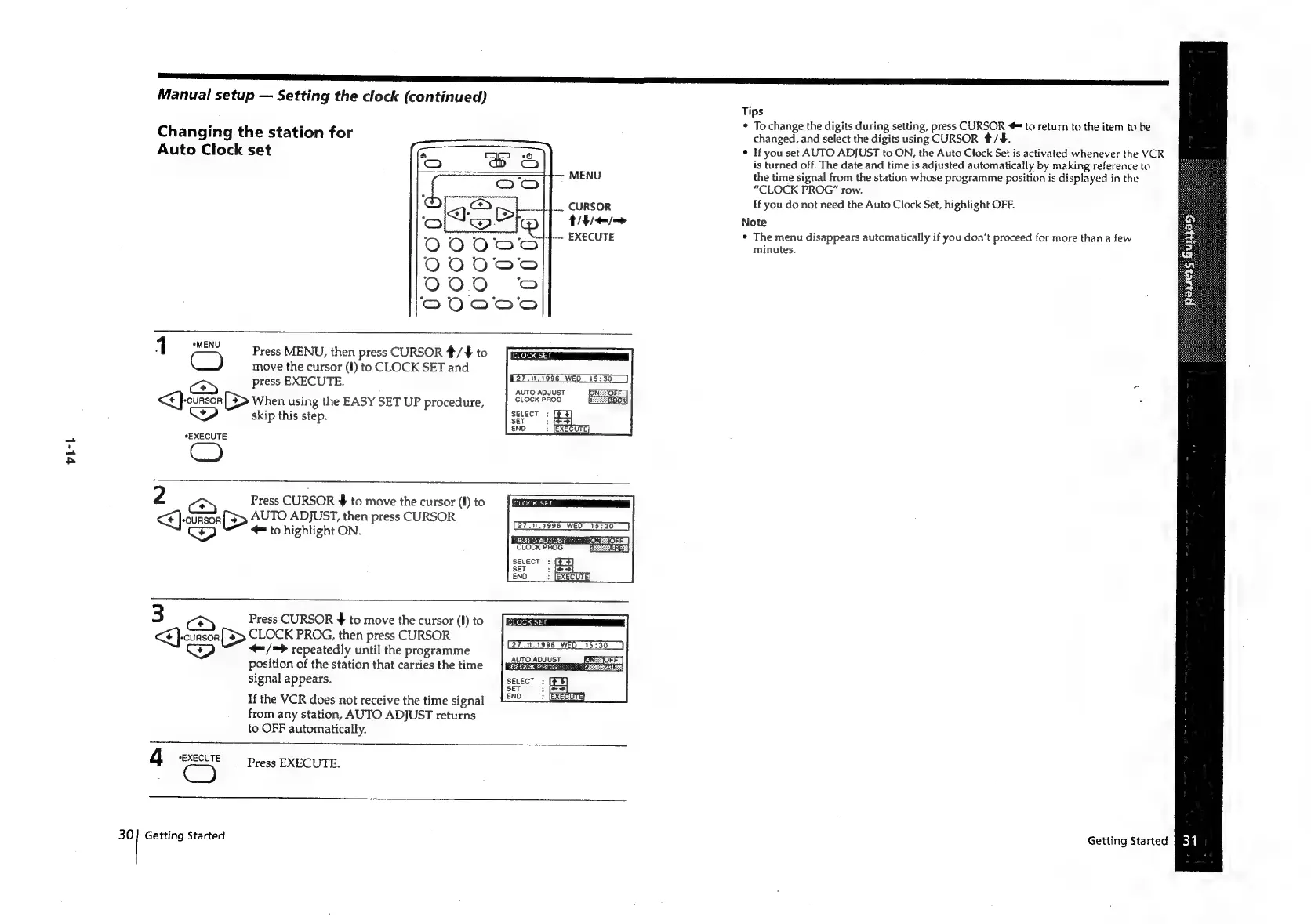
Changing
the
station
for
Auto
Clock
set
MENU
ann
on
CURSOR
i
AIF
/-—>
sf.
EXECUTE
Tos
(<>)
ics
*EXECUTE
2
Press
MENU,
then
press
CURSOR
*/¥
to
move
the
cursor
(I)
to
CLOCK
SET
and
press
EXECUTE.
>
When
using
the
EASY
SET
UP
procedure,
skip
this
step.
Press
CURSOR
¥
to
move
the
cursor
(I)
to
ee
(>
AUTO
ADJUST,
then
press
CURSOR
to
highlight
ON.
3a
Dep
4
eEXECUTE
CO
Press
CURSOR
$
to
move
the
cursor
(I)
to
CLOCK
PROG,
then
press
CURSOR
/=
>
repeatedly
until
the
programme
Position
of
the
station
that
carries
the
time
signal
appears.
If
the
VCR
does
not
receive
the
time
signal
from
any
station,
AUTO
ADJUST
returns
to
OFF
automatically.
(277996
WED
15:30
AUTO
ADJUST
BXESOFF
]
CLOCK
PROG
BEC
27.10.1996
WED
15:30
SAGES
BRA
RAE
Oi
CLOCK
PROG
SELECT
:
SET
$
ENO
27.14.1996
WEO
15:30
AUTO
ADJUST
TKOCK
PBOE:
SELECT
:
[F¥
SET
:
fe]
ENO
:
(EXECUTE)
Press
EXECUTE.
30]
Getting
Started
Tips
*
To
change
the
digits
during
setting,
press
CURSOR
=
to
return
to
the
item
to
be
changed,
and
select
the
digits
using
CURSOR
#/¥#.
If
you
set
AUTO
ADJUST
to
ON,
the
Auto
Clock
Set
is
activated
whenever
the
VCR
is
turned
off.
The
date
and
time
is
adjusted
automatically
by
making
reference
to
the
time
signal
from
the
station
whose
programme
position
is
displayed
in
the
“CLOCK
PROG”
row.
If
you
do
not
need
the
Auto
Clock
Set,
highlight
OFF.
Note
¢
The
menu
disappears
automatically
if
you
don’t
proceed
for
more
than
a
few
minutes.
Getting
Started
BBR}

Related product manuals